Flattening transparency
-
@tudor Not at this time.
It is in the backlog, maybe after 1.2 -
@VectorStyler said in Flattening transparency:
It is in the backlog, maybe after 1.2
There now seems to be something like this under Object > Flatten Opacities, but it ignores blend mode transparencies, and also transparencies over the canvas (white). But even without Illustrator kind of advanced flattening, just having a feature that divides shapes with different blend values into separate objects would be quite useful, e.g. to produce flattened PDFs without rasterizations.
-
@Arde Will add these two to the flattener: artboard as background, and Blend mode.
The problem with the background is that it is not always white, there could be other objects and those are ignored in Illustrator also.
Another limitation that will stay for now: it will not flatten masks (like gradient or other transparencies) so it will not create images from vectors when flattening.
-
saw this thread on the affinity forum the other day and was related to blend modes and VS was included in some of the testing
https://forum.affinity.serif.com/index.php?/topic/177217-possible-to-create-custom-blend-modes/ -
@VectorStyler said in Flattening transparency:
The problem with the background is that it is not always white, there could be other objects and those are ignored in Illustrator also.
I mean the following kinds of situations (solid orange and violet with Overlay blend mode but both with 100% Opacity, and green with 50% Opacity):
a) AI:
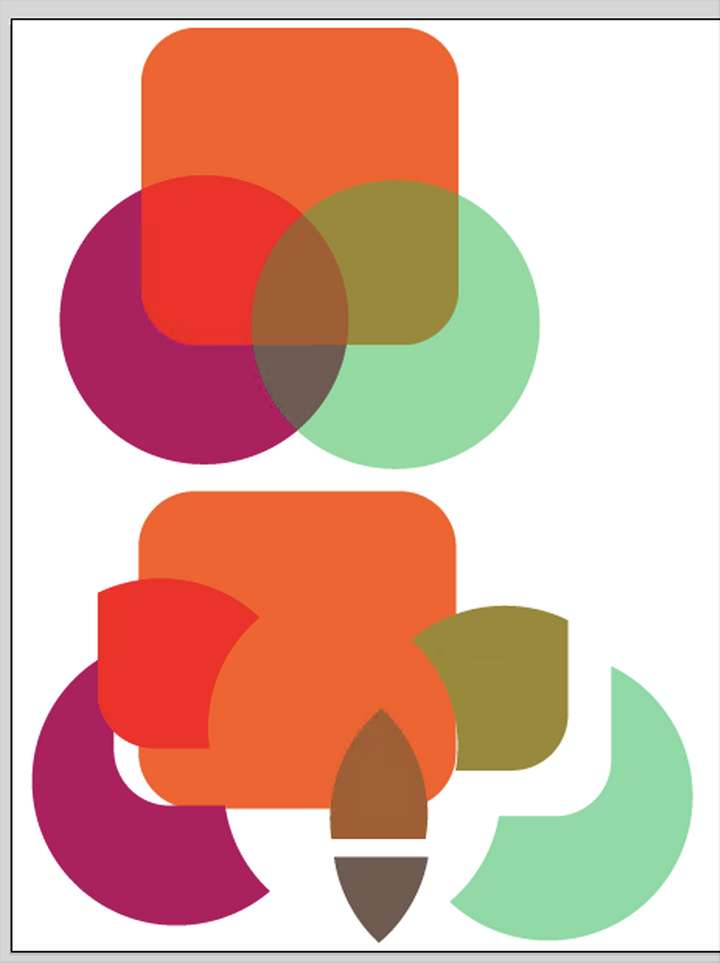
b) VS:
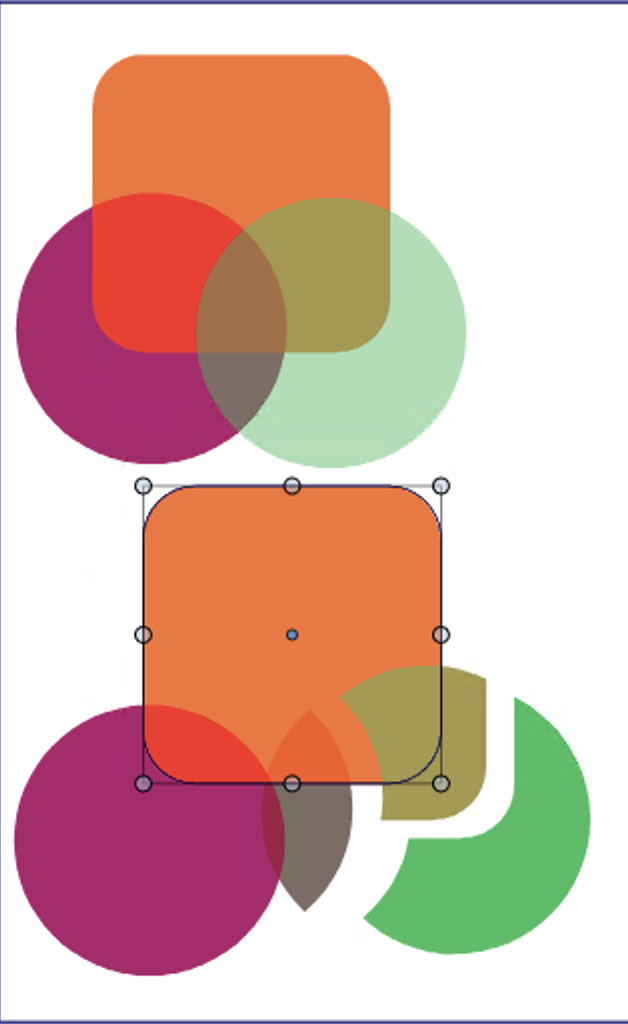
As can be seen, the violet shape that has blend mode transparency has not been flattened (divided into composing parts with non-transparent colors), and the green circle that has "Normal" blend mode but just with 50% Opacity setting, has been given a color that equals 100% Opacity value of the color the shape has.
In Illustrator it is a user option whether "alpha transparency" (object opacity) is retained or flattened, but I do not understand what you mean by white background being ignored in AI when flattening alpha transparencies?
-
Sorry for posting a reply on my own post -- I could not find a related thread so perhaps this will do. So thanks for the latest update that seems to fix the issue with opacity values (with "Normal" blend mode) against white now getting flattened properly.
But there is still an issue with blend modes, and it seems mostly in situations where divded blended shapes should be resolved against white.
So this is what happens in the latest buidl:
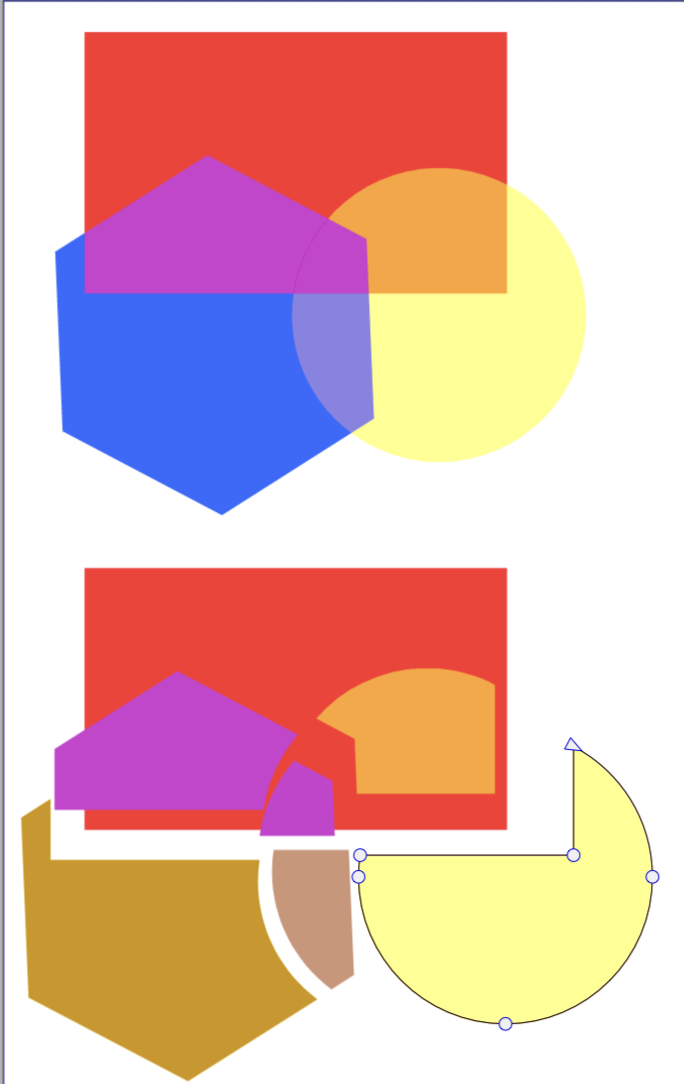
As can be seen, the shapes get expanded properly but ones that are against white of the canvas, will get wrong opaque color values. The example uses Difference blend mode on the blue hexagon (the topmost object) and normal blend mode on the yellow circle that has normal blend mode but just an opacity value. The red rectangle at the bottom has just plain solid red value. All objects are defined in RGB.
I think this is pretty close to get resolved now -- and a VERY useful operation already as it is so thanks for implementing it, and paying attention to feedback! It does not need to be even close to Adobe transparency flattener to be a highly beneficial feature!
BTW: macOS version works better than the the Windows version, just referring to this specific feature, but I suppose the code just is not in synch yet. The example above is from the macOS version.
-
@Arde Added this to the backlog, will try to replicate it.
-
@VectorStyler said in Flattening transparency:
@Arde Added this to the backlog, will try to replicate it.
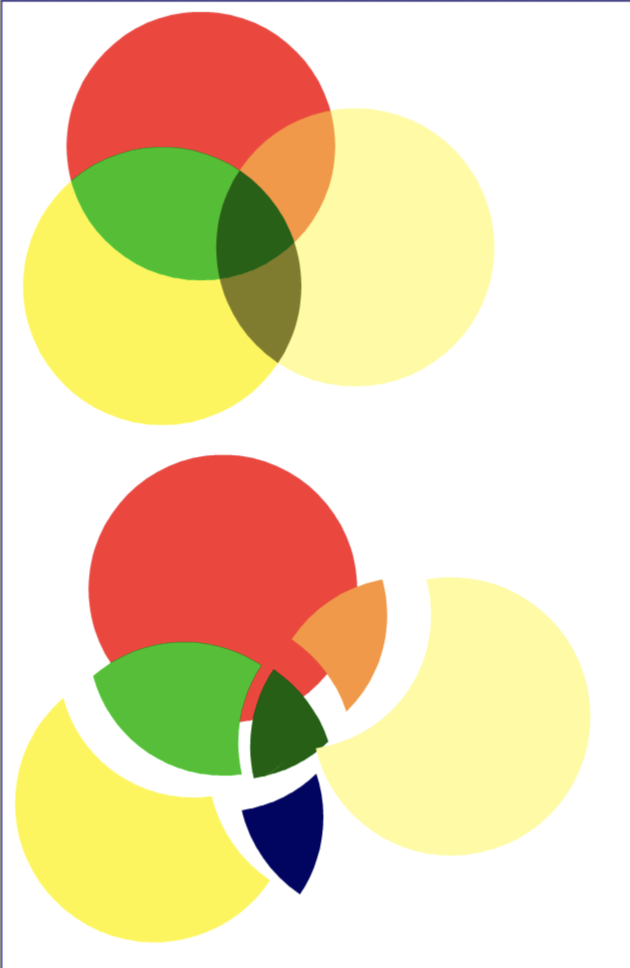
Thanks, the latest version fixes the blend modle flattening against canvas white, and now the Windows and macOS versions seem to be working similarly. But there is still issues when flattening blends agains transparencies against white (see below the blue shape at the bottom, it is correctly divided as a separate shape but gets a wrong opaque color):
-
@Arde Keep this issue open.
Can you send me that example vstyler file. -
@VectorStyler Sorry for the delay. Here is one that replicates this. The copy on top is unflattened, and copy on bottom shows flattening. It is basically a similar file as in the screenshot above, the blue segment that is a result of blend mode applied on shape at bottom left, and transparency on shape at bottom right and that shows as olive in the unflattened image, has a wrong color value once flattened.
This error, too, is probably related to canvas white in the background not having been included in calculation of the flattened color value.
-
@Arde Thanks! I will try to replicate with this.
-
@Arde The problem with the transparency can be replicated. The fix will be in the next build.

