VectorStyler
    • Categories
    • Unread
    • Recent
    • Tags
    • Popular
    • Register
    • Login

    How does arithmetic operations work in Transform panel?

    Scheduled Pinned Locked Moved Questions and Support
    5 Posts 2 Posters 4.5k Views 2 Watching
    Loading More Posts
    • Oldest to Newest
    • Newest to Oldest
    • Most Votes
    Reply
    • Reply as topic
    Log in to reply
    This topic has been deleted. Only users with topic management privileges can see it.
    • H Offline
      Harry
      last edited by

      In Transform panel, basic arithmetic operations like +, -, *, /, for move, dimension or scaling doesn't work as expected.

      Skewing and rotating seem to work well.
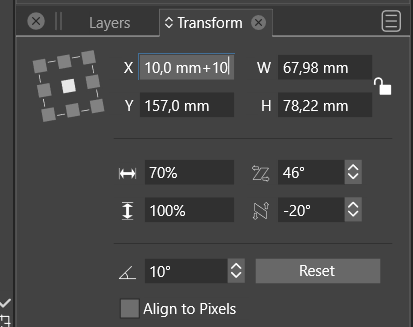
      0_1669988637188_6dbc36e4-f0bc-4278-b4b6-9fbe652f0f1a-image.png in Transform panel

      Win 11, XP Pen Deco 01 V2 graphic tablet

      VectorStylerV 1 Reply Last reply Reply Quote 0
      • VectorStylerV Offline
        VectorStyler @Harry
        last edited by

        @Harry The [mm] gets in the way. Delete [mm] and then add +10

        H 1 Reply Last reply Reply Quote 0
        • H Offline
          Harry @VectorStyler
          last edited by

          @VectorStyler said in How does arithmetic operations work in Transform panel?:

          @Harry The [mm] gets in the way. Delete [mm] and then add +10

          Tried this already - when I delete [mm} and add +10 the result is in [meters]

          But your method works for scaling.

          P.S. Do we always have to delete units? For degrees like skewing and rotation basic arithmetic operations work well.

          Win 11, XP Pen Deco 01 V2 graphic tablet

          H 1 Reply Last reply Reply Quote 0
          • H Offline
            Harry @Harry
            last edited by

            @Harry said in How does arithmetic operations work in Transform panel?:

            For degrees like skewing and rotation basic arithmetic operations work well.

            I meant work well without deleting units

            Win 11, XP Pen Deco 01 V2 graphic tablet

            VectorStylerV 1 Reply Last reply Reply Quote 0
            • VectorStylerV Offline
              VectorStyler @Harry
              last edited by

              @Harry In the angle editor the units are just decorative.
              In the position / size the units always convert to [pt] and this causes the issues here.
              I will try to improve this.

              1 Reply Last reply Reply Quote 2
              • First post
                Last post