VectorStyler
    • Categories
    • Unread
    • Recent
    • Tags
    • Popular
    • Register
    • Login

    I lost gradient styles and presets from Gradient panel
    Scheduled Pinned Locked Moved Questions and Support
    10 Posts 2 Posters 8.6k Views 2 Watching
    Loading More Posts
    • Oldest to Newest
    • Newest to Oldest
    • Most Votes
    Reply
    • Reply as topic
    Log in to reply
    This topic has been deleted. Only users with topic management privileges can see it.
    • H Offline
      Harry
      last edited by

      i'm learning VS hard and I messed with the gradients. Now every gradient preset is black.
      This could be something wrong with gradient color flipping, because gradient is visible only in Monochrome Preview:
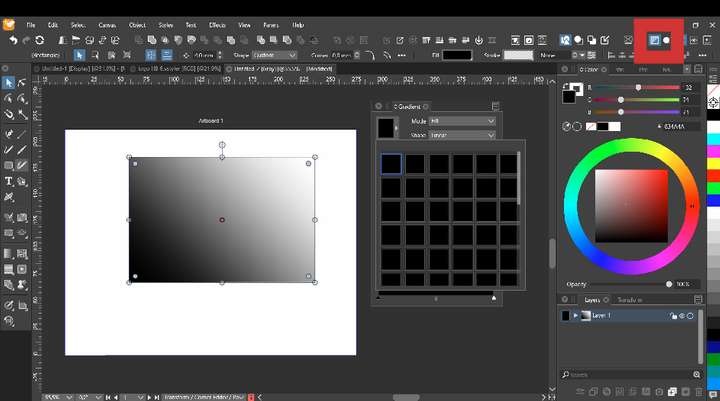
      0_1670244779184_obraz_2022-12-05_135259182.png

      Previously saved files have proper gradient styles and presets.

      Win 11, XP Pen Deco 01 V2 graphic tablet

      VectorStylerV 1 Reply Last reply Reply Quote 0
      • VectorStylerV Offline
        VectorStyler @Harry
        last edited by

        @Harry Hard to say what could cause this.

        Try restarting VS.

        If still shows the black previews, create a new document and assign a gradient from that list.
        Does it show in the document correctly?

        H 1 Reply Last reply Reply Quote 0
        • H Offline
          Harry @VectorStyler
          last edited by

          @VectorStyler said in I lost gradient styles and presets from Gradient panel:

          Does it show in the document correctly?

          No - it's just black solid fill. Gradient is visible only in monochrome

          Win 11, XP Pen Deco 01 V2 graphic tablet

          VectorStylerV 1 Reply Last reply Reply Quote 0
          • VectorStylerV Offline
            VectorStyler @Harry
            last edited by

            @Harry Send me a VS file with such a gradient.

            H 1 Reply Last reply Reply Quote 0
            • H Offline
              Harry @VectorStyler
              last edited by

              @VectorStyler said in I lost gradient styles and presets from Gradient panel:

              @Harry Send me a VS file with such a gradient.

              File sent.
              Maybe this problem started after I tried "Mask styles and presets" from Properties panel?

              Win 11, XP Pen Deco 01 V2 graphic tablet

              VectorStylerV 1 Reply Last reply Reply Quote 1
              • VectorStylerV Offline
                VectorStyler @Harry
                last edited by

                @Harry Got the file. Certainly there is a bug somewhere here.

                As a workaround, go to the View -> Display -> Display Options and select Default RGB for the display mode.

                H 1 Reply Last reply Reply Quote 1
                • H Offline
                  Harry @VectorStyler
                  last edited by

                  @VectorStyler Ok it helped!

                  But is there a way to delete gradient without deleting object?

                  Win 11, XP Pen Deco 01 V2 graphic tablet

                  VectorStylerV 1 Reply Last reply Reply Quote 0
                  • VectorStylerV Offline
                    VectorStyler @Harry
                    last edited by

                    @Harry said in I lost gradient styles and presets from Gradient panel:

                    But is there a way to delete gradient without deleting object?

                    Delete a gradient preset? or remove the gradient from the object?

                    Gradient presets can be managed (along with other presets) with the Styles -> Preset Manager command.

                    H 1 Reply Last reply Reply Quote 0
                    • H Offline
                      Harry @VectorStyler
                      last edited by

                      I meant to remove the gradient from the object.

                      Win 11, XP Pen Deco 01 V2 graphic tablet

                      VectorStylerV 1 Reply Last reply Reply Quote 0
                      • VectorStylerV Offline
                        VectorStyler @Harry
                        last edited by

                        @Harry Just select a color in the Color panel or Palette panel.

                        Make sure that no gradient color knob is selected in the gradient panel.

                        1 Reply Last reply Reply Quote 1
                        • First post
                          Last post