VectorStyler
    • Categories
    • Unread
    • Recent
    • Tags
    • Popular
    • Register
    • Login

    Brush "live" randomization / variation
    Scheduled Pinned Locked Moved Features and Ideas
    27 Posts 4 Posters 41.7k Views 4 Watching
    Loading More Posts
    • Oldest to Newest
    • Newest to Oldest
    • Most Votes
    Reply
    • Reply as topic
    Log in to reply
    This topic has been deleted. Only users with topic management privileges can see it.
    • S Offline
      Subpath
      last edited by Subpath

      @b77

      you could try "Webchemy" its a online drawing tool
      in the style of Alchemy, but have much fewer tools.
      But a Pull Brush ( you cant define your own Brushes )
      The Results can be saved as .SVG an PNG.

      Here the Link
      https://webchemy.org/

      0_1670335421195_Webchemy 1.png

      0_1670335430738_Webchemy 2.png

      0_1670335472111_Webchemy 3.png

      Win 11
      CPU: AMD Ryzen 5 9600X, 6-core.
      GPU: Nvidia Geforce RTX 5070.

      b77B 1 Reply Last reply Reply Quote 0
      • b77B Offline
        b77 @Subpath
        last edited by b77

        @Subpath Ouch… Webchemy is rough… 🙂

        MacBook Pro (Intel) running Monterey 12.6.4

        S 1 Reply Last reply Reply Quote 0
        • S Offline
          Subpath @b77
          last edited by

          @b77 said in Brush "live" randomization / variation:

          @Subpath Ouch… Webchemy is rough… 🙂

          thats true 🙂

          Win 11
          CPU: AMD Ryzen 5 9600X, 6-core.
          GPU: Nvidia Geforce RTX 5070.

          1 Reply Last reply Reply Quote 0
          • H Offline
            Harry
            last edited by

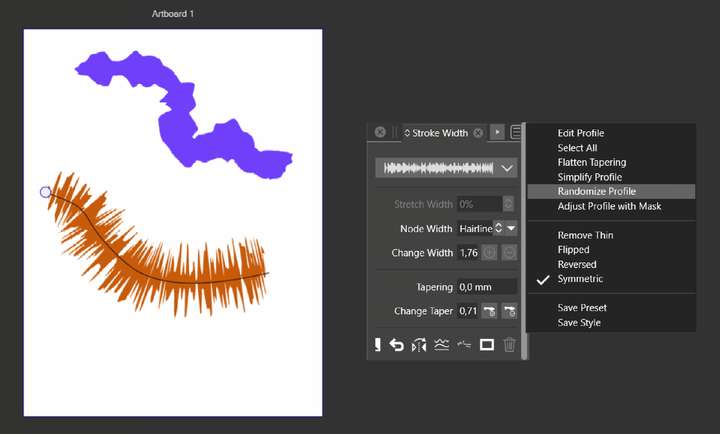
            I found temporary workaround also in the Stroke Width panel's menu - there is "Randomize profile" option. Still it's "post production", not "live" and not exactly what I meant:
            0_1670413680008_obraz_2022-12-07_124800004.png

            Win 11, XP Pen Deco 01 V2 graphic tablet

            VectorStylerV 1 Reply Last reply Reply Quote 1
            • VectorStylerV Offline
              VectorStyler @Harry
              last edited by

              @Harry If there are some good inspirations on how such a brush should look like, please upload here or send them to me by email.

              1 Reply Last reply Reply Quote 0
              • H Offline
                Harry
                last edited by

                Problem is, that I don't know.

                Let's say I'd like to design some abstract pattern. I would take "Live random effect brush tool", and I would experiment and look for some inspiration from great and interesting shapes this kind of brush could produce.

                Win 11, XP Pen Deco 01 V2 graphic tablet

                1 Reply Last reply Reply Quote 0
                • S Offline
                  Subpath
                  last edited by Subpath

                  @b77, @Harry, @VectorStyler

                  Hi

                  As a source for inspiration, for modulate Strokes, the painting program
                  Black Ink came to mind.

                  "Black Ink" uses a kind of controller nodes to modulate brushes
                  to set and control random strokes and has a node system for layers.
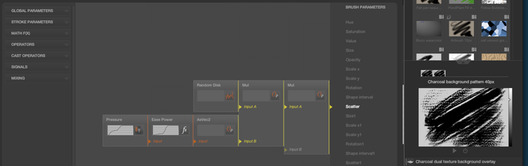
                  0_1670593430294_Black-Ink-1.png

                  Here are some videos

                  Video about the Brush Controllers:
                  Black Ink Brush Controllers

                  Video about Black Inks Layer Nodes:
                  Black Ink Layer Nodes

                  Scattering a Brush may also be interesting
                  her a Video about it
                  Scattering a Brush with Controllers

                  Win 11
                  CPU: AMD Ryzen 5 9600X, 6-core.
                  GPU: Nvidia Geforce RTX 5070.

                  1 Reply Last reply Reply Quote 3
                  • First post
                    Last post