VectorStyler
    • Categories
    • Unread
    • Recent
    • Tags
    • Popular
    • Register
    • Login

    Seamless pattern generator

    Scheduled Pinned Locked Moved Features and Ideas
    19 Posts 6 Posters 17.4k Views 5 Watching
    Loading More Posts
    • Oldest to Newest
    • Newest to Oldest
    • Most Votes
    Reply
    • Reply as topic
    Log in to reply
    This topic has been deleted. Only users with topic management privileges can see it.
    • BoldlineB Online
      Boldline
      last edited by

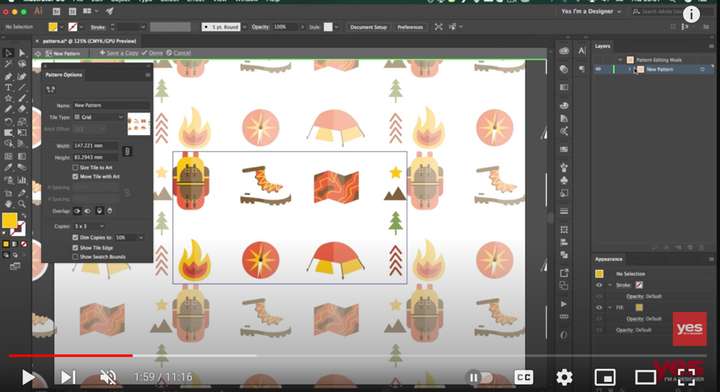
      I'm hoping the pattern tool could be expanded at some point to offer an editable real-time view similar to what is in Illustrator currently. The current settings are not bad, but it's not super intuitive. It doesn't have to be JUST like illustrator's version - but would love to see the main box and the repeating shapes around it and then allow for manual editing as well as using the many inputs already in VS

      I'm thinking ahead to things like making a rope brush pattern and being sure the parts line up correctly
      0_1671159522607_586f6097-1c80-403a-ba4e-d343164271fd-CleanShot 2022-12-15 at 21.55.05.png

      🍎 macOS Tahoe 26.2, Mac mini (M1, 2020), Chip Apple M1, Memory 16 GB
      Cintiq 27QHD Display and LG Ultra HD Display

      VectorStylerV 1 Reply Last reply Reply Quote 2
      • VectorStylerV Offline
        VectorStyler @Boldline
        last edited by

        @Boldline @encart it is possible to have real time preview while editing the pattern content.
        This can be done by having the pattern content in the document and creating a pattern style (not preset) using the "Reference Content" mode enabled.
        Then editing the content object previews all uses of the pattern.

        S 1 Reply Last reply Reply Quote 1
        • H Offline
          Harry @VectorStyler
          last edited by

          @VectorStyler said in Seamless pattern generator:

          @Harry But aren't these doable as regular tiling patterns?

          I meant something more automated - like in links I posted above

          @VectorStyler said in Seamless pattern generator:

          I think one problem here is that VS does not "fuse" the shapes from different pattern tiles. This does not exist for now.

          This could be the problem.

          I think in tiling patterns, VS is really powerful. But how to automate exporting those tiles to make them seamless?

          For example: I have a simple object and triangular tiling pattern:
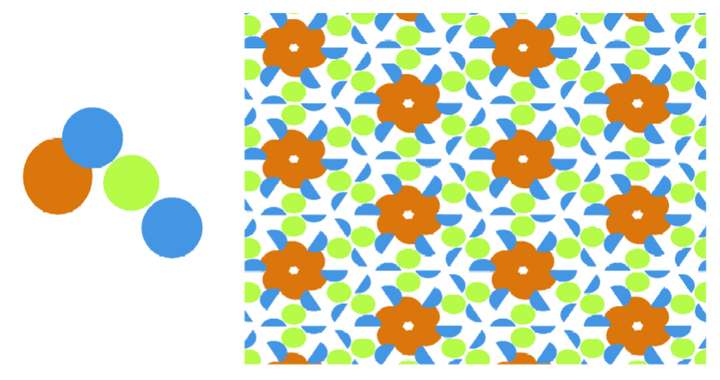
          0_1671179614512_050b7eaa-d5c6-4a15-a6cd-44806d3d9bc1-image.png

          One tile for seamless pattern could look like this:

          0_1671179889979_9722d2b8-a268-44bc-b359-b911b506f76a-image.png

          Is it a way to automate this in VS? I tried to do it manually, but results are not perfect.

          @VectorStyler said in Seamless pattern generator:

          @Boldline @encart it is possible to have real time preview while editing the pattern content.
          This can be done by having the pattern content in the document and creating a pattern style (not preset) using the "Reference Content" mode enabled.
          Then editing the content object previews all uses of the pattern.

          I think VS is very powerful, but we don't know it yet. Particularly references, overrides, styles, presets etc. Especially for beginners - like me - this is a whole new approach. I tried to learn it myself, but its not that easy. I don't know Adobe Illustrator, I came from Inkscape and Affinity Designer and as @Ingolf said in Affinity Designer v2.0:

          Coming from Affinity it must be like joining NASA after being a member of a small fireworks club.

          I think some short tutorials like those on Vimeo would be a great help.

          Win 11, XP Pen Deco 01 V2 graphic tablet

          VectorStylerV 1 Reply Last reply Reply Quote 2
          • VectorStylerV Offline
            VectorStyler @Harry
            last edited by

            @Harry said in Seamless pattern generator:

            Is it a way to automate this in VS?

            There is no way to automate this at this time.
            For now, the pattern tile must be designed so that the edges match perfectly.

            Are there apps that do this automatically?
            I'm not sure if this is possible for any kind of tile design.

            H 1 Reply Last reply Reply Quote 0
            • S Offline
              Subpath @VectorStyler
              last edited by Subpath

              @VectorStyler said in Seamless pattern generator:
              ...

              This can be done by having the pattern content in the document and creating a pattern style (not preset) using the "Reference Content" mode enabled.
              Then editing the content object previews all uses of the pattern.

              @VectorStyler would it be possible to describe the needed Steps again in a little more detail how to proceed?
              I don't quite understand the steps required.

              My steps were:
              create the pattern objects
              select all and then
              Object > Object Role > Tile Pattern Contents.

              Then, with the pattern objects still selected, Styles > Create Styles > Pattern Styles.

              But then what needs to be set in the create pattern style Panel?

              And how can I edit the pattern then?

              Win 11
              CPU: AMD Ryzen 5 9600X, 6-core.
              GPU: Nvidia Geforce RTX 5070.

              b77B 1 Reply Last reply Reply Quote 0
              • b77B Offline
                b77 @Subpath
                last edited by b77

                @Subpath I'm not sure VS or any app is supposed to "pick" existing patterns by finding the right tile
                size and tile location automatically, so that it will repeat flawlessly. Is this what you mean?

                MacBook Pro (Intel) running Monterey 12.6.4

                S 1 Reply Last reply Reply Quote 0
                • H Offline
                  Harry @VectorStyler
                  last edited by

                  @VectorStyler said in Seamless pattern generator:

                  @Harry said in Seamless pattern generator:

                  Is it a way to automate this in VS?

                  There is no way to automate this at this time.
                  For now, the pattern tile must be designed so that the edges match perfectly.

                  Are there apps that do this automatically?
                  I'm not sure if this is possible for any kind of tile design.

                  @b77 said in Seamless pattern generator:

                  @Subpath I'm not sure VS or any app is supposed to "pick" existing patterns by finding the right tile
                  size and tile location automatically, so that it will repeat flawlessly. Is this what you mean?

                  Maybe I expressed myself wrong.

                  I meant some sort of "automated" frame to adjust seamless pattern like in https://www.wowpatterns.com/pattern-maker/app/
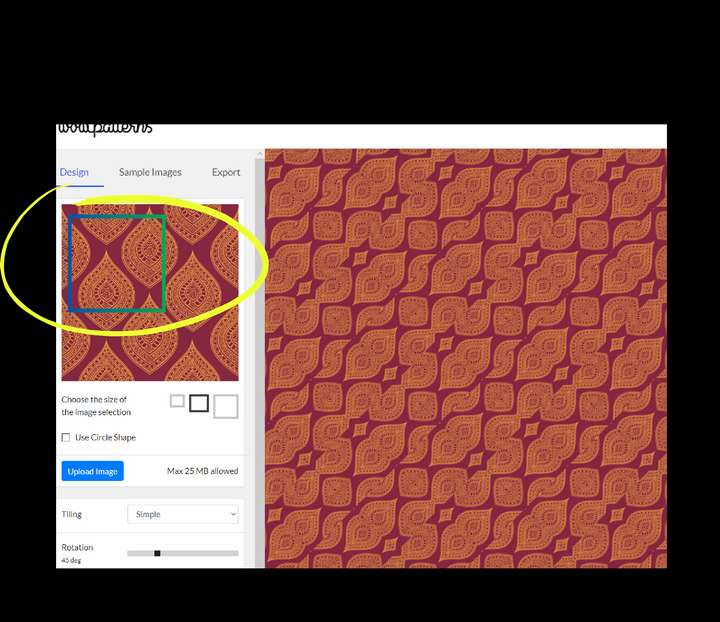
                  0_1671186248656_obraz_2022-12-16_112408653.png

                  In addition to setting the pattern correctly, you could also experiment and get interesting results.

                  Win 11, XP Pen Deco 01 V2 graphic tablet

                  1 Reply Last reply Reply Quote 1
                  • S Offline
                    Subpath @b77
                    last edited by Subpath

                    @b77 said in Seamless pattern generator:

                    @Subpath I'm not sure VS or any app is supposed to "pick" existing patterns by finding the right tile
                    size and tile location automatically, so that it will repeat flawlessly. Is this what you mean?

                    there seems to be a misunderstanding here ?
                    or do you mean @Harry ?

                    I just asked @VectorStyler in my post above to describe the steps
                    from his posts about reference content in a little more detail

                    Win 11
                    CPU: AMD Ryzen 5 9600X, 6-core.
                    GPU: Nvidia Geforce RTX 5070.

                    b77B 1 Reply Last reply Reply Quote 0
                    • b77B Offline
                      b77 @Subpath
                      last edited by

                      @Subpath You're right, it was Harry. Sorry. 🙂

                      @Harry I agree that something that lets the user adjust the tile size interactively would be welcome. 👍

                      MacBook Pro (Intel) running Monterey 12.6.4

                      H 1 Reply Last reply Reply Quote 0
                      • H Offline
                        Harry @b77
                        last edited by

                        @b77 said in Seamless pattern generator:

                        something that lets the user adjust the tile size interactively would be welcome

                        Not only tile size, but its position on the pattern also 🙂

                        Win 11, XP Pen Deco 01 V2 graphic tablet

                        1 Reply Last reply Reply Quote 2
                        • S Offline
                          Subpath
                          last edited by

                          @Harry

                          in case you may not know, you could create
                          some of that Patterns from "Wowpatterns"

                          with Clipping Objects in VS is a little more work
                          but do able i think. In the end you have to choose
                          the Section you like and create a pattern from it.

                          I record a Video here to show some steps
                          will also do a little Tutorial which take some time
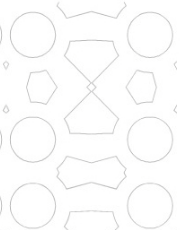
                          here the video

                          0_1671190068214_clip-pattern.png

                          Win 11
                          CPU: AMD Ryzen 5 9600X, 6-core.
                          GPU: Nvidia Geforce RTX 5070.

                          H 1 Reply Last reply Reply Quote 2
                          • H Offline
                            Harry @Subpath
                            last edited by

                            @Subpath Thank you very much. I didn't know that. It is very helpful and possibilities are endless. I'm looking forward to see your tutorial.

                            Win 11, XP Pen Deco 01 V2 graphic tablet

                            S 1 Reply Last reply Reply Quote 1
                            • S Offline
                              Subpath @Harry
                              last edited by

                              @Harry

                              your welcome
                              glad it is helpful

                              and yes, the possibilities are endless 🙂

                              Win 11
                              CPU: AMD Ryzen 5 9600X, 6-core.
                              GPU: Nvidia Geforce RTX 5070.

                              1 Reply Last reply Reply Quote 1
                              • S Offline
                                Subpath
                                last edited by

                                @Harry

                                The Tutorial is online, you found it
                                in the Tutorial Section.

                                Here the LInk
                                https://www.vectorstyler.com/forum/topic/2801/how-to-create-pattern-fills-with-clipped-shapes

                                Win 11
                                CPU: AMD Ryzen 5 9600X, 6-core.
                                GPU: Nvidia Geforce RTX 5070.

                                1 Reply Last reply Reply Quote 3
                                • First post
                                  Last post
