VectorStyler
    • Categories
    • Unread
    • Recent
    • Tags
    • Popular
    • Register
    • Login

    Slabtype text alignment option

    Scheduled Pinned Locked Moved Features and Ideas
    7 Posts 4 Posters 6.1k Views 3 Watching
    Loading More Posts
    • Oldest to Newest
    • Newest to Oldest
    • Most Votes
    Reply
    • Reply as topic
    Log in to reply
    This topic has been deleted. Only users with topic management privileges can see it.
    • BoldlineB Online
      Boldline
      last edited by Boldline

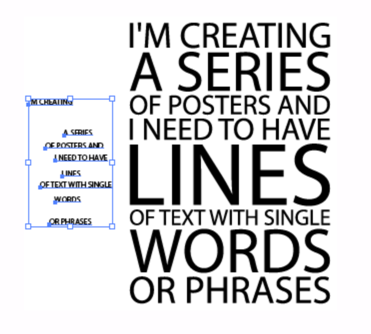
      I saw this today and felt it would be a great addition to VS at some point when possible.
      Essentially you create several lines of active text and then select them all and run a script that automatically aligns them all to center and sizes up the text to all be the exact same width.

      Here is a link to a script someone created for Illustrator.

      Here is another tutorial showing the same thing referencing the script provided in the first link
      0_1671398813660_a6092b3c-6eee-4a1d-9cec-c5600cbbf233-CleanShot 2022-12-18 at 16.26.20.png

      🍎 macOS Tahoe 26.2, Mac mini (M1, 2020), Chip Apple M1, Memory 16 GB
      Cintiq 27QHD Display and LG Ultra HD Display

      VectorStylerV 1 Reply Last reply Reply Quote 2
      • encartE Offline
        encart
        last edited by encart

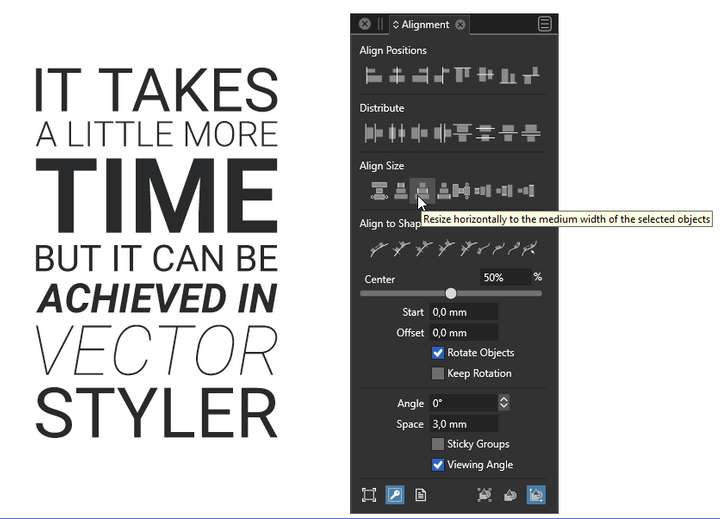
        @Boldline I could be wrong, but I think I once asked for proportional scaling to be added and it's possible.
        I know it requires a few more clicks, but I think it's quite simple.
        Video
        0_1671404483356_screenshot_20221219_000110.png

        Edit:
        I have tried recording all actions step by step as an action and assigning a keyboard shortcut, but it does not work well.

        @VectorStyler I have now noticed that the order of the lines has changed on the recording.

        Windows 11 Home 10.0.22621

        b77B 1 Reply Last reply Reply Quote 3
        • BoldlineB Online
          Boldline
          last edited by

          @encart totally awesome. Thanks for sharing. I'm glad it can already be done in VS albeit a few more steps. Always great to have multiple options. I think in the long run, things like this would be great as default scripts built in to VS for efficiency

          🍎 macOS Tahoe 26.2, Mac mini (M1, 2020), Chip Apple M1, Memory 16 GB
          Cintiq 27QHD Display and LG Ultra HD Display

          1 Reply Last reply Reply Quote 2
          • b77B Offline
            b77 @encart
            last edited by

            @encart This can be done with an action, no?

            MacBook Pro (Intel) running Monterey 12.6.4

            encartE 1 Reply Last reply Reply Quote 1
            • encartE Offline
              encart @b77
              last edited by

              @b77 Unfortunately no. I have just tried it and it comes out a mess. It takes longer to sort out than to do step by step.

              Windows 11 Home 10.0.22621

              b77B 1 Reply Last reply Reply Quote 0
              • b77B Offline
                b77 @encart
                last edited by b77

                @encart Starting from your idea, here is a slightly faster method: https://recordit.co/Zxll0xjgVn

                (Align objects in geometric order' needs to be enabled in the Alignment panel).

                @VectorStyler But it still doesn't let me record the align actions so I can automate it…

                MacBook Pro (Intel) running Monterey 12.6.4

                1 Reply Last reply Reply Quote 2
                • VectorStylerV Offline
                  VectorStyler @Boldline
                  last edited by

                  @Boldline Yes, this is doable with the Alignment panel. It needs maybe more clicks that ideal, will try to improve that.


                  1 Reply Last reply Reply Quote 0
                  • First post
                    Last post