VectorStyler
    • Categories
    • Unread
    • Recent
    • Tags
    • Popular
    • Register
    • Login

    Order of arrangement icons

    Scheduled Pinned Locked Moved Features and Ideas
    16 Posts 6 Posters 12.4k Views 4 Watching
    Loading More Posts
    • Oldest to Newest
    • Newest to Oldest
    • Most Votes
    Reply
    • Reply as topic
    Log in to reply
    This topic has been deleted. Only users with topic management privileges can see it.
    • encartE Offline
      encart
      last edited by encart

      0_1671659932343_screenshot_20221221_225054.png
      It's more of a detail, but I've caught myself several times wanting to move an object backwards and intuitively looking for the icon as the last of the 4, but it's in a different place.
      What do you think of the default order:
      Bring to front, Bring Forward, Send Back, Send Backward ?

      Windows 11 Home 10.0.22621

      b77B 2 Replies Last reply Reply Quote 1
      • b77B Offline
        b77 @encart
        last edited by b77

        @encart You mean like this?

        0_1671666473672_1671659932547-screenshot_20221221_225054.png

        …
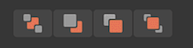
        In Affinity Designer they are arranged like this:
        0_1671666411306_Screenshot 2022-12-22 at 01.42.20.png

        …
        In Inkscape they are like this:

        0_1671666363752_Screenshot 2022-12-22 at 01.44.46.png

        MacBook Pro (Intel) running Monterey 12.6.4

        IngolfI 1 Reply Last reply Reply Quote 0
        • IngolfI Offline
          Ingolf
          last edited by Ingolf

          I customized the toolbars to my own taste - the less icons used, the more icons I actually see:

          0_1671675731657_dc4e2eae-7afd-42f6-b6c1-e2d5c227c661-image.png

          @VectorStyler The forced distribution of icons across the entire toolbar works against people like me who remove a lot of icons to simplify the user interface greatly - and works against a more simple UI philosofy should you ever introduce simple and advanced UI etc. etc.

          0_1671675865185_b7588fd3-09e3-421d-a695-5153189c1f77-image.png

          Doesn't hurt too much now but with a higher screen resolution the result would look silly. 🙂

          It would be good to have a setting that does not adjust icons over the whole toolbar, but uses a constant distance value between icons/groups of icons.

          🍏 macOS Sequoia Apple Silicon

          b77B 1 Reply Last reply Reply Quote 1
          • b77B Offline
            b77 @Ingolf
            last edited by

            @Ingolf Good observation, a constant distance between the groups of buttons would be better. 👍
            Not sure a Prefs setting is even needed for this.

            Anyway, @encart spoke about the order of the four buttons.
            These are ordered differently in all these apps, I don't see it as something that is obviously "natural" or "correct", is it?

            MacBook Pro (Intel) running Monterey 12.6.4

            1 Reply Last reply Reply Quote 2
            • S Offline
              Subpath
              last edited by Subpath

              I also see a habitual arrangement rather than
              a natural one and that the arrangement of
              the icons depends very much on the needs
              of the user.

              Since I prefer to work mouse oriented
              than to use keyboard shortcuts with 2 or 3 keys.
              ( i dont need to hurry 🙂 )
              I always created my own toolbar in Coreldraw.

              Win 11
              CPU: AMD Ryzen 5 9600X, 6-core.
              GPU: Nvidia Geforce RTX 5070.

              1 Reply Last reply Reply Quote 1
              • IngolfI Offline
                Ingolf @b77
                last edited by Ingolf

                @b77 said in Order of arrangement icons:

                In Affinity Designer they are arranged like this:
                0_1671666411306_Screenshot 2022-12-22 at 01.42.20.png

                THAT icon order in Affinity always annoyed me. That means I have to mentally stop and decode the icons again. 'Aha, you have placed two related icons furthest apart because... because?'

                I decode the icons 500 times faster when they are in function order:

                TOP - BOTTOM - UP - DOWN

                This is true 10 x more when using monochrome icons.

                So I 💕 love 💕 this:

                0_1671715239633_eb4dc116-d4fe-403e-a607-222fc4ba2b75-image.png

                and passionately hate 🖕 😠 the teenage room model:

                0_1671666411306_Screenshot 2022-12-22 at 01.42.20.png

                🍏 macOS Sequoia Apple Silicon

                F 1 Reply Last reply Reply Quote 1
                • b77B Offline
                  b77 @encart
                  last edited by b77

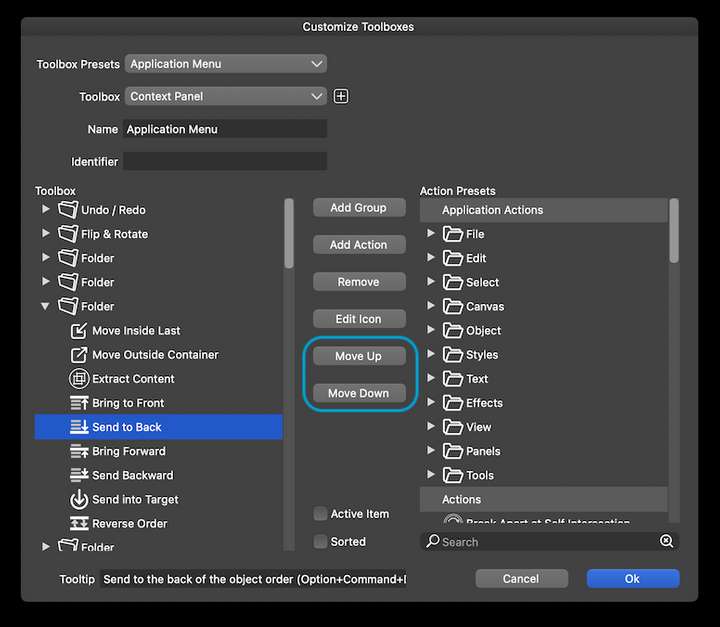
                  @encart Well… you can rearrange them with the 'Move Up' and 'Move Down' buttons in 'Customize Toolboxes':
                  0_1671717223327_Screenshot 2022-12-22 at 15.51.09.png

                  MacBook Pro (Intel) running Monterey 12.6.4

                  1 Reply Last reply Reply Quote 3
                  • F Offline
                    fde101 Global Moderator @Ingolf
                    last edited by fde101

                    @Ingolf said in Order of arrangement icons:

                    THAT icon order in Affinity always annoyed me. That means I have to mentally stop and decode the icons again. 'Aha, you have placed two related icons furthest apart because... because?'

                    I would need to go in the other direction on that one: two of the buttons move things forward and two of them move things backward. Your preferred order separates BOTH sets of related buttons from each other.

                    The Affinity order seems most natural, as it places the resulting layer order of the commands from back to front.

                    IngolfI 1 Reply Last reply Reply Quote 1
                    • IngolfI Offline
                      Ingolf @fde101
                      last edited by

                      @fde101

                      ... but when you find one icon that is related to what you need to do, the other one is far away. It's like putting cake forks between forks and knives in the cutlery drawer.

                      🍏 macOS Sequoia Apple Silicon

                      F 1 Reply Last reply Reply Quote 1
                      • F Offline
                        fde101 Global Moderator @Ingolf
                        last edited by

                        @Ingolf

                        With the Affinity (normal) ordering, if I need to move a layer backward, and I find the button that moves it to the very back, then the one that moves it one layer to the back is right next to it. If I need to move a layer forward, and I find the button that moves it to the very front, the one that moves it one layer forward is right next to it. With the order you are listing, there is a button in between either way.

                        1 Reply Last reply Reply Quote 1
                        • IngolfI Offline
                          Ingolf
                          last edited by Ingolf

                          Well, my eyes look for symbols, decode them, then I move the pointer. I simply find it easier to find (decode) and remember the location when things are strictly grouped like in VS. On top of that, I find the symbols in VS much easier to decode.

                          I'm referring to my own preferences. I don't find Serif's order natural at all when used in a drawing program.

                          Because you see, when two icons that are relatively similar are next to each other, I take a second or two to make sure I've understood them correctly. Worst case I use the tooltip to make sure I understand and an extra second is wasted.

                          The model in VS I never, not once doubt because the two juxtaposed icons on the left clearly identify their function by the icons next to each other much more clearly showing they have the same functionality (just opposite each other) and the two icons on the right are clearly related in the same way.

                          Viola; good and effective usability. In Affinity you have to let your eyes run all the way over all the icons.

                          🍏 macOS Sequoia Apple Silicon

                          1 Reply Last reply Reply Quote 1
                          • BoldlineB Offline
                            Boldline
                            last edited by Boldline

                            This is why it's great that VS has so many customization options! Edit the order to what works best for your workflow

                            🍎 macOS Tahoe 26.2, Mac mini (M1, 2020), Chip Apple M1, Memory 16 GB
                            Cintiq 27QHD Display and LG Ultra HD Display

                            1 Reply Last reply Reply Quote 2
                            • b77B Offline
                              b77
                              last edited by

                              …or just use the shortcuts. It's what I do. 🙂

                              MacBook Pro (Intel) running Monterey 12.6.4

                              IngolfI 1 Reply Last reply Reply Quote 1
                              • BoldlineB Offline
                                Boldline
                                last edited by

                                I actually prefer the Affinity style symbols for these functions - they read better at a glance to me - but it's not a big deal. Keyboard shortcuts are the best!

                                🍎 macOS Tahoe 26.2, Mac mini (M1, 2020), Chip Apple M1, Memory 16 GB
                                Cintiq 27QHD Display and LG Ultra HD Display

                                b77B 1 Reply Last reply Reply Quote 0
                                • b77B Offline
                                  b77 @Boldline
                                  last edited by b77

                                  @Boldline The problem with Affinity's symbols for ordering is that they look similar to
                                  the symbols for Boolean operations AND those for Draw on Top/Above/Behind.
                                  Too much visual similarity, IMO.

                                  MacBook Pro (Intel) running Monterey 12.6.4

                                  1 Reply Last reply Reply Quote 0
                                  • IngolfI Offline
                                    Ingolf @b77
                                    last edited by Ingolf

                                    @b77 said in Order of arrangement icons:

                                    …or just use the shortcuts. It's what I do. 🙂

                                    True but quite a few of the shortcuts require:

                                    • That you remember them (I try but use too many programs to remember them for long)
                                    • That you let go of the mouse/pointing device (to use Option+Control+Up for example)
                                    • Or touch those keys using one hand with a focused, slow touch that only a squid can compete with

                                    That is why I often (during the most hectic drawing phase) move some panels close to/over the artboard - and even make custom panels with the features I need when working in these phases with the mouse on the canvas. No keyboard interruptions. Just A, V, G, C etc. at most - my left hand seems to remember them for me. 🙂

                                    🍏 macOS Sequoia Apple Silicon

                                    1 Reply Last reply Reply Quote 1
                                    • First post
                                      Last post