VectorStyler
    • Categories
    • Unread
    • Recent
    • Tags
    • Popular
    • Register
    • Login

    Corner tool possibilities

    Scheduled Pinned Locked Moved Features and Ideas
    7 Posts 2 Posters 6.5k Views 1 Watching
    Loading More Posts
    • Oldest to Newest
    • Newest to Oldest
    • Most Votes
    Reply
    • Reply as topic
    Log in to reply
    This topic has been deleted. Only users with topic management privileges can see it.
    • BoldlineB Online
      Boldline
      last edited by

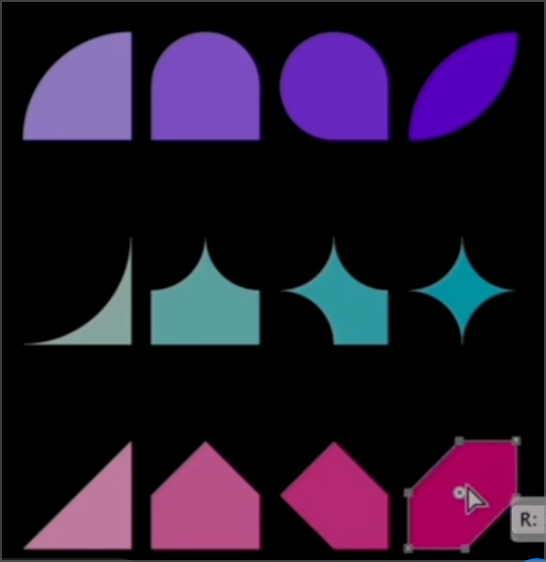
      I'm going to run a test and see how many of these can be accomplished in Vectorstyler with the corner tool
      https://www.instagram.com/reel/CnPR5N3J4rf/?igshid=Zjc2ZTc4Nzk=

      🍎 macOS Tahoe 26.2, Mac mini (M1, 2020), Chip Apple M1, Memory 16 GB
      Cintiq 27QHD Display and LG Ultra HD Display

      S 1 Reply Last reply Reply Quote 2
      • S Offline
        Subpath @Boldline
        last edited by

        @Boldline said in Corner tool possibilities:

        and see how many of these can be accomplished in Vectorstyler with the corner tool

        i would say all and many, many more 🙂

        Win 11
        CPU: AMD Ryzen 5 9600X, 6-core.
        GPU: Nvidia Geforce RTX 5070.

        1 Reply Last reply Reply Quote 0
        • BoldlineB Online
          Boldline
          last edited by Boldline

          The top row was pretty easy to replicate, but with the rest I was unable to figure out a way to replicate with just the corner tool like in the IG post. Is there a way to get a negative bend/sharp corner in the middle using the corner tool like in the second and third rows of the example video?
          0_1673796637611_e6d8aef9-d294-43d0-8864-3933803f415b-BLD 2023-01-15 at 10.24.49@2x.png

          Here was as far as I could go:
          0_1673796647397_7a4131f5-b6b0-4936-9395-02372915ffa4-BLD 2023-01-15 at 10.27.15.png

          In practicing with these, I noticed it is difficult to pull the specified corners to meet perfectly together
          Perhaps adding a slight magnetic snap when they cross over one another? much like what was added to the parametric shapes? If added, I'd make it more subtle than the current magnetic snapping setting for the parametric shapes (I'd even lower the power of the snap for the parametric shapes as well)

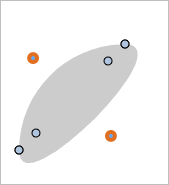
          Also noticed with the last shape I tried to make in the video above, there seems to be a strange result when it aligns overtop another point:
          0_1673798034829_85808540-d520-4e55-afaf-20fc732ec5d7-BLD 2023-01-15 at 10.53.44.png

          🍎 macOS Tahoe 26.2, Mac mini (M1, 2020), Chip Apple M1, Memory 16 GB
          Cintiq 27QHD Display and LG Ultra HD Display

          1 Reply Last reply Reply Quote 1
          • S Offline
            Subpath
            last edited by Subpath

            @Boldline

            First thank you, for making me take a second look
            on corner creation.

            Recommend to use the Corner Panel for precise settings
            you can change the Values in the Input field with the Scroll Wheel.
            .
            .
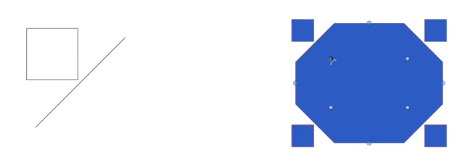
            I also recommend to take a look at "Corner Shapes" Video
            from Vectorstyler Tutorial Videos at Viemo
            Here the Link to the Video
            Pic from the video
            0_1673802534859_Pic from Video.png

            .
            .

            You get negative Corners if you set this two Icons
            in the Corner Panel.

            The Pic for negative Corner Settings in Corner Panel
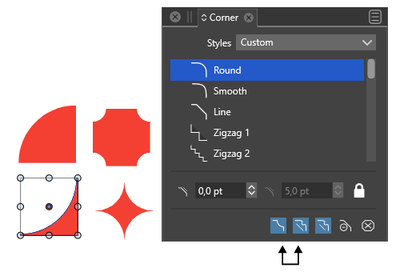
            0_1673802302247_Corner-negativ-Way.png

            Win 11
            CPU: AMD Ryzen 5 9600X, 6-core.
            GPU: Nvidia Geforce RTX 5070.

            BoldlineB 1 Reply Last reply Reply Quote 2
            • BoldlineB Online
              Boldline @Subpath
              last edited by

              @Subpath Thanks for your help as well. I had not played around enough with the settings in the corner panel prior to this.

              I was able to easily recreate all the shape samples in the IG video after your helpful post
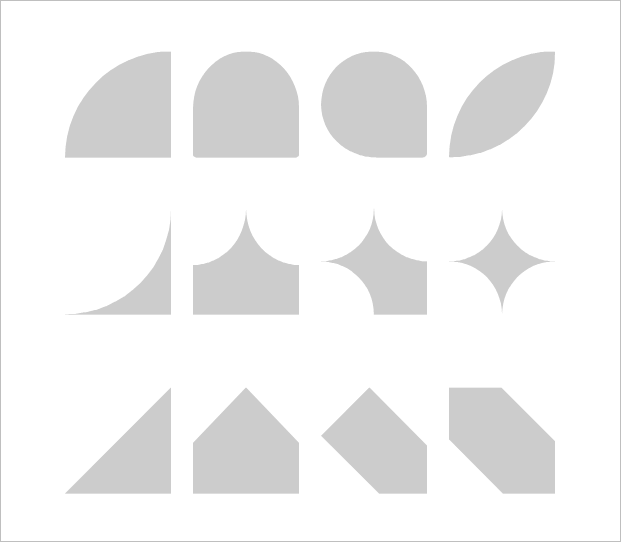
              0_1673804737753_2ce412b2-221b-4d30-825d-d41e43979eda-BLD 2023-01-15 at 12.44.17.png

              🍎 macOS Tahoe 26.2, Mac mini (M1, 2020), Chip Apple M1, Memory 16 GB
              Cintiq 27QHD Display and LG Ultra HD Display

              S 1 Reply Last reply Reply Quote 1
              • S Offline
                Subpath @Boldline
                last edited by Subpath

                @Boldline

                your welcome, looks great
                so mission accomplished 🙂

                bwt for me the Corner Tool looks
                very promising for Pattern creation

                0_1673806864066_Corner for pattern-1.png

                Win 11
                CPU: AMD Ryzen 5 9600X, 6-core.
                GPU: Nvidia Geforce RTX 5070.

                BoldlineB 1 Reply Last reply Reply Quote 2
                • BoldlineB Online
                  Boldline @Subpath
                  last edited by

                  @Subpath said in Corner tool possibilities:

                  so mission accomplished

                  Yes the immediate mission was accomplished! Hoping @VectorStyler can address the minor but important suggestion for improvement and the error with the top row far right example that seemed to overinflate

                  🍎 macOS Tahoe 26.2, Mac mini (M1, 2020), Chip Apple M1, Memory 16 GB
                  Cintiq 27QHD Display and LG Ultra HD Display

                  1 Reply Last reply Reply Quote 0
                  • First post
                    Last post