VectorStyler
    • Categories
    • Unread
    • Recent
    • Tags
    • Popular
    • Register
    • Login

    Page layout: columns guides & gutters

    Scheduled Pinned Locked Moved Features and Ideas
    10 Posts 3 Posters 9.4k Views 3 Watching
    Loading More Posts
    • Oldest to Newest
    • Newest to Oldest
    • Most Votes
    Reply
    • Reply as topic
    Log in to reply
    This topic has been deleted. Only users with topic management privileges can see it.
    • B Offline
      B-Vs-V
      last edited by

      @VectorStyler Like a page layout software, would it be possible to add the possibility to create guide columns and gutters based on either the width/height of the page or on the margins? This would be very useful to be able to use VS to design simple documents layouts... unless it is already possible but I can't find how?
      Thanks ☺

      W11 Pro 25H2 - 12th Gen Intel(R) i7-12700K 3.61 GHz - RAM 64 Go - NVIDIA GF GTX 4070 Ti - Intuos - Dell UP3216Q / Eizo ColorEdge
      W11 Pro 25H2 - 12th Gen Intel(R) i7-12700KF 3.60 GHz -RAM 64 Go - NVIDIA GF GTX 3080 - IntuosPro- ProArt PA329C

      S VectorStylerV 2 Replies Last reply Reply Quote 1
      • S Offline
        Subpath @B-Vs-V
        last edited by Subpath

        @Pat

        I am not so firm with page layout / desktop publishing software
        and also not familiar with what possibilities VS offers for this.

        But I know diffusely that there is also an open source
        desktop publishing program called "Scribus".

        Their web page
        https://www.scribus.net/

        Videos about it:

        Tutorials
        https://www.youtube.com/watch?v=hMlT9C6xcDw

        Easy Layout in 15 Minutes
        https://www.youtube.com/watch?v=slbiQ0mJWbw

        Win 11
        CPU: AMD Ryzen 5 9600X, 6-core.
        GPU: Nvidia Geforce RTX 5070.

        B 1 Reply Last reply Reply Quote 0
        • B Offline
          B-Vs-V @Subpath
          last edited by B-Vs-V

          @Subpath Thanks ☺
          I know Scribus but what I would like is to be able to benefit from VS and its many features with some additional page layout facilities. The idea is also to add some functionalities to VS ☺

          W11 Pro 25H2 - 12th Gen Intel(R) i7-12700K 3.61 GHz - RAM 64 Go - NVIDIA GF GTX 4070 Ti - Intuos - Dell UP3216Q / Eizo ColorEdge
          W11 Pro 25H2 - 12th Gen Intel(R) i7-12700KF 3.60 GHz -RAM 64 Go - NVIDIA GF GTX 3080 - IntuosPro- ProArt PA329C

          S 1 Reply Last reply Reply Quote 0
          • S Offline
            Subpath @B-Vs-V
            last edited by

            @Pat , ok got it 🙂

            Win 11
            CPU: AMD Ryzen 5 9600X, 6-core.
            GPU: Nvidia Geforce RTX 5070.

            1 Reply Last reply Reply Quote 1
            • VectorStylerV Offline
              VectorStyler @B-Vs-V
              last edited by

              @Pat said in Page layout: columns guides & gutters:

              would it be possible to add the possibility to create guide columns and gutters based on either the width/height of the page or on the margins

              Not possible to do this. Would this mean that a text frame would automatically take up the column number and gutter sizes from the guides?

              For now, it is possible to setup multi-column text frames.

              B 1 Reply Last reply Reply Quote 0
              • B Offline
                B-Vs-V @VectorStyler
                last edited by

                @VectorStyler Not necessarily at first. They should first be seen as guides of columns & rows & gutters that would help page layout by snapping text frames, objects (illustrations, cartoons, photos, etc.).

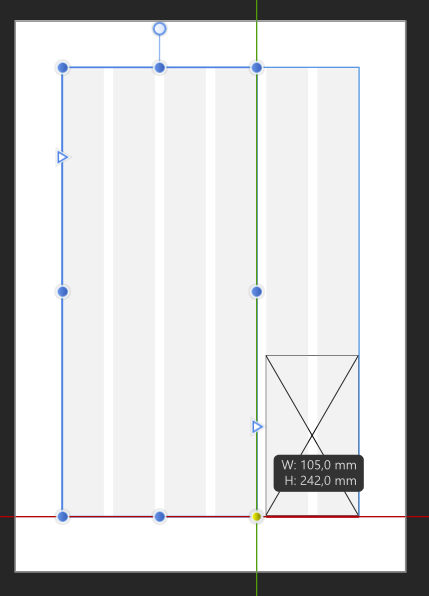
                Below is an example of 6 columns & gutters (within the margins) allowing easy snapping of a text frame & an object. This is one of the basis for page layout: it would already allow designing flyers, brochures, posters in VS very easily without the need to conceive complex guides & grids.
                0_1675089878204_047bf444-3b77-43bd-9dd6-0a2a9b886101-image.png

                W11 Pro 25H2 - 12th Gen Intel(R) i7-12700K 3.61 GHz - RAM 64 Go - NVIDIA GF GTX 4070 Ti - Intuos - Dell UP3216Q / Eizo ColorEdge
                W11 Pro 25H2 - 12th Gen Intel(R) i7-12700KF 3.60 GHz -RAM 64 Go - NVIDIA GF GTX 3080 - IntuosPro- ProArt PA329C

                VectorStylerV 1 Reply Last reply Reply Quote 0
                • VectorStylerV Offline
                  VectorStyler @B-Vs-V
                  last edited by

                  @Pat The Canvas -> Create Guidelines can be used to set up these kind of guidelines, but of course these will not be dynamically linked to the artboard.

                  B 1 Reply Last reply Reply Quote 0
                  • B Offline
                    B-Vs-V @VectorStyler
                    last edited by B-Vs-V

                    @VectorStyler I will look into it (canvas guidelines) but the important thing is to be able to use it on at least one artboard with snapping. In the possibility that you decide to code a page layout program, it would already be done ☺

                    W11 Pro 25H2 - 12th Gen Intel(R) i7-12700K 3.61 GHz - RAM 64 Go - NVIDIA GF GTX 4070 Ti - Intuos - Dell UP3216Q / Eizo ColorEdge
                    W11 Pro 25H2 - 12th Gen Intel(R) i7-12700KF 3.60 GHz -RAM 64 Go - NVIDIA GF GTX 3080 - IntuosPro- ProArt PA329C

                    1 Reply Last reply Reply Quote 1
                    • S Offline
                      Subpath
                      last edited by

                      @Pat

                      Did you know that you can align objects
                      in different ways on an artboard?

                      Here a short video

                      0_1675251507161_align-to-artboard.png

                      Win 11
                      CPU: AMD Ryzen 5 9600X, 6-core.
                      GPU: Nvidia Geforce RTX 5070.

                      B 1 Reply Last reply Reply Quote 1
                      • B Offline
                        B-Vs-V @Subpath
                        last edited by B-Vs-V

                        @Subpath Thanks to take the time to give a feedback ☺
                        Yes I know this but the idea is to organize an artboard for page layout with specific guides for that purpose ☺
                        While waiting for this feature (hopefully) I’ll organize guides & grids.

                        W11 Pro 25H2 - 12th Gen Intel(R) i7-12700K 3.61 GHz - RAM 64 Go - NVIDIA GF GTX 4070 Ti - Intuos - Dell UP3216Q / Eizo ColorEdge
                        W11 Pro 25H2 - 12th Gen Intel(R) i7-12700KF 3.60 GHz -RAM 64 Go - NVIDIA GF GTX 3080 - IntuosPro- ProArt PA329C

                        1 Reply Last reply Reply Quote 1
                        • First post
                          Last post