VectorStyler
    • Categories
    • Unread
    • Recent
    • Tags
    • Popular
    • Register
    • Login

    Convert objects to lines ?

    Scheduled Pinned Locked Moved Questions and Support
    11 Posts 3 Posters 9.2k Views 3 Watching
    Loading More Posts
    • Oldest to Newest
    • Newest to Oldest
    • Most Votes
    Reply
    • Reply as topic
    Log in to reply
    This topic has been deleted. Only users with topic management privileges can see it.
    • VectorStylerV Offline
      VectorStyler @Igull
      last edited by

      @Igull Would this convert curves to lines also?

      As for the text part: VS documents can be save in JSON or XML formats (Document Setup -> File -> File Format).

      IgullI 1 Reply Last reply Reply Quote 0
      • S Offline
        Subpath @Igull
        last edited by

        @Igull

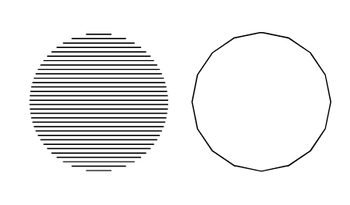
        dit you mean something like the left one ?
        or like the right one ?

        or something totally different ?

        0_1675183450468_Segments.png

        Win 11
        CPU: AMD Ryzen 5 9600X, 6-core.
        GPU: Nvidia Geforce RTX 5070.

        IgullI 1 Reply Last reply Reply Quote 0
        • IgullI Offline
          Igull @VectorStyler
          last edited by

          @VectorStyler said in Convert objects to lines ?:

          @Igull Would this convert curves to lines also?

          As for the text part: VS documents can be save in JSON or XML formats (Document Setup -> File -> File Format).

          Yes, all objects would be converted into straight line segments - it's all part of a simple 2D CNC system and it means that the processor doesn't have any hard work if it only has to cut straight lines and not contend with calculating splines etc 🙂

          I didn't know that VS could save in XML ! That's really handy as it's fairly easy to parse (probably as it was designed that way LOL).

          Thanks

          Neil

          iMac 27" 2015 Catalina 32Gb, MacBook Pro 13" 2016 Monterey 8Gb, Mac Mini M2 2023 8Gb

          1 Reply Last reply Reply Quote 1
          • IgullI Offline
            Igull @Subpath
            last edited by

            @Subpath said in Convert objects to lines ?:

            @Igull

            dit you mean something like the left one ?
            or like the right one ?

            or something totally different ?

            0_1675183450468_Segments.png

            The vectored one on the right, the left hand one is rastered , but I can see why you asked, I should have been clearer 🙂

            Neil

            iMac 27" 2015 Catalina 32Gb, MacBook Pro 13" 2016 Monterey 8Gb, Mac Mini M2 2023 8Gb

            VectorStylerV S 2 Replies Last reply Reply Quote 1
            • VectorStylerV Offline
              VectorStyler @Igull
              last edited by

              @Igull Added the "convert to lines" to the backlog.

              IgullI 1 Reply Last reply Reply Quote 0
              • S Offline
                Subpath @Igull
                last edited by

                @Igull

                ...but I can see why you asked...

                it is also because of my English, sometimes
                I am not sure if I have understood correctly
                and the translators are not always helpful

                Win 11
                CPU: AMD Ryzen 5 9600X, 6-core.
                GPU: Nvidia Geforce RTX 5070.

                1 Reply Last reply Reply Quote 0
                • S Offline
                  Subpath
                  last edited by Subpath

                  @Igull

                  in the Video are two possible Ways
                  to create such segments in VS
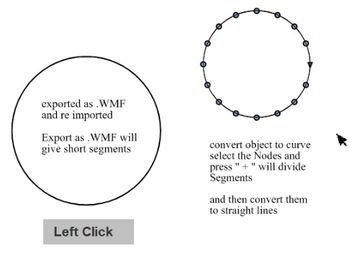
                  Here the Video

                  0_1675187272167_Segments2.png

                  unfortunately the .wmf export trick work only on
                  curved lines and not an straight ones

                  Win 11
                  CPU: AMD Ryzen 5 9600X, 6-core.
                  GPU: Nvidia Geforce RTX 5070.

                  IgullI 1 Reply Last reply Reply Quote 2
                  • IgullI Offline
                    Igull @Subpath
                    last edited by

                    @Subpath said in Convert objects to lines ?:
                    @Igull

                    unfortunately the .wmf export trick work only on
                    curved lines and not an straight ones

                    Actually, it does 🙂 A straight line only has two pairs of XY co-ordinates - so it doesn't need to be broken into smaller segments - just the curves !

                    This works extremely well on a number of shapes I tried, the 'resolution' of the number of segments is sufficiently good for my current purposes ! (I wonder if WMF has a 'resolution' for segments ??? - I need to look at that).

                    So that's a great win for me for now !!! It seems that while VS will export and open WMF files, it doesn't seem to want to import them ?? Not an issue for now as I can open then cut/paste.

                    Csaba said that I can export as XML - that is really useful - even saving as SVG does a similar job as I can parse out the object co-ordinates from both file flavours.

                    Don't you just love VS !!!!

                    BTW, what is your native language ??

                    Thanks a lot for this.

                    Neil

                    iMac 27" 2015 Catalina 32Gb, MacBook Pro 13" 2016 Monterey 8Gb, Mac Mini M2 2023 8Gb

                    S 1 Reply Last reply Reply Quote 2
                    • IgullI Offline
                      Igull @VectorStyler
                      last edited by

                      @VectorStyler said in Convert objects to lines ?:

                      @Igull Added the "convert to lines" to the backlog.

                      That is outstanding, thanks for that ! 👍

                      Neil

                      iMac 27" 2015 Catalina 32Gb, MacBook Pro 13" 2016 Monterey 8Gb, Mac Mini M2 2023 8Gb

                      1 Reply Last reply Reply Quote 0
                      • S Offline
                        Subpath @Igull
                        last edited by Subpath

                        @Igull

                        your welcome

                        ...BTW, what is your native language ??...
                        my native language is german

                        ...Don't you just love VS !!!!...
                        Of course, that's why we are here 🙂

                        I know that .wmf works in this way from the time
                        I worked professionally and had to somehow import
                        the strangest file formats into Corel Draw for
                        further processing

                        Win 11
                        CPU: AMD Ryzen 5 9600X, 6-core.
                        GPU: Nvidia Geforce RTX 5070.

                        1 Reply Last reply Reply Quote 1
                        • First post
                          Last post