Moving Text Frames
-
I'm having a lot of issues with moving text frames around (something that I don't have to do very often). The issue arises at certain zoom levels - I can't find a panel or anything that gives a value to the zoom level, so can't give a number to this unfortunately.
The texts are generally only a few letters. Using the transform tool to click and position the text around at higher zoom levels is fine, but as you zoom out, it becomes next to impossible to click and drag the text, you can never find that sweet spot as the corner centre indicators just get in the way.
I'm sure there must be a way around this that I'm missing - I've even read the manual AND prior posts LOL, but can't find that elusive answer !TIA
Neil
iMac 27" 2015 Catalina 32Gb, MacBook Pro 13" 2016 Monterey 8Gb, Mac Mini M2 2023 8Gb
-
in case you dont know
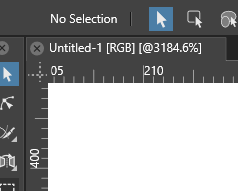
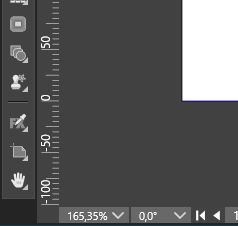
the actual zoom level is displayed
in the Document Tab right besides the title
and down below in the left document cornerSee pictures here
.
.
-
Great, thanks for that, hadn't thought to look in the filename tab

OK, the issue starts at 200% zoom, it's OK at 300% and above - at 200% and below, it's simply not possible to move the text frame at all - character size is 4.23mm (probably a metric equivalent point size - I'm more interested in it's metric dimension
)Any way around this ? 200% and below is generally the zoom level that I'm moving frames around.
Thanks
Neil
-
@Igull Maybe it's something related to a Prefs setting? I don't have this issue here. Can you try reverting to defaults?
The Preferences files are here:
- switch to the Finder
- click the 'Go' menu > Go to Folder…
- paste this: ~/Library/Application Support/NumericPath/VectorStyler1.0/vector/data/resources
- press Enter/Return.
- move these two files (settings.xml and workspace.xml) somewhere else, then restart the app.
If it's solved, send the .xml files to the developer's email.
MacBook Pro (Intel) running Monterey 12.6.4
-
@Igull I cannot replicate this with a text frame.
Was this a shape text or a frame text? With shape text, clicking outside of the glyph shape will not select.
If you could send an example where this issue occurs, I will try to replicate this
-
@VectorStyler said in Moving Text Frames:
@Igull I cannot replicate this with a text frame.
Was this a shape text or a frame text? With shape text, clicking outside of the glyph shape will not select.
If you could send an example where this issue occurs, I will try to replicate this
It's frame text, just sending the file now.
Neil
iMac 27" 2015 Catalina 32Gb, MacBook Pro 13" 2016 Monterey 8Gb, Mac Mini M2 2023 8Gb
-
@b77 said in Moving Text Frames:
@Igull Maybe it's something related to a Prefs setting? I don't have this issue here. Can you try reverting to defaults?
The Preferences files are here:
- switch to the Finder
- click the 'Go' menu > Go to Folder…
- paste this: ~/Library/Application Support/NumericPath/VectorStyler1.0/vector/data/resources
- press Enter/Return.
- move these two files (settings.xml and workspace.xml) somewhere else, then restart the app.
If it's solved, send the .xml files to the developer's email.
Still the same it seems

I've sent the file to Csaba.
Thanks
Neil
-
@Igull The problem can be replicated. It is caused by the corner handles that were enabled for the transform tool.
Will be fixed.


