VectorStyler
    • Categories
    • Unread
    • Recent
    • Tags
    • Popular
    • Register
    • Login

    Selection tool similar to Affinity Designer

    Scheduled Pinned Locked Moved Features and Ideas
    7 Posts 4 Posters 6.8k Views 3 Watching
    Loading More Posts
    • Oldest to Newest
    • Newest to Oldest
    • Most Votes
    Reply
    • Reply as topic
    Log in to reply
    This topic has been deleted. Only users with topic management privileges can see it.
    • visualrevoltV Offline
      visualrevolt
      last edited by

      Can you make box selection tool similar to Affinity Designer?

      I prefer Affinity Designer selection tool approach better, than Vectorstyler.
      In attached videos I show you why.

      Affinity Designer:
      https://recordit.co/DKK36YBA27

      Vector Styler:
      https://recordit.co/EOvzYcWlt1

      We have a group of objects overlapping one another.
      In Affinity Designer, shapes marked as a whole objects are selected.
      If, I use similar approach in Vectorstyler all shapes are marked regardless.

      b77B 1 Reply Last reply Reply Quote 0
      • b77B Offline
        b77 @visualrevolt
        last edited by

        @visualrevolt You need to uncheck 'Intersecting Selection' in Preferences > Editing Options 2.

        MacBook Pro (Intel) running Monterey 12.6.4

        1 Reply Last reply Reply Quote 1
        • visualrevoltV Offline
          visualrevolt
          last edited by

          WOW! ☺
          Thanks for your help.
          This program suprise me everytime when, I need certain feature and it has been already implemented.👍

          b77B S 2 Replies Last reply Reply Quote 5
          • b77B Offline
            b77 @visualrevolt
            last edited by b77

            @visualrevolt Btw, I'm curious if intersecting selection is available in AD and if it is, which mode is the default?

            MacBook Pro (Intel) running Monterey 12.6.4

            visualrevoltV 1 Reply Last reply Reply Quote 0
            • S Offline
              Subpath @visualrevolt
              last edited by

              @visualrevolt said in Selection tool similar to Affinity Designer:

              This program suprise me everytime when, I need certain feature and it has been already implemented.

              I guess this won't be the last time. 🙂
              It's the same with me

              Win 11
              CPU: AMD Ryzen 5 9600X, 6-core.
              GPU: Nvidia Geforce RTX 5070.

              BoldlineB 1 Reply Last reply Reply Quote 1
              • visualrevoltV Offline
                visualrevolt @b77
                last edited by visualrevolt

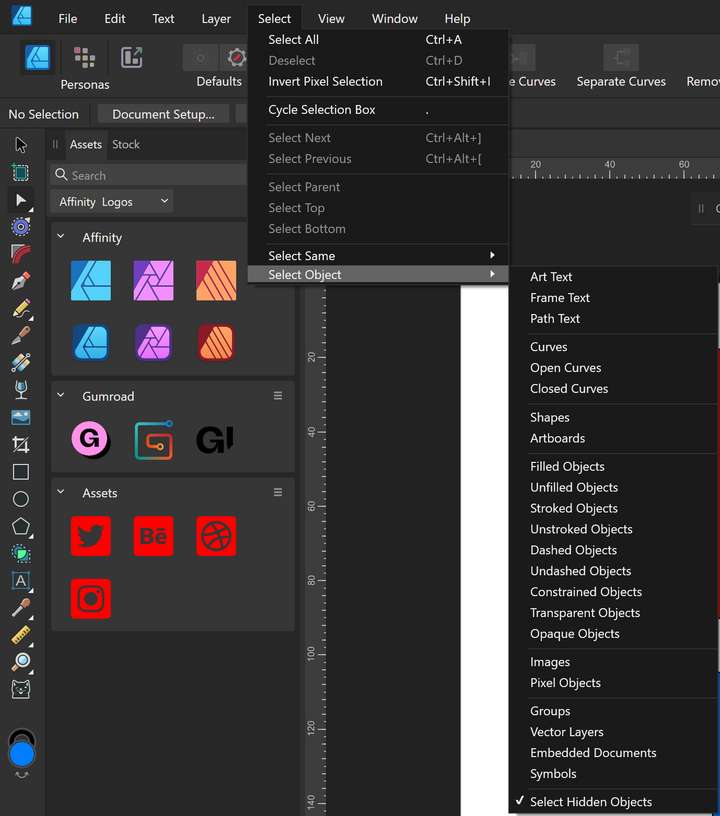
                @b77 As far as I know by default is only one mode. There is an option how to select certain objects from select menu, but regarding customisation is not even closer to Vectorstyler.
                0_1678229620792_AD selection.png

                I use both programs and they are great 👍

                1 Reply Last reply Reply Quote 0
                • BoldlineB Online
                  Boldline @Subpath
                  last edited by

                  @Subpath I agree. I always feel like I need to preface my requests on the forum with "This is probably already in the program but I could not find it by myself,"

                  It feels like everything is already implemented or if not, it's already been suggested and added to the queue to be added in a future update.

                  🍎 macOS Tahoe 26.2, Mac mini (M1, 2020), Chip Apple M1, Memory 16 GB
                  Cintiq 27QHD Display and LG Ultra HD Display

                  1 Reply Last reply Reply Quote 0
                  • First post
                    Last post