VectorStyler
    • Categories
    • Unread
    • Recent
    • Tags
    • Popular
    • Register
    • Login

    Unintentional Opacity in a Noise Gradient

    Scheduled Pinned Locked Moved Questions and Support
    11 Posts 2 Posters 9.4k Views 2 Watching
    Loading More Posts
    • Oldest to Newest
    • Newest to Oldest
    • Most Votes
    Reply
    • Reply as topic
    Log in to reply
    This topic has been deleted. Only users with topic management privileges can see it.
    • S Offline
      Subpath
      last edited by Subpath

      Wonder why a Gradient gets an unintentional Opacity
      when I select Noise as Shape in the Gradient Panel.

      Is Noise as a Shape also possible
      without any additional Opacity ?
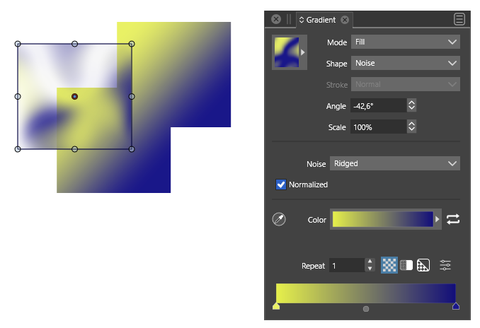
      0_1679661550515_Opacity in Noise.png

      Win 11
      CPU: AMD Ryzen 5 9600X, 6-core.
      GPU: Nvidia Geforce RTX 5070.

      VectorStylerV 1 Reply Last reply Reply Quote 0
      • VectorStylerV Offline
        VectorStyler @Subpath
        last edited by

        @Subpath Click on the second icon in the row starting with the "Repeat" label.
        This will allow the control of opacity.
        Otherwise the opacity is generated by the noise.

        S 1 Reply Last reply Reply Quote 0
        • S Offline
          Subpath @VectorStyler
          last edited by

          @VectorStyler

          The second icon doesn't seem to do anything and neither
          does the third. Everything looks the same and stays the same.

          Also, the shape dropdown menu displays incorrect information.

          Here is a video

          Win 11
          CPU: AMD Ryzen 5 9600X, 6-core.
          GPU: Nvidia Geforce RTX 5070.

          VectorStylerV 1 Reply Last reply Reply Quote 0
          • VectorStylerV Offline
            VectorStyler @Subpath
            last edited by

            @Subpath Send me a file with those gradients from the recording. I will try to figure out what is wrong.

            S 1 Reply Last reply Reply Quote 0
            • S Offline
              Subpath @VectorStyler
              last edited by

              @VectorStyler said in Unintentional Opacity in a Noise Gradient:

              @Subpath Send me a file with those gradients from the recording. I will try to figure out what is wrong.

              File is sent

              Win 11
              CPU: AMD Ryzen 5 9600X, 6-core.
              GPU: Nvidia Geforce RTX 5070.

              VectorStylerV 2 Replies Last reply Reply Quote 0
              • VectorStylerV Offline
                VectorStyler @Subpath
                last edited by

                @Subpath Got it!

                1 Reply Last reply Reply Quote 0
                • VectorStylerV Offline
                  VectorStyler @Subpath
                  last edited by

                  @Subpath This is how it looks here, after set the gradient opacity mode to the second icon:

                  I will return to this on Windows later.
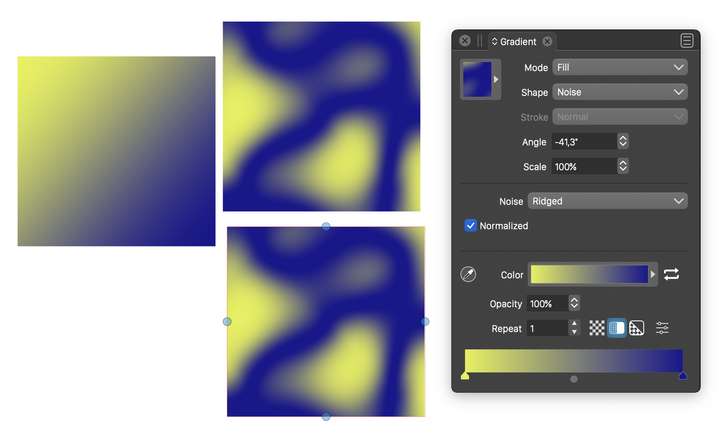
                  0_1679912849349_noisegradient.png

                  S 1 Reply Last reply Reply Quote 1
                  • S Offline
                    Subpath @VectorStyler
                    last edited by Subpath

                    @VectorStyler , thanks

                    definitely looks different from mine

                    This problem is not urgent for me, it caught my eye
                    and I wanted to mention it

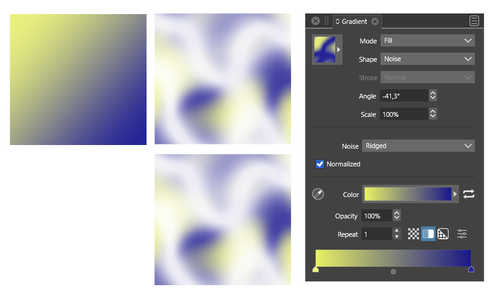
                    here my result, new try
                    0_1679916449094_Gradient-Noise-2.png

                    Win 11
                    CPU: AMD Ryzen 5 9600X, 6-core.
                    GPU: Nvidia Geforce RTX 5070.

                    VectorStylerV 1 Reply Last reply Reply Quote 1
                    • VectorStylerV Offline
                      VectorStyler @Subpath
                      last edited by

                      @Subpath I opened a bug on this one, will try to have it fixed in the next build.

                      Did you try the Software mode for the Compute Engine settings in preferences?

                      S 1 Reply Last reply Reply Quote 1
                      • S Offline
                        Subpath @VectorStyler
                        last edited by Subpath

                        @VectorStyler said in Unintentional Opacity in a Noise Gradient:

                        Did you try the Software mode for the Compute Engine settings in preferences?

                        Software is my standard setting.
                        Tried Software, Nvidia Cuda and OpenCL.

                        The noise gradient does not work with
                        Software and Nvidia Cuda.

                        Noise gradient work when I switch to OpenCL.
                        But VS was unusable with OpenCL, too much lags.

                        After I restarted the application it seems a bit better
                        but not really as smooth as the others.

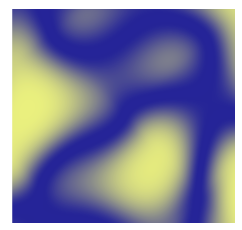
                        Here my result in OpenCL.
                        0_1679932059727_Noise Gradient-3.png

                        Win 11
                        CPU: AMD Ryzen 5 9600X, 6-core.
                        GPU: Nvidia Geforce RTX 5070.

                        VectorStylerV 1 Reply Last reply Reply Quote 1
                        • VectorStylerV Offline
                          VectorStyler @Subpath
                          last edited by

                          @Subpath it should work with Software at least in all cases, so this might be a bug unrelated to the GPU.

                          1 Reply Last reply Reply Quote 1
                          • First post
                            Last post