VectorStyler
    • Categories
    • Unread
    • Recent
    • Tags
    • Popular
    • Register
    • Login

    Text on path aligned to "ascent" leaves large gap at top between words and path

    Scheduled Pinned Locked Moved Questions and Support
    4 Posts 3 Posters 4.1k Views 3 Watching
    Loading More Posts
    • Oldest to Newest
    • Newest to Oldest
    • Most Votes
    Reply
    • Reply as topic
    Log in to reply
    This topic has been deleted. Only users with topic management privileges can see it.
    • BoldlineB Offline
      Boldline
      last edited by

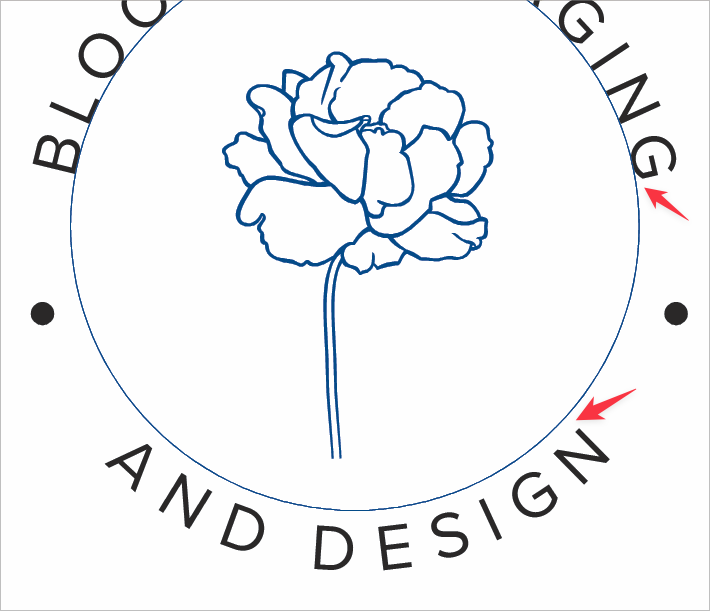
      I created a circular path and added text to it. I then copied the same text and pasted it over itself and rotated it around the bottom of the same path. I used the spacebar to flip it to the inside and then highlighted the text and used the "text on path" panel to set the alignment to "ascent". This worked, but it left a large gap from the top of the letters to the path above it that it is aligned to. This is not happening with the text aligned to the baseline. I know I could set all text to the centerline, but that would make using the ascent useless
      0_1680208969676_ad37fd68-3fa0-4b69-84dc-9df186fac7d8-BLD 2023-03-30 at 16.42.29.png

      🍎 macOS Tahoe 26.2, Mac mini (M1, 2020), Chip Apple M1, Memory 16 GB
      Cintiq 27QHD Display and LG Ultra HD Display

      b77B VectorStylerV 2 Replies Last reply Reply Quote 1
      • b77B Offline
        b77 @Boldline
        last edited by b77

        @Boldline Use 'Capital Height' alignment instead of 'Ascent'.

        MacBook Pro (Intel) running Monterey 12.6.4

        1 Reply Last reply Reply Quote 2
        • VectorStylerV Offline
          VectorStyler @Boldline
          last edited by

          @Boldline Ascent is a bit above the capital height, to leave room for diacritical marks.

          1 Reply Last reply Reply Quote 1
          • BoldlineB Offline
            Boldline
            last edited by

            @vectorstyler @b77 thank you both for explaining. That makes sense now.

            🍎 macOS Tahoe 26.2, Mac mini (M1, 2020), Chip Apple M1, Memory 16 GB
            Cintiq 27QHD Display and LG Ultra HD Display

            1 Reply Last reply Reply Quote 0
            • First post
              Last post
