VectorStyler
    • Categories
    • Unread
    • Recent
    • Tags
    • Popular
    • Register
    • Login

    Cannot assign shortcut for Select -> Select Similar -> Fill Color ?

    Scheduled Pinned Locked Moved Questions and Support
    9 Posts 5 Posters 8.9k Views 3 Watching
    Loading More Posts
    • Oldest to Newest
    • Newest to Oldest
    • Most Votes
    Reply
    • Reply as topic
    Log in to reply
    This topic has been deleted. Only users with topic management privileges can see it.
    • syllieS Offline
      syllie
      last edited by

      I know the action existed before, and I assume this functionality is now covered as Select -> Select Similar -> Fill Content, but when looking to assign a keyboard shortcut I can only find 'Select Similar'. Am I missing something? How is this supposed to work please? Is it possible to select all objects in a document that have the same fill with a shortcut?

      Windows 10 Pro | 22H2

      b77B VectorStylerV 2 Replies Last reply Reply Quote 0
      • S Offline
        Subpath
        last edited by

        @syllie

        can not really answer your question
        but @b77 made a while ago a search able
        and sort able Shortcut Table for Mac and Win,
        which may be helpful.

        Here the LInk
        https://www.vectorstyler.com/forum/topic/2115/sortable-shortcuts-table-html

        Win 11
        CPU: AMD Ryzen 5 9600X, 6-core.
        GPU: Nvidia Geforce RTX 5070.

        BoldlineB 1 Reply Last reply Reply Quote 1
        • BoldlineB Offline
          Boldline @Subpath
          last edited by

          @Subpath @syllie I think there are a couple issues. First is that the specific select options are not available to add a shortcut to our add to a custom toolbox.

          The other issue is the current lack of available keyboard shortcuts. I believe @vectorstyler is planning to add the option for three-key shortcuts in the future. This would open up a plenty of new potential keyboard shortcuts to assign to tasks.

          🍎 macOS Tahoe 26.2, Mac mini (M1, 2020), Chip Apple M1, Memory 16 GB
          Cintiq 27QHD Display and LG Ultra HD Display

          1 Reply Last reply Reply Quote 2
          • b77B Offline
            b77 @syllie
            last edited by

            @syllie Yep, it seems this cannot be done atm.

            As a possible alternative, you can add the 'Select Similar' submenu to
            the contextual menu: https://recordit.co/1zc8ytfBEE

            MacBook Pro (Intel) running Monterey 12.6.4

            syllieS 1 Reply Last reply Reply Quote 2
            • syllieS Offline
              syllie @b77
              last edited by

              @b77 Thanks for the suggestion!

              I do not consider this an alternative really for a shortcut, too many steps to get what I want (right click, locate the action (similar), hover over the submenu (by style, by outline, by effect), then locate the subaction), but it is faster than reaching for the main menu. I tried adding it to a quick panel (custom toolbox) but the number of clicks & locate is the same.

              Windows 10 Pro | 22H2

              b77B 1 Reply Last reply Reply Quote 1
              • b77B Offline
                b77 @syllie
                last edited by b77

                @syllie Enabling the 'Inplace Menu' option will display the three submenus directly in the context menu.

                But yeah, still not a custom shortcut replacement.

                MacBook Pro (Intel) running Monterey 12.6.4

                syllieS 1 Reply Last reply Reply Quote 1
                • syllieS Offline
                  syllie @b77
                  last edited by

                  @b77 Hey thank you for mentioning that option.

                  It made me look at options when adding it to a custom toolbox and by ticking the 'active item' box it results in a one-click access:
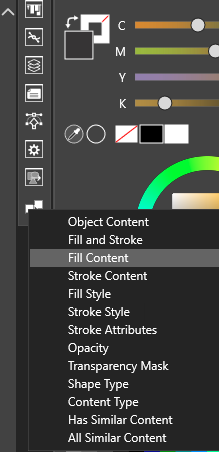
                  0_1680827207691_a2487a97-64c2-4350-a023-24a0b5f36396-image.png

                  That is a much faster option now (only to be beaten by a shortcut)

                  Windows 10 Pro | 22H2

                  b77B 1 Reply Last reply Reply Quote 1
                  • b77B Offline
                    b77 @syllie
                    last edited by

                    @syllie Indeed, that's even better. 👍

                    MacBook Pro (Intel) running Monterey 12.6.4

                    1 Reply Last reply Reply Quote 0
                    • VectorStylerV Offline
                      VectorStyler @syllie
                      last edited by

                      @syllie Yes, those are not separate actions. I will try to improve this for 1.2

                      1 Reply Last reply Reply Quote 2
                      • First post
                        Last post
