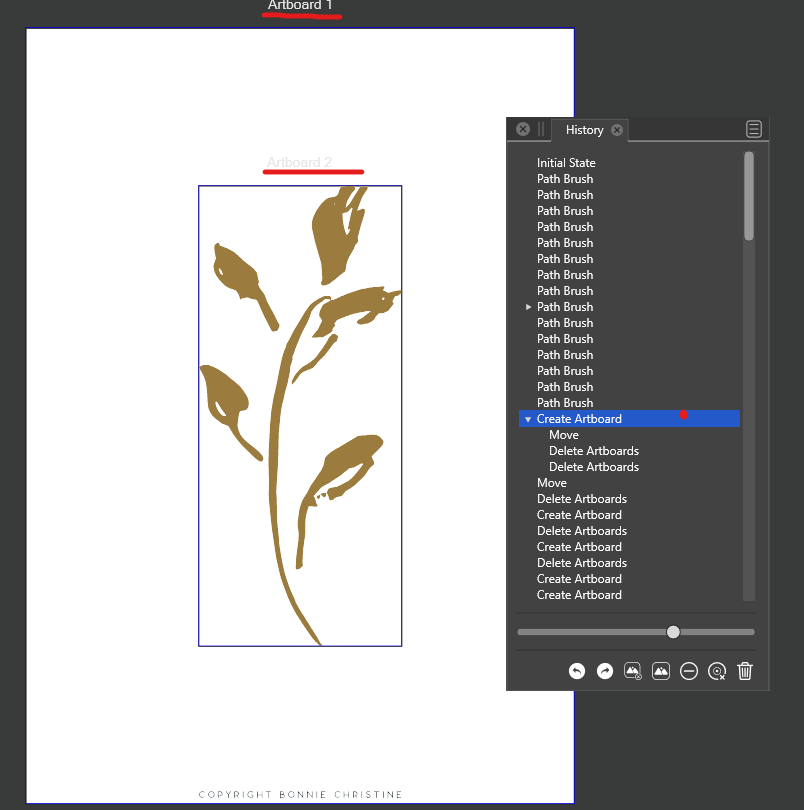
How did I create this 2nd artboard?
-
This is going to sound a little bit silly, but I was looking for a 'convert to artboard' option like in AI. Experimenting a bit and looking through the forum I found this option is not there (yet) but, looking back on my screen, I somehow managed to envelope the object on its own artboard. It is exactly what I was after, but I cannot figure out how I did this - there were no popups or settings that I okay'd and I did have the object selected. The history panel does not reveal any clues (but 'create artboard') and I have not been able to do it again. Any clue is welcome!
-
@syllie if you move the art off the main artboard and then click on the art board tool in the vertical toolbox on the left, it should make a second artboard the size of the selected object
-
You need to click (once) with the Artboard tool on the object, and an artboard is created.
MacBook Pro (Intel) running Monterey 12.6.4
-
@VectorStyler I know this was introduced just a few months ago, but a visible
command in the Canvas menu ('Artboard to Selection' or something named
better) would make it easy for users to find or identify it. -
@b77 Close - but that gave me a clue how I did it and it can be reproduced. On windows this is:
- Select artwork
- Activate artboard tool -> right click on artwork. Ignore popup.
The artwork is then enveloped by the new artboard.
Note: it does not matter if artwork is on an existing artboard or outside of it.
Not working:
- If artwork is not selected
- By left clicking on the artwork with the artboard tool, no matter if the artwork is selected / deselected
When I move the artboard tool (inside an existing artboard) / or (over artwork outside of an artboard) the cursor changes to select tool. Right clicking creates the new artboard (dismiss context menu with Esc).
Note sure if this is intended behaviour, but that is what happens on Win10.
Windows 10 Pro | 22H2
-
@syllie At least on the Mac an artboard can be added around a selected
object with normal (left mouse button) click (using the Artboard tool).
When right-clicking it, only the context menu shows up.In any case, I think the current behavior is best — when the object on
the artboard is not selected, clicking it with the Artboard Tool should not
create an artboard around it. -
@b77 said in How did I create this 2nd artboard?:
In any case, I think the current behavior is best — when the object on
the artboard is not selected, clicking it with the Artboard Tool should not
create an artboard around it.Yes - I did not mean to imply that 'it was not working' (or should work otherwise than you described). My 'not working' was more like 'if I do this while... then the artboard is not created'.
By the sounds of it, the functionality on Mac is as I would have expected it: select object(s) and click on them with the artboard tool -> create artboard. On windows this currently needs a RMB click + dismiss of menu.
-
@syllie If no artwork is selected, then clicking will not create an artboard, this is by design.
-
@VectorStyler Yes understood, and that is how I expect it to work. However there seems to be a difference now between this functionality on Mac and Win:
Mac: Select artwork + LMB click with artboard tool creates a new artboard
Win: Select artwork + RMB click with artboard tool creates a new artboard. Needs dismiss of the context menu too. Nothing happens on LMB click. -
@syllie said in How did I create this 2nd artboard?:
Select artwork + RMB click with artboard tool creates a new artboard
This part could be a bug. Will be fixed ASAP.


