VectorStyler
    • Categories
    • Unread
    • Recent
    • Tags
    • Popular
    • Register
    • Login

    Easiest way to do "Pucker" effect in VS?
    Scheduled Pinned Locked Moved Questions and Support
    11 Posts 5 Posters 9.1k Views 3 Watching
    Loading More Posts
    • Oldest to Newest
    • Newest to Oldest
    • Most Votes
    Reply
    • Reply as topic
    Log in to reply
    This topic has been deleted. Only users with topic management privileges can see it.
    • VectorStylerV Offline
      VectorStyler @syllie
      last edited by

      @syllie No such effect.

      syllieS 1 Reply Last reply Reply Quote 0
      • syllieS Offline
        syllie @VectorStyler
        last edited by

        @VectorStyler aww.. okay - it is quite primitive and easy to make but would have been nice! Thanks for the feedback.

        Windows 10 Pro | 22H2

        1 Reply Last reply Reply Quote 0
        • S Offline
          Subpath @syllie
          last edited by Subpath

          @syllie

          never give up 🙂

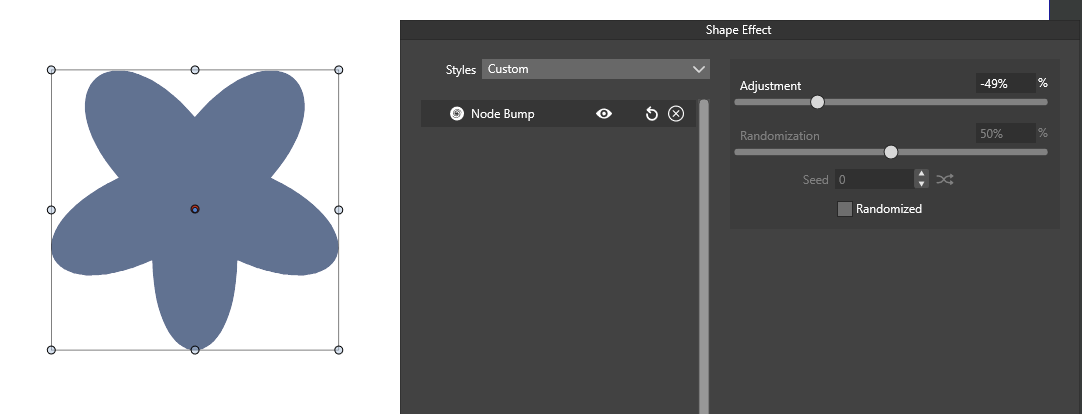
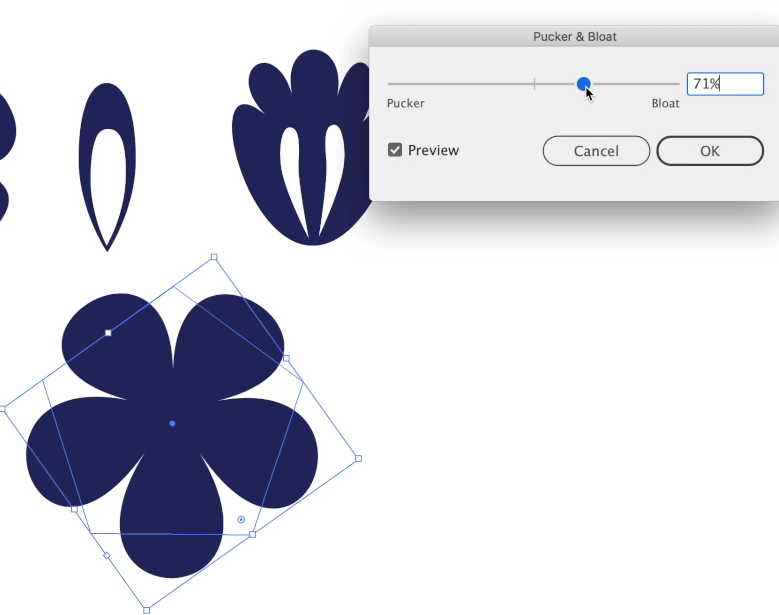
          had a kind of result with
          the Shape Effect > Distortion > Spikes
          (original Shape was a circle converted in curves)
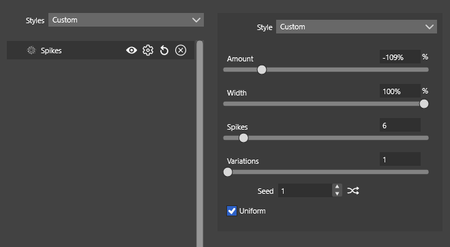
          0_1681390924485_Plucker and Bloat.png

          0_1681390934747_Plucker-Bloat-2.png
          .
          .
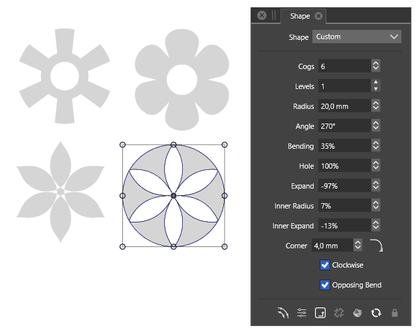
          the shape panel offers also a few options
          in conjunction with these Smart Shapes here
          Tip: change also the Value in the Corner field
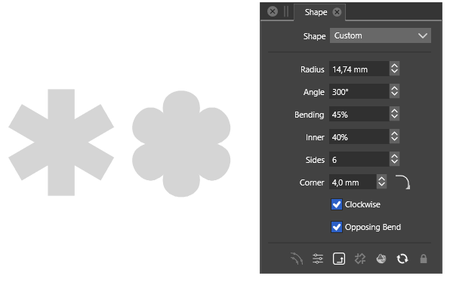
          0_1681391282523_Plucker-3.png
          .
          .
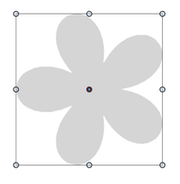
          0_1681391591172_Plucker-4.png

          Win 11
          CPU: AMD Ryzen 5 9600X, 6-core.
          GPU: Nvidia Geforce RTX 5070.

          b77B syllieS 3 Replies Last reply Reply Quote 4
          • b77B Offline
            b77 @Subpath
            last edited by b77

            @Subpath What was the initial shape in the Spikes example?
            A squared star? A normal star? I can't get the same effect here.

            MacBook Pro (Intel) running Monterey 12.6.4

            S 1 Reply Last reply Reply Quote 1
            • S Offline
              Subpath @b77
              last edited by Subpath

              @b77

              it was a circle, had a example from a illustrator video
              the circle was converted to curve

              Win 11
              CPU: AMD Ryzen 5 9600X, 6-core.
              GPU: Nvidia Geforce RTX 5070.

              b77B 1 Reply Last reply Reply Quote 2
              • b77B Offline
                b77 @Subpath
                last edited by

                @Subpath D'oh! 😆

                MacBook Pro (Intel) running Monterey 12.6.4

                1 Reply Last reply Reply Quote 2
                • BoldlineB Offline
                  Boldline @syllie
                  last edited by

                  @syllie hopefully this is something that can be improved upon in the future. I'm glad you brought it up!

                  🍎 macOS Tahoe 26.2, Mac mini (M1, 2020), Chip Apple M1, Memory 16 GB
                  Cintiq 27QHD Display and LG Ultra HD Display

                  1 Reply Last reply Reply Quote 2
                  • syllieS Offline
                    syllie @Subpath
                    last edited by

                    @Subpath @b77 @Boldline Thank you all for chiming in! It is SO good to see this kind of collaboration and hints and tips to get a more complete picture of options. These shapes are much closer to what I had in mind and definitely an option. Thanks Subpath for bringing these settings to my attention!

                    Windows 10 Pro | 22H2

                    S 1 Reply Last reply Reply Quote 1
                    • syllieS Offline
                      syllie @Subpath
                      last edited by syllie

                      @Subpath said in Easiest way to do "Pucker" effect in VS?:

                      Tip: change also the Value in the Corner field

                      This one is super interesting as the shape of the corner can be edited further to give very interesting outcomes:
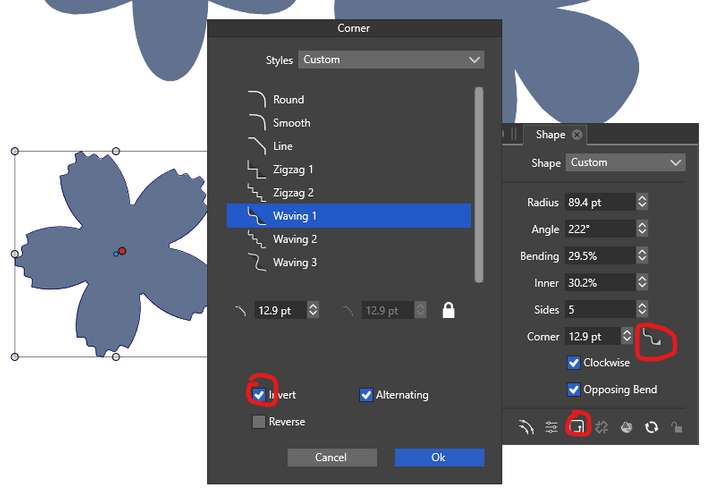
                      0_1681415268230_c3abb8b3-518d-48a7-9195-ad13583593e1-image.png

                      Add to that the option to edit the corner shapes and the sky is the limit:
                      https://www.vectorstyler.com/documentation/shapes/editcorners/#create-corner-shapes

                      Windows 10 Pro | 22H2

                      1 Reply Last reply Reply Quote 2
                      • S Offline
                        Subpath @syllie
                        last edited by Subpath

                        @syllie

                        your welcome, indeed VS offers some playground to have fun 🙂
                        .
                        .
                        btw related to corners
                        @VectorStyler made already a video how to edit your own corner
                        here the video with some corner magic
                        .
                        .
                        I create a Tutorial a while ago, which shows
                        a bit the power of smart shapes for pattern making
                        Here the link:
                        https://www.vectorstyler.com/forum/topic/2142/the-shape-of-things-using-parametric-shapes-for-pattern-making

                        Win 11
                        CPU: AMD Ryzen 5 9600X, 6-core.
                        GPU: Nvidia Geforce RTX 5070.

                        1 Reply Last reply Reply Quote 1
                        • First post
                          Last post