VectorStyler
    • Categories
    • Unread
    • Recent
    • Tags
    • Popular
    • Register
    • Login

    "Upscayl" (Win/Mac) free open source upscaler.

    Scheduled Pinned Locked Moved General Discussion
    7 Posts 3 Posters 13.1k Views 2 Watching
    Loading More Posts
    • Oldest to Newest
    • Newest to Oldest
    • Most Votes
    Reply
    • Reply as topic
    Log in to reply
    This topic has been deleted. Only users with topic management privileges can see it.
    • S Offline
      Subpath
      last edited by Subpath

      "Upscayl" (Win/Mac) can be helpful for everyone
      who struggles with vectorizing low resolution bitmaps

      I like it. Normally it does 4x upscaling but 8x upscaling
      is also possible and you can choose between different
      upscaling types/modes.

      Here is the link
      https://github.com/upscayl/upscayl

      Win 11
      CPU: AMD Ryzen 5 9600X, 6-core.
      GPU: Nvidia Geforce RTX 5070.

      b77B 1 Reply Last reply Reply Quote 5
      • b77B Offline
        b77 @Subpath
        last edited by b77

        @Subpath Nice find!

        Guys, don't click the 'Double Upscayl' checkbox like I did, or you will end up with a huge 24000 x 17000 px image. πŸ˜†

        MacBook Pro (Intel) running Monterey 12.6.4

        S 1 Reply Last reply Reply Quote 2
        • S Offline
          Subpath @b77
          last edited by

          @b77 said in "Upscayl" free open source upscaler.:

          Guys, don't click the 'Double Upscayl'

          πŸ™‚ and it will take some time too

          Win 11
          CPU: AMD Ryzen 5 9600X, 6-core.
          GPU: Nvidia Geforce RTX 5070.

          b77B 1 Reply Last reply Reply Quote 2
          • b77B Offline
            b77 @Subpath
            last edited by b77

            @Subpath Yep, about 15 minutes… That setting needs to be used only on small images.

            MacBook Pro (Intel) running Monterey 12.6.4

            S 1 Reply Last reply Reply Quote 1
            • S Offline
              Subpath @b77
              last edited by Subpath

              @b77

              tried 8x a few times just of curiosity πŸ™‚
              4x fits my regulary needs

              was impressed the first time I used it
              this upscaler does a pretty good job

              Win 11
              CPU: AMD Ryzen 5 9600X, 6-core.
              GPU: Nvidia Geforce RTX 5070.

              1 Reply Last reply Reply Quote 0
              • BoldlineB Online
                Boldline
                last edited by Boldline

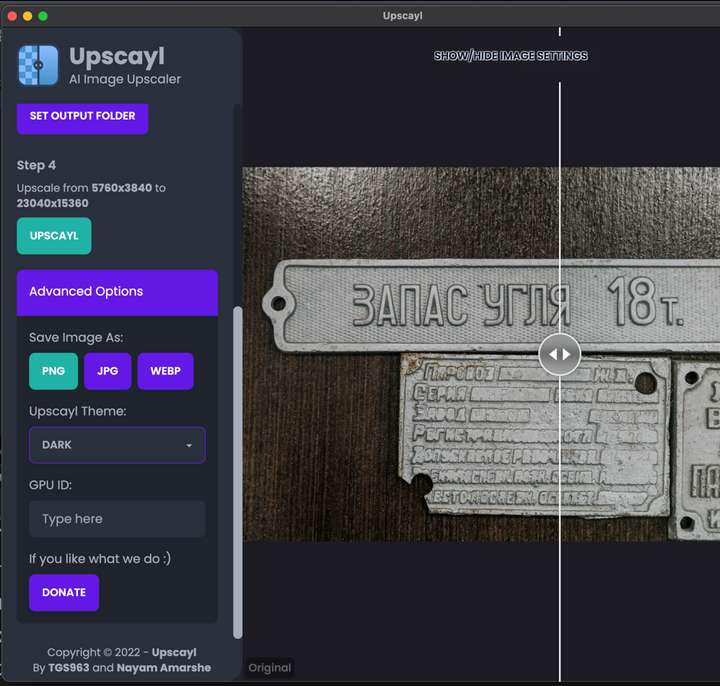
                This is a really cool program, but I cannot figure out how to export the resulting file. Am I missing something?

                *Edit - ok looks like it automatically downloads it upon completion to the designated folder
                0_1682998316051_cdcbf71e-1766-4301-af47-14c0002ff41e-CleanShot 2023-05-01 at 23.30.46.png

                🍎 macOS Sequoia 15.3, Mac mini (M1, 2020), Chip Apple M1, Memory 16 GB
                Cintiq 27QHD Display and LG Ultra HD Display

                S 1 Reply Last reply Reply Quote 1
                • S Offline
                  Subpath @Boldline
                  last edited by Subpath

                  @Boldline

                  Seems, you found it already

                  But just for anybody else.
                  Upscayle saves the result in the folder where the source image
                  came from.
                  That button "Set output folder" is misleading / does not work.

                  Create a new folder, put a copy of the image you like
                  to upscale into this folder. Scale the image, the result
                  is now also in this folder.

                  Win 11
                  CPU: AMD Ryzen 5 9600X, 6-core.
                  GPU: Nvidia Geforce RTX 5070.

                  1 Reply Last reply Reply Quote 1
                  • First post
                    Last post