Things related to the Origin point that could be better
-
I think the "origin point" in VS leaves a little to be
desired in appearance and handling.
.
.
I dont like the actual circle cross, it blocks often my
view rather than being a help in positioning of the
origin point.I think a simple cross would be more helpful
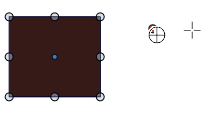
or here how it looks in coreldraw
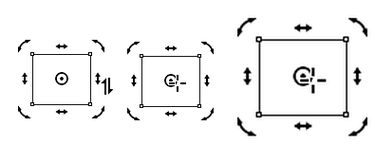
.
.
Some ideas for redesign
.
.
1.
One idea I had, how about users could
create their own cross and color it.
.
.
2.
Different sizes of the cross
It would be nice if a user can set/switch between different sizes
of the cross. From time to time i wish the cross would
be a little larger
.
.
3.
Positioning the Origin Point
A cool feature of Coreldraw, which i miss in VS
is the ability to set the Origin point to defined
coordinates and also relative to the center.Coreldraw has input fields extra for this, maybe
something like this could be fit under rotation
in the transform panel ?
Here a video how it works in coreldraw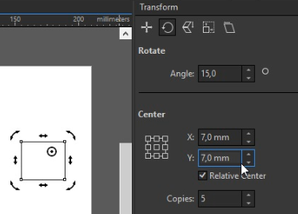
.
.
4.
Snapping options for the Origin point
it would also be nice if the origin point could
react on snapping options e.g. snapping on
points/nodesWin 11
CPU: AMD Ryzen 5 9600X, 6-core.
GPU: Nvidia Geforce RTX 5070. -
@Subpath I like the cross within a circle icon more than a cross by itself though I also like the smaller dot inside a slightly larger circle.
I'm not a fan of all the rotation and sheer arrows being visible like in the example from Corel - it feels cluttered and not graphic design sleek to me.
I love that VS maintains a marker to represent the center of the actual shape even as you can move the rotation point anywhere you want.
Corel seems to have a lot of cool functions but the aesthetics have always looked poor to me
Perhaps if VS had a few options for this in terms of look and size for the user to choose between?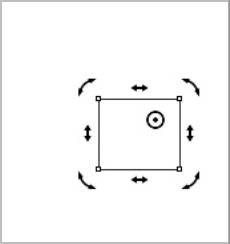
I like the idea of being able to control the origin point defined coordinates and also relative to the center and also the snapping ability option
-
@Subpath said in Things related to the Origin point that could be better:
4.Snapping options for the Origin point
it would also be nice if the origin point could
react on snapping options e.g. snapping on
points/nodesCurrently, when moving the center, it snaps with any of the enabled snapping options.
Is this about having the (moved) center of objects as a snapping location? -
@VectorStyler said in Things related to the Origin point that could be better:
@Subpath said in Things related to the Origin point that could be better:
4.Snapping options for the Origin point
it would also be nice if the origin point could
react on snapping options e.g. snapping on
points/nodes...Currently, when moving the center, it snaps with any of the enabled snapping options....
i think Point 4 was a bit unprecise articulated from me. While snapping
the turning point to other Objects Nodes works fineBut snapping the turning point to the Nodes of the origin Object
doesnt work and thats what i miss.here a video
.
.
.
...Is this about having the (moved) center of objects as a snapping location?...No, only the possibility to snap the turning point
for example at a node.Win 11
CPU: AMD Ryzen 5 9600X, 6-core.
GPU: Nvidia Geforce RTX 5070. -
...I'm not a fan of all the rotation and sheer arrows being visible like in the example from Corel - it feels cluttered and not graphic design sleek to me.....
Its not about the handles, only how the turning point look
just for inspirationthe circle-cross for moving the turning point in VS
just cover, in my eyes, too much whats underneat.
this makes it hard to position the turning point
to a exact location.i hardly see the turning point under that circle-cross
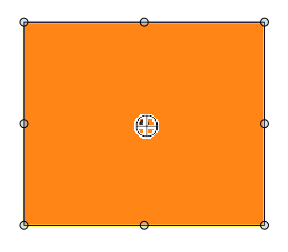
-
@Subpath said in Things related to the Origin point that could be better:
possibility to snap the turning point for example at a node.
This works, but it will not snap to the nodes of the same object (by default). Enable the "Snap to Original" option in the Snapping panel menu.
-
@VectorStyler said in Things related to the Origin point that could be better:
This works, but it will not snap to the nodes of the same object (by default). Enable the "Snap to Original" option in the Snapping panel menu.
wow, thats cool

made me already a preset for this
.
.
Have a question, about snapping to nodes.
I do not know if that would be possible and I can also live without this function.But it would be nice if the nodes could be displayed in the process.
At the moment it's a bit of guessing and trying with the help of the
snap tool where the nodes exactly are. -
@Subpath said in Things related to the Origin point that could be better:
would be nice if the nodes could be displayed in the process
Added this for the future.

