VectorStyler
    • Categories
    • Unread
    • Recent
    • Tags
    • Popular
    • Register
    • Login

    "Quick Look" on Mac

    Scheduled Pinned Locked Moved Questions and Support
    9 Posts 3 Posters 6.4k Views 2 Watching
    Loading More Posts
    • Oldest to Newest
    • Newest to Oldest
    • Most Votes
    Reply
    • Reply as topic
    Log in to reply
    This topic has been deleted. Only users with topic management privileges can see it.
    • IgullI Offline
      Igull
      last edited by

      Is there an intention to include "Quick Look" on VS files for Mac?

      This is such an important feature on Mac (there's even a hack version for windoze I believe ?). It's one of those things that I use constantly and find it really annoying when I can't see what the file is and have to open VS to view it (first world issue 🙂 ).

      TIA

      Neil

      iMac 27" 2015 Catalina 32Gb, MacBook Pro 13" 2016 Monterey 8Gb, Mac Mini M2 2023 8Gb

      VectorStylerV 1 Reply Last reply Reply Quote 0
      • VectorStylerV Offline
        VectorStyler @Igull
        last edited by

        @Igull Yes, and this has been (partially) fixed.
        The Intel and Apple Silicon binaries should support quick look, the universal does not for now.

        But in the new VS quick look support, you must enable file preview in Document Setup and save the file again.

        BoldlineB IgullI 2 Replies Last reply Reply Quote 0
        • BoldlineB Offline
          Boldline @VectorStyler
          last edited by

          @VectorStyler said in "Quick Look" on Mac:

          The Intel and Apple Silicon binaries should support quick look

          I know this was a longstanding issue that @vectorbrando was aware of and that it would eventually get fixed - I tested it today using build 80 and it's not working for me on my M1 mac. I have "store preview" selected prior to creation of the file

          🍎 macOS Tahoe 26.2, Mac mini (M1, 2020), Chip Apple M1, Memory 16 GB
          Cintiq 27QHD Display and LG Ultra HD Display

          VectorStylerV 1 Reply Last reply Reply Quote 1
          • IgullI Offline
            Igull @VectorStyler
            last edited by

            @VectorStyler said in "Quick Look" on Mac:

            @Igull Yes, and this has been (partially) fixed.
            The Intel and Apple Silicon binaries should support quick look, the universal does not for now.

            But in the new VS quick look support, you must enable file preview in Document Setup and save the file again.

            Have tried both my old Imac Intel and on my new M2 Mac Mini - neither show a preview with quick look ?

            This is with "Store Preview" enabled and the file re-saved.

            Neil

            iMac 27" 2015 Catalina 32Gb, MacBook Pro 13" 2016 Monterey 8Gb, Mac Mini M2 2023 8Gb

            1 Reply Last reply Reply Quote 1
            • VectorStylerV Offline
              VectorStyler @Boldline
              last edited by

              @Boldline Are you using the Universal binary?

              BoldlineB 1 Reply Last reply Reply Quote 0
              • BoldlineB Offline
                Boldline @VectorStyler
                last edited by

                @VectorStyler said in "Quick Look" on Mac:

                @Boldline Are you using the Universal binary?

                I shouldn't be. Is there a way to double-check that? I'm almost 100% sure I've always used the Apple silicon version. For the last year and a half since I got my M1, I've just been using the automated update in VS that pops up when applicable.

                🍎 macOS Tahoe 26.2, Mac mini (M1, 2020), Chip Apple M1, Memory 16 GB
                Cintiq 27QHD Display and LG Ultra HD Display

                VectorStylerV 1 Reply Last reply Reply Quote 0
                • VectorStylerV Offline
                  VectorStyler @Boldline
                  last edited by

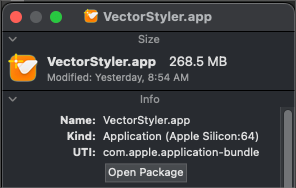
                  @Boldline What is the size of the VectorStyler.app file?

                  BoldlineB 1 Reply Last reply Reply Quote 0
                  • BoldlineB Offline
                    Boldline @VectorStyler
                    last edited by

                    @VectorStyler
                    0_1683043807087_cf5e824d-42b7-474b-bfba-6cd349bc44af-BLD 2023-05-02 at 12.09.00.png

                    It's 268.5 MB and it says "Apple Silicon". Does the word "bundle" in the UTI relevant info?

                    🍎 macOS Tahoe 26.2, Mac mini (M1, 2020), Chip Apple M1, Memory 16 GB
                    Cintiq 27QHD Display and LG Ultra HD Display

                    VectorStylerV 1 Reply Last reply Reply Quote 0
                    • VectorStylerV Offline
                      VectorStyler @Boldline
                      last edited by

                      @Boldline 268.5 MB is not the universal.
                      I will test this again if to find out what is going on.

                      1 Reply Last reply Reply Quote 0
                      • First post
                        Last post