VectorStyler
    • Categories
    • Unread
    • Recent
    • Tags
    • Popular
    • Register
    • Login

    command + 1, command+2 and command+3 shortcuts control both segment type and zoom out
    Scheduled Pinned Locked Moved Questions and Support
    8 Posts 4 Posters 9.6k Views 3 Watching
    Loading More Posts
    • Oldest to Newest
    • Newest to Oldest
    • Most Votes
    Reply
    • Reply as topic
    Log in to reply
    This topic has been deleted. Only users with topic management privileges can see it.
    • BoldlineB Online
      Boldline
      last edited by

      I'm running into an issue where it seems there are multiple tasks assigned to the same keyboard shortcut.

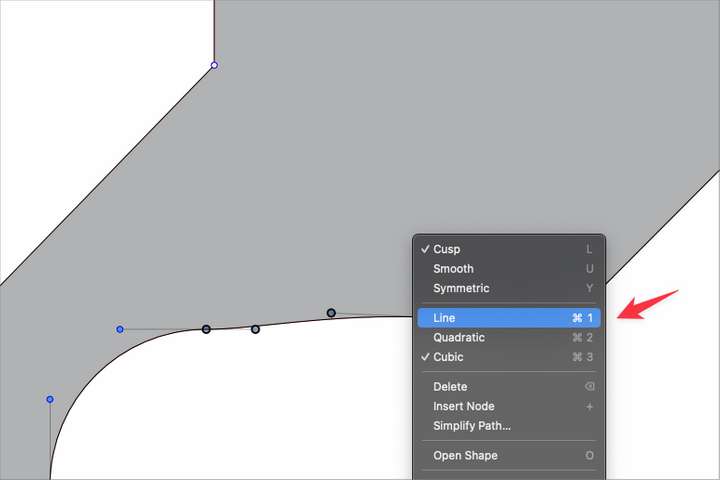
      command + 1, command+2 and command+3 are shortcuts to adjust the line, quadratic and cubic respectively. They work if I use the right-click menu to access them, but if I try to use the keyboard shortcuts themselves, it zooms me out to full screen. If I use command-2, it pulls the view out further.
      0_1683290483145_BLD 2023-05-05 at 08.17.58.png

      🍎 macOS Tahoe 26.2, Mac mini (M1, 2020), Chip Apple M1, Memory 16 GB
      Cintiq 27QHD Display and LG Ultra HD Display

      b77B VectorStylerV 2 Replies Last reply Reply Quote 1
      • b77B Offline
        b77 @Boldline
        last edited by b77

        @Boldline Hm… looks like a shortcut conflict with Actual Size (Cmd-1), Zoom to All Objects (Cmd-2) and Rotate View to 0° (Cmd-3).
        Previously these were just 1, 2 and 3, but now opacity is adjusted with that.

        MacBook Pro (Intel) running Monterey 12.6.4

        BoldlineB 1 Reply Last reply Reply Quote 1
        • BoldlineB Online
          Boldline @b77
          last edited by

          @b77 Thanks for helping me clarify the issue.

          🍎 macOS Tahoe 26.2, Mac mini (M1, 2020), Chip Apple M1, Memory 16 GB
          Cintiq 27QHD Display and LG Ultra HD Display

          b77B 1 Reply Last reply Reply Quote 0
          • b77B Offline
            b77 @Boldline
            last edited by b77

            @VectorStyler and @Ingolf
            Is adjusting opacity needed when in shape editing mode (A)?
            I would revert to simple 1, 2 and 3 for these commands.

            MacBook Pro (Intel) running Monterey 12.6.4

            BoldlineB IngolfI 2 Replies Last reply Reply Quote 0
            • BoldlineB Online
              Boldline @b77
              last edited by

              @b77 Maybe the answer is to make "Actual Size", Zoom to All Objects" and Rotate View to 0°" all be three-key commands when @VectorStyler expands that function from the current 2-key limit

              🍎 macOS Tahoe 26.2, Mac mini (M1, 2020), Chip Apple M1, Memory 16 GB
              Cintiq 27QHD Display and LG Ultra HD Display

              b77B 1 Reply Last reply Reply Quote 0
              • b77B Offline
                b77 @Boldline
                last edited by b77

                @Boldline Cmd-0/1/2/3 are "established" shortcuts in vector graphics — I wouldn't change them.

                MacBook Pro (Intel) running Monterey 12.6.4

                1 Reply Last reply Reply Quote 0
                • VectorStylerV Offline
                  VectorStyler @Boldline
                  last edited by

                  @Boldline Looks like a mistake in the default shortcut settings.

                  1 Reply Last reply Reply Quote 0
                  • IngolfI Offline
                    Ingolf @b77
                    last edited by

                    @b77 said in command + 1, command+2 and command+3 shortcuts control both segment type and zoom out:

                    @VectorStyler and @Ingolf
                    Is adjusting opacity needed when in shape editing mode (A)?
                    I would revert to simple 1, 2 and 3 for these commands.

                    Oh Yes - very much needed. But without modifier of course.

                    🍏 macOS Sequoia Apple Silicon

                    1 Reply Last reply Reply Quote 0
                    • First post
                      Last post
