More shape guides
-
Could we add more shape guides to VS? For example, a heart shape, tear shape, etc.
I needed a quick heart shape today and jumped over to Affinity to make one fast and it made me think about what could be added in VS.
VS already has things like the polygon tool that can easily make triangles and trapezoids so I'm not thinking EVERY shape needs to be it's own button. It looks like VS offers much more flexibility and options for more shapes and editing them than any other vector app. I included a screenshot of what Affinity offers, many of these are already included in VS either as a dedicated button or can be made with the options of a base shape. I'm thinking of the ones listed here that are not easily made in VS as of now.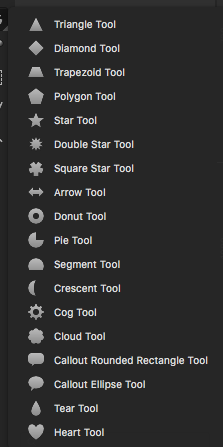
-
@Boldline Most of the shapes in the list can be achieved with some configuring of existing shapes. For example: the Donut is actually a circle with Count set to 2.
Some shapes like the heart, tear, callout, crescent and arrow, can be created with the combination of multiple shapes, but once created they can be saved as shape presets and reused later. Shape presets are a good way to keep all sorts of special shapes around for reuse.More parametric shapes could be added in a version after release.
-
ok thanks for explaining that. I don't want to see it get overly crowded with dedicated buttons for every shape possible. I do like the idea of being able to save custom shapes. Just played around with that. I don't see a way to modify the shape the way you can with the existing ones offered. Is that something that can be set when I create my custom shape?
Here is a heart example from affinity (VS has this already for other shapes but i was focusing on the heart in my example)
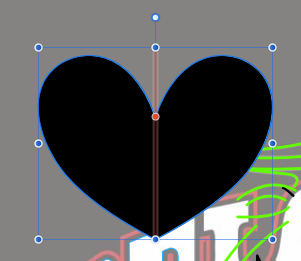
If we want to add a guided edit like this to our own custom shapes in VS, is that possible? -
@Boldline It is not possible to modify these custom shapes in that way, they are just (editable) paths, without any parameters.
I'll think of a way to add parametric shapes in the future, without creating a complex toolbox.
I add this to the future goals backlog.

