VectorStyler
    • Categories
    • Unread
    • Recent
    • Tags
    • Popular
    • Register
    • Login

    Clipping within text ?


    Scheduled Pinned Locked Moved Questions and Support
    15 Posts 3 Posters 11.1k Views 3 Watching
    Loading More Posts
    • Oldest to Newest
    • Newest to Oldest
    • Most Votes
    Reply
    • Reply as topic
    Log in to reply
    This topic has been deleted. Only users with topic management privileges can see it.
    • B Offline
      B-Vs-V @VectorStyler
      last edited by B-Vs-V

      @VectorStyler Right but I was surprised to get such a difference with a change of 0.1 px.
      I have to figure out what is the second approach ☺

      W11 Pro 25H2 - 12th Gen Intel(R) i7-12700K 3.61 GHz - RAM 64 Go - NVIDIA GF GTX 4070 Ti - Intuos - Dell UP3216Q / Eizo ColorEdge
      W11 Pro 25H2 - 12th Gen Intel(R) i7-12700KF 3.60 GHz -RAM 64 Go - NVIDIA GF GTX 3080 - IntuosPro- ProArt PA329C

      VectorStylerV 1 Reply Last reply Reply Quote 1
      • VectorStylerV Offline
        VectorStyler @B-Vs-V
        last edited by

        @Pat said in Clipping within text ?:

        Right but I was surprised to get such a difference with a change of 0.1 px.

        I will test this.

        B 1 Reply Last reply Reply Quote 1
        • B Offline
          B-Vs-V @VectorStyler
          last edited by

          @VectorStyler said in Clipping within text ?:

          @Pat > The second approach (with the object role and Shape style) will leave the text editable.

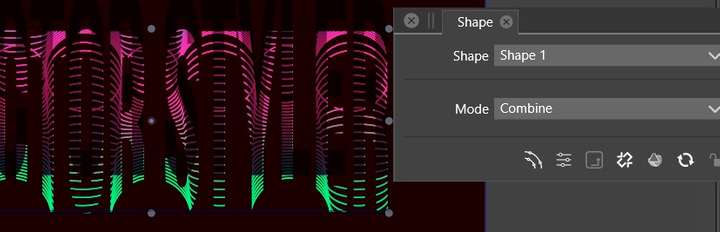
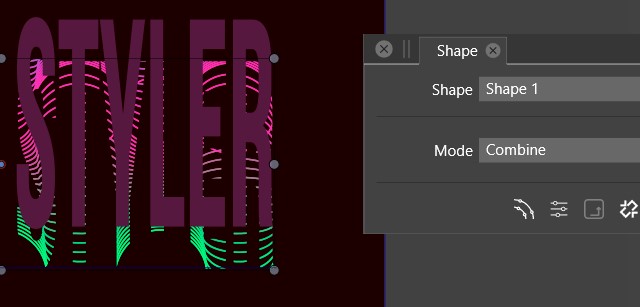
          It doesn't work as expected I guess:
          before

          0_1683436733875_sh1.jpg

          after
          0_1683436762518_sh2.jpg

          or
          0_1683436772935_sh3.jpg

          W11 Pro 25H2 - 12th Gen Intel(R) i7-12700K 3.61 GHz - RAM 64 Go - NVIDIA GF GTX 4070 Ti - Intuos - Dell UP3216Q / Eizo ColorEdge
          W11 Pro 25H2 - 12th Gen Intel(R) i7-12700KF 3.60 GHz -RAM 64 Go - NVIDIA GF GTX 3080 - IntuosPro- ProArt PA329C

          1 Reply Last reply Reply Quote 0
          • B Offline
            B-Vs-V
            last edited by

            @VectorStyler the easiest would be to (be able to) clip the design into the text ☺

            W11 Pro 25H2 - 12th Gen Intel(R) i7-12700K 3.61 GHz - RAM 64 Go - NVIDIA GF GTX 4070 Ti - Intuos - Dell UP3216Q / Eizo ColorEdge
            W11 Pro 25H2 - 12th Gen Intel(R) i7-12700KF 3.60 GHz -RAM 64 Go - NVIDIA GF GTX 3080 - IntuosPro- ProArt PA329C

            1 Reply Last reply Reply Quote 1
            • B Offline
              B-Vs-V @VectorStyler
              last edited by

              @VectorStyler VS crashes when I changed the "mode" through the shape panel. I've sent you two crash reports.
              I'll send you the file.
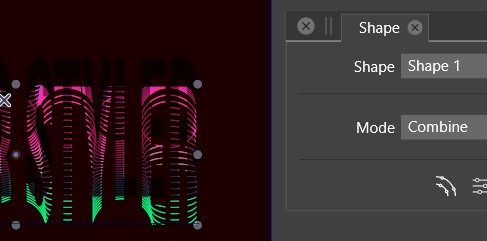
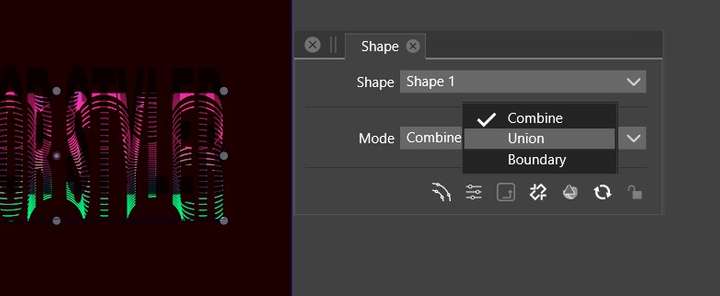
              0_1683437427344_sh1.jpg

              0_1683437477008_sh2.jpg

              W11 Pro 25H2 - 12th Gen Intel(R) i7-12700K 3.61 GHz - RAM 64 Go - NVIDIA GF GTX 4070 Ti - Intuos - Dell UP3216Q / Eizo ColorEdge
              W11 Pro 25H2 - 12th Gen Intel(R) i7-12700KF 3.60 GHz -RAM 64 Go - NVIDIA GF GTX 3080 - IntuosPro- ProArt PA329C

              1 Reply Last reply Reply Quote 1
              • B Offline
                B-Vs-V @VectorStyler
                last edited by

                @VectorStyler said in Clipping within text ?:

                @Pat The second approach (with the object role and Shape style) will leave the text editable.

                Is there a way to undo that later other than going back through the history panel ? Thanks ☺

                W11 Pro 25H2 - 12th Gen Intel(R) i7-12700K 3.61 GHz - RAM 64 Go - NVIDIA GF GTX 4070 Ti - Intuos - Dell UP3216Q / Eizo ColorEdge
                W11 Pro 25H2 - 12th Gen Intel(R) i7-12700KF 3.60 GHz -RAM 64 Go - NVIDIA GF GTX 3080 - IntuosPro- ProArt PA329C

                VectorStylerV 1 Reply Last reply Reply Quote 0
                • VectorStylerV Offline
                  VectorStyler @B-Vs-V
                  last edited by

                  @Pat I will try to replicate the shape mode crash. Was this with the clipped blend in the example emailed earlier?

                  The blend clipping in the text contained a bug (in the blend calculation, when clipped). This is fixed now and the fix will be in the next build (sometime this week).

                  B 1 Reply Last reply Reply Quote 1
                  • B Offline
                    B-Vs-V @VectorStyler
                    last edited by

                    @VectorStyler Yes, I think so.
                    Thanks for the fix & the next release ☺

                    W11 Pro 25H2 - 12th Gen Intel(R) i7-12700K 3.61 GHz - RAM 64 Go - NVIDIA GF GTX 4070 Ti - Intuos - Dell UP3216Q / Eizo ColorEdge
                    W11 Pro 25H2 - 12th Gen Intel(R) i7-12700KF 3.60 GHz -RAM 64 Go - NVIDIA GF GTX 3080 - IntuosPro- ProArt PA329C

                    VectorStylerV 1 Reply Last reply Reply Quote 0
                    • VectorStylerV Offline
                      VectorStyler @B-Vs-V
                      last edited by

                      @Pat Regarding the text clipping of blend object, these is fixed in the new build, but with one caveat. It might be required to enable the Object -> Content -> Winding Fill for the text object (that is used for clipping) to achieve the desired goal. Some font outlines contain overlapping "holes".

                      Another solution is to enable the Character panel -> panel menu -> Normalize Glyph for the text. This is also needed for most of the variable fonts that rely on overlapping shapes to create configurable glyphs.

                      B 1 Reply Last reply Reply Quote 2
                      • B Offline
                        B-Vs-V @VectorStyler
                        last edited by

                        @VectorStyler Thanks, duly noted ☺
                        To recall what to do in the future , I'll will save the post ☺

                        W11 Pro 25H2 - 12th Gen Intel(R) i7-12700K 3.61 GHz - RAM 64 Go - NVIDIA GF GTX 4070 Ti - Intuos - Dell UP3216Q / Eizo ColorEdge
                        W11 Pro 25H2 - 12th Gen Intel(R) i7-12700KF 3.60 GHz -RAM 64 Go - NVIDIA GF GTX 3080 - IntuosPro- ProArt PA329C

                        1 Reply Last reply Reply Quote 0
                        • First post
                          Last post