How do I revert back to initial traditional star shape?
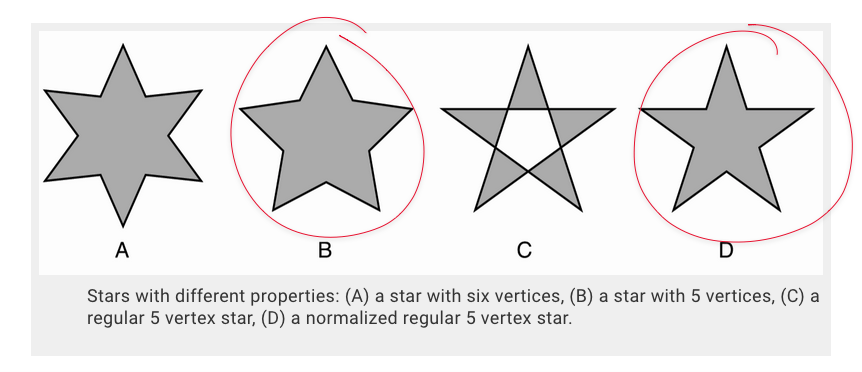
-
I was playing around with the star tool and got away from the traditional initial shape. When I hit the revert icon at the bottom of the star panel window, it reverts back to a certain place in the process, but I'm not easily able to return to a traditional five or six vertex star. Is there a way to do this? Is there a way to make the five vertex star my default star instead of a six vertex star? I use five point stars far more than six vertex ones.
Would it make sense to add a keystroke modifier for the star shapes? So that if held down while creating the star, it would create the regular star or the star with curved lines? like options B and D in the pic from the VS guidebook? Could this option be added to all star options? Even A and C? Illustrator does this. I know it can be achieved in the star panel settings I assume?Is there a way to make a 5 vertex star sit flat when created? So the two bottom vertices are level?
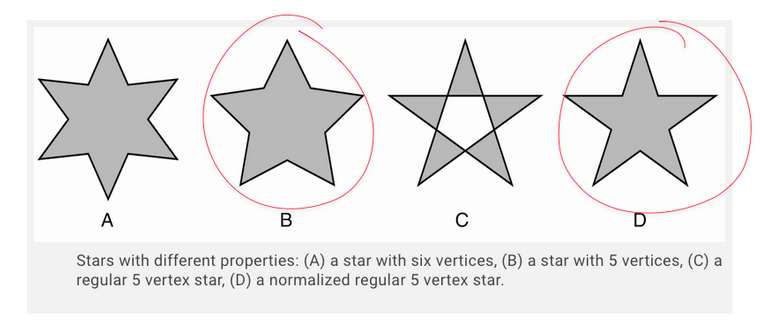
-
@Boldline The revert icon should restore to the default star shape. Also: the Regular (and when enabled the Normalized) checkbox can be used to get to case (B) and (C).
I will add key modifiers to the star drawing to control these options while drawing, but it might be more limited than the panel settings.
The Shape panel can be used to control all star (or other) shape properties. -
I recorded a video of me trying to get back to the traditional five or six vertice star I began with. I even closed out the app completely and tried fresh, same result.
🍎 macOS Tahoe 26.2, Mac mini (M1, 2020), Chip Apple M1, Memory 16 GB
Cintiq 27QHD Display and LG Ultra HD Display -
@vectoradmin said in How do I revert back to initial traditional star shape?:
I will add key modifiers to the star drawing to control these options while drawing, but it might be more limited than the panel settings.
I understand the modifiers may be redundant and limited compared to the the amazing control options in the panel. From my view, it could be an easy quick way to create a simple star or bloated one lol
-
@Boldline The problem is with the Corner settings (should be set to 0). The corner size is not reset to default when clicking the icon.
-
@vectoradmin thank you! that did it.
-
@vectoradmin said in How do I revert back to initial traditional star shape?:
Also: the Regular (and when enabled the Normalized) checkbox can be used to get to case (B) and (C).
Forgive me if I'm missing something - When I click into the star panel prior to seeing my star shape on screen, if I set "regular" and "normalized", I still get a "bloated' star. If I go into the shape panel afterward, I can again hit the "regular" and "normalized" inside shape tool panel and it fixes the star. I understand the shape tool panel can modify all shapes and that is awesome. Are the "regular" and "normalized" not working properly in the star edit panel specifically? Wouldn't they accomplish the same task as what the shape tool does?
Here's a video of me doing as I described -
@Boldline Looks like a bug. Those options seems to be ignored when creating new shapes, and only used when changing afterwards on the selected shape.
-
@vectoradmin The star shape reverting and other issues are fixed in the new build.

