VectorStyler
    • Categories
    • Unread
    • Recent
    • Tags
    • Popular
    • Register
    • Login

    Could halves and quarters be added to size presets options?
    Scheduled Pinned Locked Moved Features and Ideas
    3 Posts 2 Posters 3.5k Views 1 Watching
    Loading More Posts
    • Oldest to Newest
    • Newest to Oldest
    • Most Votes
    Reply
    • Reply as topic
    Log in to reply
    This topic has been deleted. Only users with topic management privileges can see it.
    • BoldlineB Offline
      Boldline
      last edited by

      In the size presets section of preferences, would it be possible to add more precise sizes including .25 and .75.
      Right now for example, when I try to add .75, it defaults to .8
      This happens in the actual program as well in the stroke panel for example, if I type in .75 pt for the stroke, it auto changes to .8
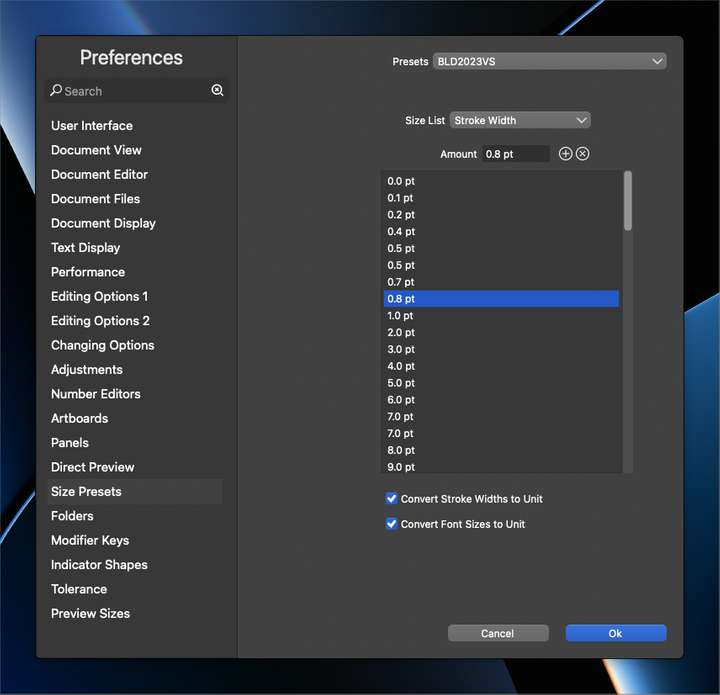
      0_1684765334862_e45645d0-a172-4d61-8a03-1e0f7a9725a5-BLD 2023-05-22 at 10.22.07.png

      https://recordit.co/hvxndQmBp3

      🍎 macOS Tahoe 26.2, Mac mini (M1, 2020), Chip Apple M1, Memory 16 GB
      Cintiq 27QHD Display and LG Ultra HD Display

      VectorStylerV 1 Reply Last reply Reply Quote 0
      • VectorStylerV Offline
        VectorStyler @Boldline
        last edited by

        @Boldline Try setting the Preferences -> Number Editors -> Point Precision to 2.

        BoldlineB 1 Reply Last reply Reply Quote 1
        • BoldlineB Offline
          Boldline @VectorStyler
          last edited by Boldline

          @VectorStyler WOW!! How did I miss this before? 🙂 Love the amount of customization here. Thank you! I appreciate you taking the time to show me

          🍎 macOS Tahoe 26.2, Mac mini (M1, 2020), Chip Apple M1, Memory 16 GB
          Cintiq 27QHD Display and LG Ultra HD Display

          1 Reply Last reply Reply Quote 1
          • First post
            Last post
