Tooltip hover over color palette reveals name of palette file
-
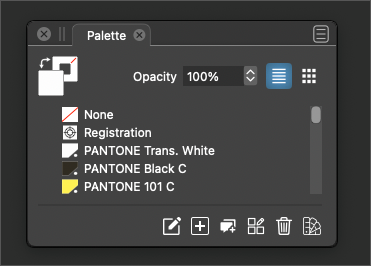
It's a small thing, but I wanted to see about the possibility of adding a tooltip hover over the color palette tab that would reveal the filename of the corresponding palette. If the user has not swapped the default palette with their own custom one, it could just pop up with "default palette"
I know this can also be checked in the document info already. Right now it just says "Palette" which does not seem to explain much or allow for verification, etc.
Another question would be, should the default palette display the name of the corresponding palette by default instead of saying "palette"?
🍎 macOS Tahoe 26.2, Mac mini (M1, 2020), Chip Apple M1, Memory 16 GB
Cintiq 27QHD Display and LG Ultra HD Display -
@Boldline Having the name visible directly on the tab is better — no tooltip needed.
-
@b77 yes I agree. It was kind of a running thought process the led to the second question lol
-
@Boldline said in Tooltip hover over color palette reveals name of palette file:
Another question would be, should the default palette display the name of the corresponding palette by default instead of saying "palette"?
The default palette has no name actually (it is stored in the document). Yes, it did have a name when it was selected, but that is not stored with the palette.
-
@VectorStyler is it possible for this panel to use the name of the palette if the user replaces the default palette with their own custom palette file? Initially I thought a tooltip would suffice, but making it show the actual name would be a big improvement.
Much like we once had the color bar palette have the option to show it's name
-
@Boldline said in Tooltip hover over color palette reveals name of palette file:
is it possible for this panel to use the name of the palette if the user replaces the default palette with their own custom palette file?
I have to look into this. Currently the palette panel title shows the name from the palette file name, unless it is the document color palette in which case it shows "Palette"
But there might be some kind of solution here. -
@VectorStyler said in Tooltip hover over color palette reveals name of palette file:
Currently the palette panel title shows the name from the palette file name, unless it is the document color palette in which case it shows "Palette"
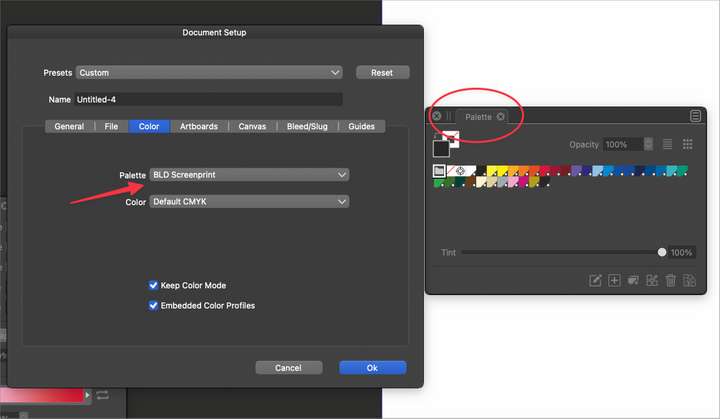
I'm getting a different result here. In new document setup, I had already replaced the default palette with my own palette "BLD Screenprint.ase", but it still shows in the color palette as "Palette"
-
@Boldline Yes, that is the current intended behavior, since that palette file is "imported" into the document and becomes the document palette.
-
@VectorStyler ok, I understand what you were intending. Speaking for myself, I'm big on redundancy and making sure everything is accurate. It would be helpful to quickly know what palette is open - for both the document palette and the color bar secondary palette. At one point there was a tooltip on the color bar palette that gave you the name of it but that does not seem to be there now. (unless I missed it)


