"Select and Transform" Context Panel Icons - Idea.
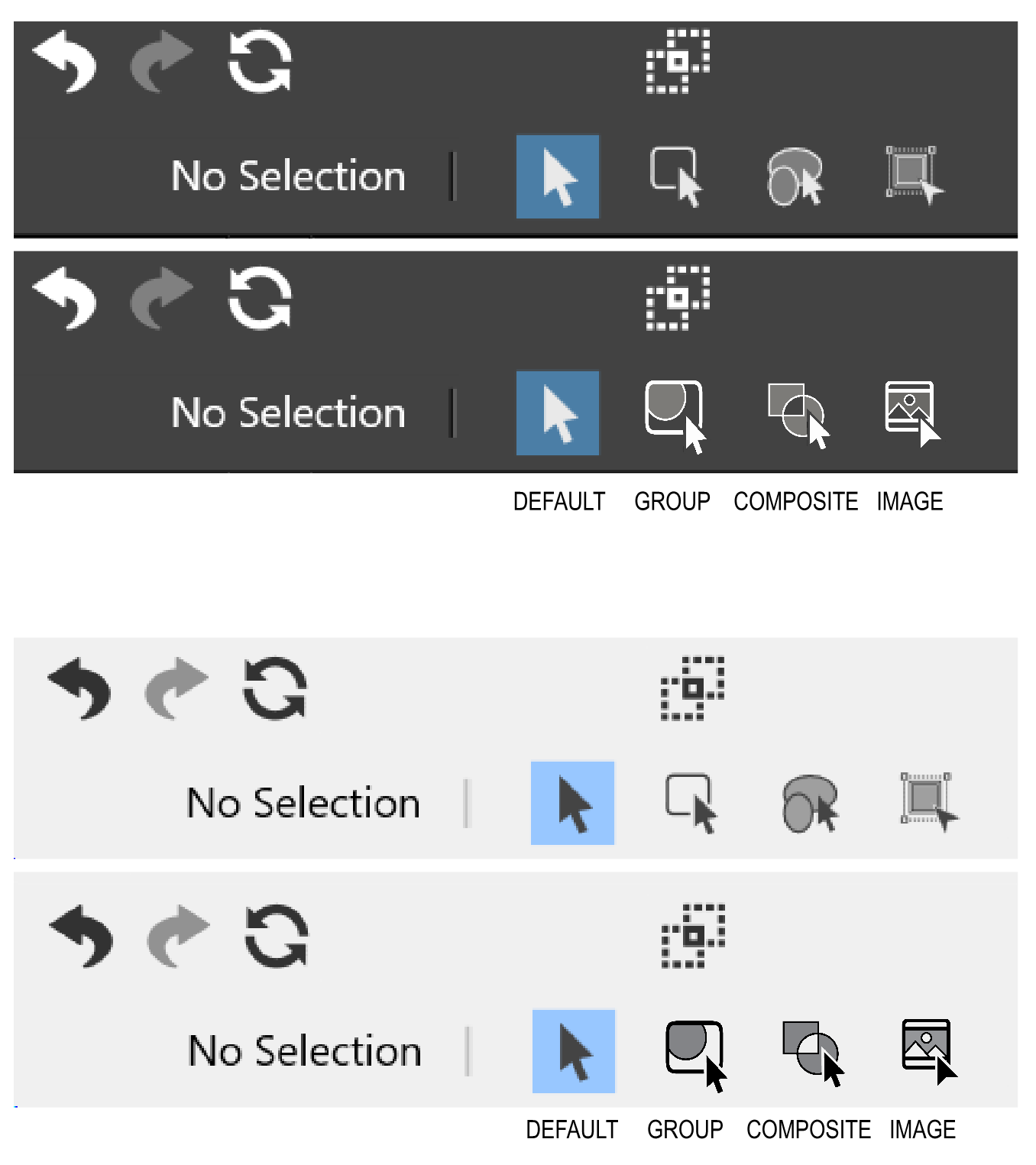
-
At first glance I find your Composite Icon a bit misleading, because it
looks like the Combine Icon but means a different Task.@Subpath, I think it should somehow represent the composite icons somehow because that is what the modifier is for. Of course the composite and combine icons are the same icon set, just one function is destructive, one is not. Do you feel that it would be fairly intuitive to know that this tool modifier is for moving a base object created from the non-destructive operation?

-
@Victor-Vector, @Subpath:
I've been working on a new set of icons for the context panel for a few months in my spare time.
I'll check them again this weekend and post them on the forum.MacBook Pro (Intel) running Monterey 12.6.4
-
@b77 Cool! I am excited to see them.
-
This may be a personal thing of mine, but for me Combine and
Booleans like Weld, Cut etc. are different things. Do not know
whether I am technically correct with such considerations.
In Corel Draw e.g. there are more separated.And while i see Composite more as a non-destructible boolean,
i think some kind of Boolean Icon would be a better fit.
But definitely one that is different from the Combine Icon. -
now I'm curious too

-
@Victor-Vector said in "Select and Transform" Context Panel Icons - Idea.:
As I started to learn VectorStyler, I noticed that some functions were harder to wrap my head around than others.
Thanks for considering!
I adore them. I have used Vectorstyler a lot and forget what exactly the icons represent. I just remember "I prefer number two".
With those icons is now crystal clear to me what kind of selection method the icons represents.
Well done.
-
@Victor-Vector I think these icons are much better than the current ones.
-
@Ingolf, @VectorStyler Thank you!
@VectorStyler , If you wish to use them for future versions of VS, I can send the source files to you, and/or please let me know the format and size you need them in and I will have them ready to implement, so you have less work to do.
After exploring the toolbox and many of the other panels, I am absolutely blown away by the number and quality of the icon set for VectorStyler. 2016+ icons is a mammoth task for any creator and the set is very good at communicating the functions. There are only a few that are slightly ambiguous or do not convey the functions of the tools, so hats off to the icon portion of VectorStyler. It helps contribute to making it the powerful vector design tool that it is.
-
@Victor-Vector I would use them if allowed
send me a vstyler file of the icons. -
@VectorStyler
You have my permission, of course! Here is the file attached.I am a bit embarrassed, as I used Photoshop as a shortcut to create the icon transparency. I did this to keep the assets non-destructive so I could change stroke weights, object arrangements, etc., in case fixes were needed.
If you wish, I can finalize them, expanding the strokes, combine them so the vector versions have the transparency, just let me know!


