Request: Non-blocking sliders in color selection dialogs
-
There are things that give me problems in programs that I only realised why late in the game.
I've never really felt confident about what exactly I'm choosing when I use sliders in VS to select colours, and I've often wondered if the sliders were even showing correctly. Now I understand why.
The object in the slider you drag block the color you want to select underneath. It's a big white blob, and to know exactly what you're getting, you have to orientate yourself to the left where the result can be seen. This doesn't work for me. The white blob simply hides the colour I have chosen and a fairly large area of the colour scale that lies underneath it. Making fine adjustments this way is a pain.
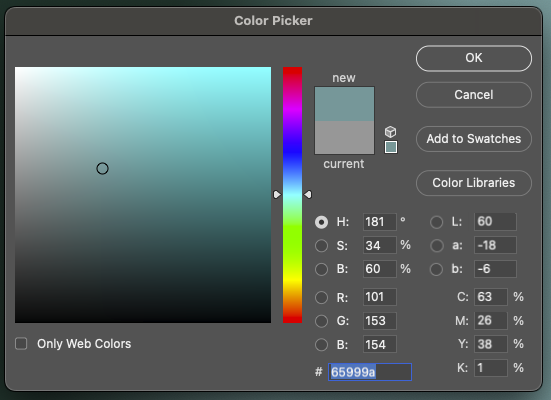
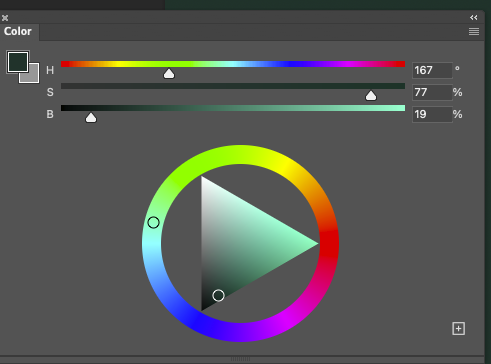
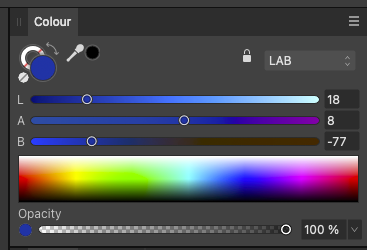
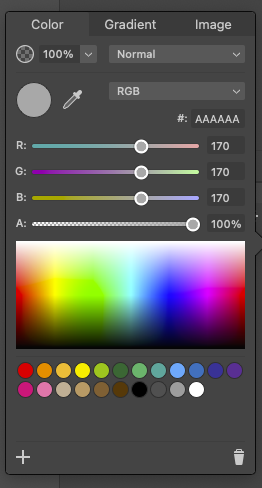
I have compared with my other graphics programs, they all use a model where you can clearly see what colour you will get, examples:
Adobe CC:
Affinity:
Amadine:
And last, Vectorstyler:
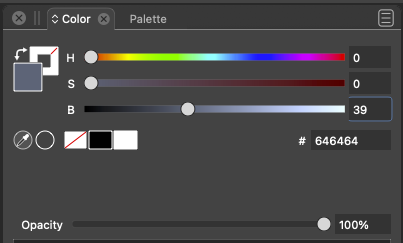

-
@Ingolf You have a good observation on how other companies handle that in the interface. I find that I just slide the sliders and watch for feedback in the swatch when using color picker interfaces, as the size of the swatch reveals more of the color.
I do appreciate the Adobe approach where the user can see the "new" and "Current" color next to each other; that is very handy! -
@Victor-Vector said in Request: Non-blocking sliders in color selection dialogs:
@Ingolf You have a good observation on how other companies handle that in the interface. I find that I just slide the sliders and watch for feedback in the swatch when using color picker interfaces, as the size of the swatch reveals more of the color.
That is possible yes, but I simply found the white filled circle less intuitive to work with; I need to slide it to a point I have identified and then near that exact point the area only a few pixels wide is hidden when I am there. Other companies solved that issue years ago. I use color sliders all day long so the less hassle the much much better.
Oh yeah, I had actually forgotten that new-current feature. Pretty neat.
-
well recognized
i second your Idea -
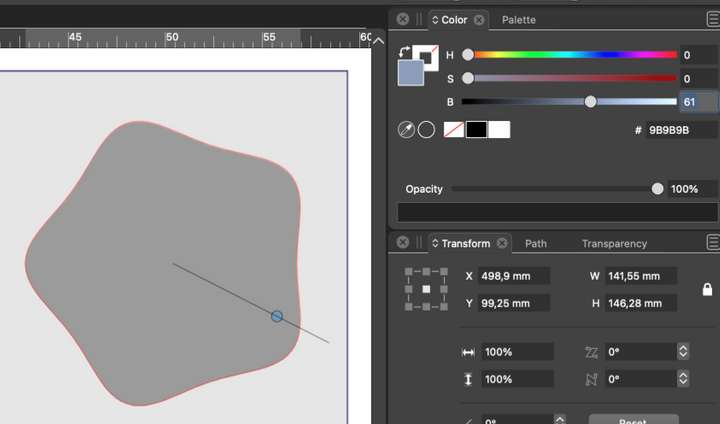
I especially discovered it because I wondered about this... can you spot the issue?
-
@Ingolf Hmmm, I am a bit stumped.
Is the issue you are referring to the fact that the fill color for the shape is a neutral grey and the fill color you have selected on the color panel a cool grey, even though the hue slider does not correspond to that grey in the color panel?
In my interface, the actual shape grey and the swatch grey both look neutral... -
I only see this in H** modes, not RGB, CMYK, LAB. Mister @VectorStyler has it on his radar.
It was the neurotic, almost nervous looking back and forth between the left and right side of the colour panel to check if I or the program was crazy that made me realise that the zig-zagging with the eyes is something I'm not used to from other programs.
🍏 macOS Sequoia Apple Silicon
-
@Ingolf, indeed, a strange anomaly. On my Win11 machine I do not have this occurring.
I noticed in your post's footer you list both a Mac and a Win11 OS. Are you running VectorStyler on both OSs? Do you get the same anomaly on both? -
@Ingolf Exit VS and remove the ~/Library/NumericPath/VectorStyler1.0/zeta/data/color/colorcontext.dat file,
this will reset all color settings. -
@VectorStyler said in Request: Non-blocking sliders in color selection dialogs:
/colorcontext.dat file,
That fixed the issue, thanks!
The folder on my Mac is ~/Library/Application Support/NumericPath/VectorStyler1.0/zeta/data/color btw
-
@Victor-Vector said in Request: Non-blocking sliders in color selection dialogs:
@Ingolf, indeed, a strange anomaly. On my Win11 machine I do not have this occurring.
I noticed in your post's footer you list both a Mac and a Win11 OS. Are you running VectorStyler on both OSs? Do you get the same anomaly on both?My intuition was right that it was a configuration issue, so I didn't check before Csaba gave the above advice. I only turn on my (fast) Windows machine when I have no other choice.


