VectorStyler
    • Categories
    • Unread
    • Recent
    • Tags
    • Popular
    • Register
    • Login

    3D Help

    Scheduled Pinned Locked Moved Questions and Support
    27 Posts 5 Posters 35.1k Views 3 Watching
    Loading More Posts
    • Oldest to Newest
    • Newest to Oldest
    • Most Votes
    Reply
    • Reply as topic
    Log in to reply
    This topic has been deleted. Only users with topic management privileges can see it.
    • S Offline
      Subpath @Igull
      last edited by

      @Igull said in 3D Help:

      @Subpath said in 3D Help:

      Another strange Solution

      Yes, I suppose I could do that too, but I have a Fusion 360 and an Onshape licence which can do pretty much anything in 3D - I was just looking for an easy way out with a 'one trick pony':-)

      Neil

      Understandable 🙂
      But its a bit harder for Mac User.
      On PC there are a few more Options

      Here a Extrusion from Magix Graphics Designer
      which also has such a Tool build in (PC only)
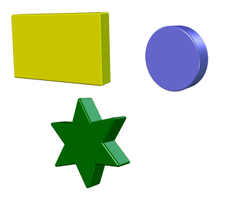
      0_1685974495077_Magix-Extrusion.png

      Win 11
      CPU: AMD Ryzen 5 9600X, 6-core.
      GPU: Nvidia Geforce RTX 5070.

      IgullI 1 Reply Last reply Reply Quote 1
      • IgullI Offline
        Igull @Subpath
        last edited by

        @Subpath said in 3D Help:

        On PC there are a few more Options

        You're rubbing my nose in it 🙂 🙂 🙂

        iMac 27" 2015 Catalina 32Gb, MacBook Pro 13" 2016 Monterey 8Gb, Mac Mini M2 2023 8Gb

        S 1 Reply Last reply Reply Quote 1
        • BoldlineB Offline
          Boldline
          last edited by

          This is not directly related, but I've been giving thought over time to how to best create the 3D wrap around look with a vector path. I was thinking of it in terms of a dedicated shape like the existing oval and rectangle shapes, but now I'm thinking the best way to create those will be when basic 3D extrude is (hopefully) added to VS

          0_1685975559387_5932f189-cd44-4ee0-8eac-3fb7d41d5356-BLD 2023-06-05 at 10.24.01@2x.png

          🍎 macOS Tahoe 26.2, Mac mini (M1, 2020), Chip Apple M1, Memory 16 GB
          Cintiq 27QHD Display and LG Ultra HD Display

          S 1 Reply Last reply Reply Quote 1
          • S Offline
            Subpath @Igull
            last edited by

            @Igull said in 3D Help:

            @Subpath said in 3D Help:

            On PC there are a few more Options

            You're rubbing my nose in it 🙂 🙂 🙂

            I probably should not have done that 🙂

            Win 11
            CPU: AMD Ryzen 5 9600X, 6-core.
            GPU: Nvidia Geforce RTX 5070.

            1 Reply Last reply Reply Quote 0
            • S Offline
              Subpath @Boldline
              last edited by Subpath

              @Boldline

              In Corel you could take any Form/ Shape
              (even grouped) and extrude it
              in Magix Graphics Designer too

              The result in Magix is only a Bitmap
              but it has more lightning, beveling options

              In Corel it stay as a Vector Object where you could
              break apart the parts and reuse them as vector objects
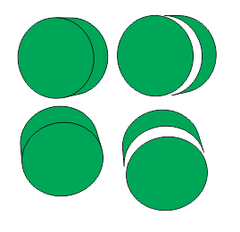
              0_1685977652751_Corel Extrude.png

              Win 11
              CPU: AMD Ryzen 5 9600X, 6-core.
              GPU: Nvidia Geforce RTX 5070.

              1 Reply Last reply Reply Quote 1
              • F Offline
                fde101 Global Moderator @Igull
                last edited by

                @Igull not sure about the demo version, but I have a paid license of Art Text 4, and I can just drag a PDF exported from VS into the Art Text window and it loads it as a 2D shape.

                I can then right-click and convert to 3D after which an option to set the extrusion depth becomes available in the properties area on the right.

                IgullI 1 Reply Last reply Reply Quote 0
                • IgullI Offline
                  Igull @fde101
                  last edited by

                  @fde101 said in 3D Help:

                  @Igull not sure about the demo version, but I have a paid license of Art Text 4, and I can just drag a PDF exported from VS into the Art Text window and it loads it as a 2D shape.

                  I can then right-click and convert to 3D after which an option to set the extrusion depth becomes available in the properties area on the right.

                  Mmm, tried a number of PDFs all of which dragged across, but didn't show on the artboard (or only showed the bounding box - and you couldn't right click to create 3d)- seems extremely slow and very unstable (tried it on an M2 this afternoon - a bit faster, but same results) - may be something to do with the demo version. But all it has is a TRIAL watermark, everything else is supposed to work according to the info. It's probably fine for doing text and minimal 3D objects I think - might be too much heavy lifting to move all my bits around.

                  Thanks for the info, I'll keep the trial, might find other uses for it !

                  Neil

                  iMac 27" 2015 Catalina 32Gb, MacBook Pro 13" 2016 Monterey 8Gb, Mac Mini M2 2023 8Gb

                  1 Reply Last reply Reply Quote 0
                  • First post
                    Last post