Second Modifier Key
-
In Freehand and Illustrator:
-
Holding Alt + Shift keys while scaling an object will scale the object uniformly from its center.
-
Holding Alt key while moving an object will clone or duplicate the object.
In VectorStyler, we can use the first method above by changing the Preferences > Modifier Keys > Centered Adjustment key to Alt key, but it will clash with the Copy While Changing key:
Centered_Adjustment_Modifier_Keys
Is it possible to add the second modifier key, so we can assign Alt + Shift keys to the Centered Adjustment?
-
-
@gotanidea Currently, a function can be assigned to a single modifier key at a time.
So the above combination cannot be done at this time. (Alt+Shift will duplicate and scale uniformly).I added this to the backlog and will think of a solution, but it might not be in 1.2
-
@VectorStyler on Windows, I am always utilising the Control key to scale an object from the centre. Most of the time it works very well, the only glitch is other times not so well especially on text.
-
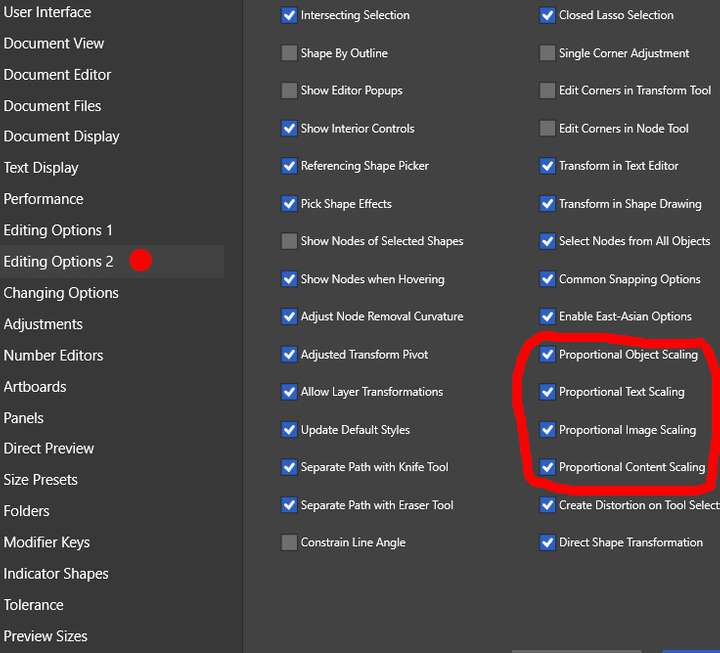
@gotanidea you also might want to take a look at the Preferences and tweak a little bit to use the Control key (by itself BTW) if you are on Windows as I have done.
Refer to attached image.
I hope it helps.
-
@William-Kansepa Thanks for the suggestion, but it would be too tedious to check the Proportional Object Scaling checkbox every time I scale an object. It would be easier to use Freehand's and Illustrator's Alt + Shift modifier keys
-
@gotanidea said in Second Modifier Key:
@William-Kansepa Thanks for the suggestion, but it would be too tedious to check the Proportional Object Scaling checkbox every time I scale an object. It would be easier to use Freehand's and Illustrator's Alt + Shift modifier keys
You only have to do it once and save your settings file.
-
@William-Kansepa I mean I don't always scale an object uniformly from its center. Sometimes, the objects are scaled non-uniformly from their corners
-
@gotanidea said in Second Modifier Key:
@William-Kansepa I mean I don't always scale an object uniformly from its center. Sometimes, the objects are scaled non-uniformly from their corners
You don't have to worry about that as this setting can still allow you to scale non-uniformly if you use the top, bottom and side transform handles on the bounding box. It will still be possible to drag on a single transform handle to non-uniformly scale an object (NOTE: not on the corner handles).
Use Control key to scale uniformly from the centre and use it to scale non-uniformly from the centre by dragging top, bottom and side transform handles.
-
@William-Kansepa Actually, the problem is not the Proportional Object Scaling. But the inability to use Alt key as the modifier key of the Centered Adjustment option, because of the reason the Admin mentioned above
