VectorStyler
    • Categories
    • Unread
    • Recent
    • Tags
    • Popular
    • Register
    • Login

    Adding tool like...

    Scheduled Pinned Locked Moved Features and Ideas
    5 Posts 2 Posters 5.5k Views 2 Watching
    Loading More Posts
    • Oldest to Newest
    • Newest to Oldest
    • Most Votes
    Reply
    • Reply as topic
    Log in to reply
    This topic has been deleted. Only users with topic management privileges can see it.
    • B Offline
      B-Vs-V
      last edited by

      In AD I did play with the contour tool and one can get interesting design with that. Do we have it in VS (can't find a similar feature) and if no, would it be hard to implement it ? Thanks ☺

      W11 Pro 25H2 - 12th Gen Intel(R) i7-12700K 3.61 GHz - RAM 64 Go - NVIDIA GF GTX 4070 Ti - Intuos - Dell UP3216Q / Eizo ColorEdge
      W11 Pro 25H2 - 12th Gen Intel(R) i7-12700KF 3.60 GHz -RAM 64 Go - NVIDIA GF GTX 3080 - IntuosPro- ProArt PA329C

      VectorStylerV 1 Reply Last reply Reply Quote 0
      • VectorStylerV Offline
        VectorStyler @B-Vs-V
        last edited by

        @Pat Yes there is Contour in VS, not sure how the one in AD works, but in VS there is a contour tool (just above the blend tool) and a contour panel for options (Panels -> Effects -> Contour).

        B 1 Reply Last reply Reply Quote 0
        • B Offline
          B-Vs-V @VectorStyler
          last edited by

          @VectorStyler Of course, I did use once but forgot...
          It would be nice if the colour picker tool (kind of a pipet) could pick a colour outside the panel (e.g., on the artboard) ☺

          W11 Pro 25H2 - 12th Gen Intel(R) i7-12700K 3.61 GHz - RAM 64 Go - NVIDIA GF GTX 4070 Ti - Intuos - Dell UP3216Q / Eizo ColorEdge
          W11 Pro 25H2 - 12th Gen Intel(R) i7-12700KF 3.60 GHz -RAM 64 Go - NVIDIA GF GTX 3080 - IntuosPro- ProArt PA329C

          VectorStylerV 1 Reply Last reply Reply Quote 0
          • VectorStylerV Offline
            VectorStyler @B-Vs-V
            last edited by

            @Pat The "pipet" icon in the Color panel should activate a color picker that picks from any part of the canvas.

            B 1 Reply Last reply Reply Quote 0
            • B Offline
              B-Vs-V @VectorStyler
              last edited by B-Vs-V

              @VectorStyler I meant in the colour sub-panels of the contour panel.
              It's not a priori easy to know where to control the various parameters of the contour tool.

              The pipet icon disappears before the screenshot but I meant there :
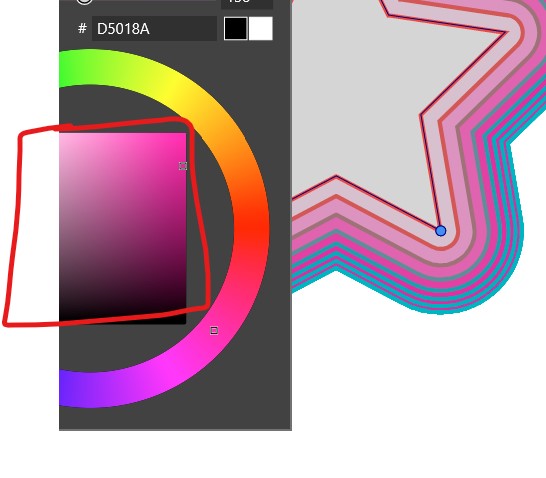
              0_1688649751758_pipet.jpg

              W11 Pro 25H2 - 12th Gen Intel(R) i7-12700K 3.61 GHz - RAM 64 Go - NVIDIA GF GTX 4070 Ti - Intuos - Dell UP3216Q / Eizo ColorEdge
              W11 Pro 25H2 - 12th Gen Intel(R) i7-12700KF 3.60 GHz -RAM 64 Go - NVIDIA GF GTX 3080 - IntuosPro- ProArt PA329C

              1 Reply Last reply Reply Quote 1
              • First post
                Last post
