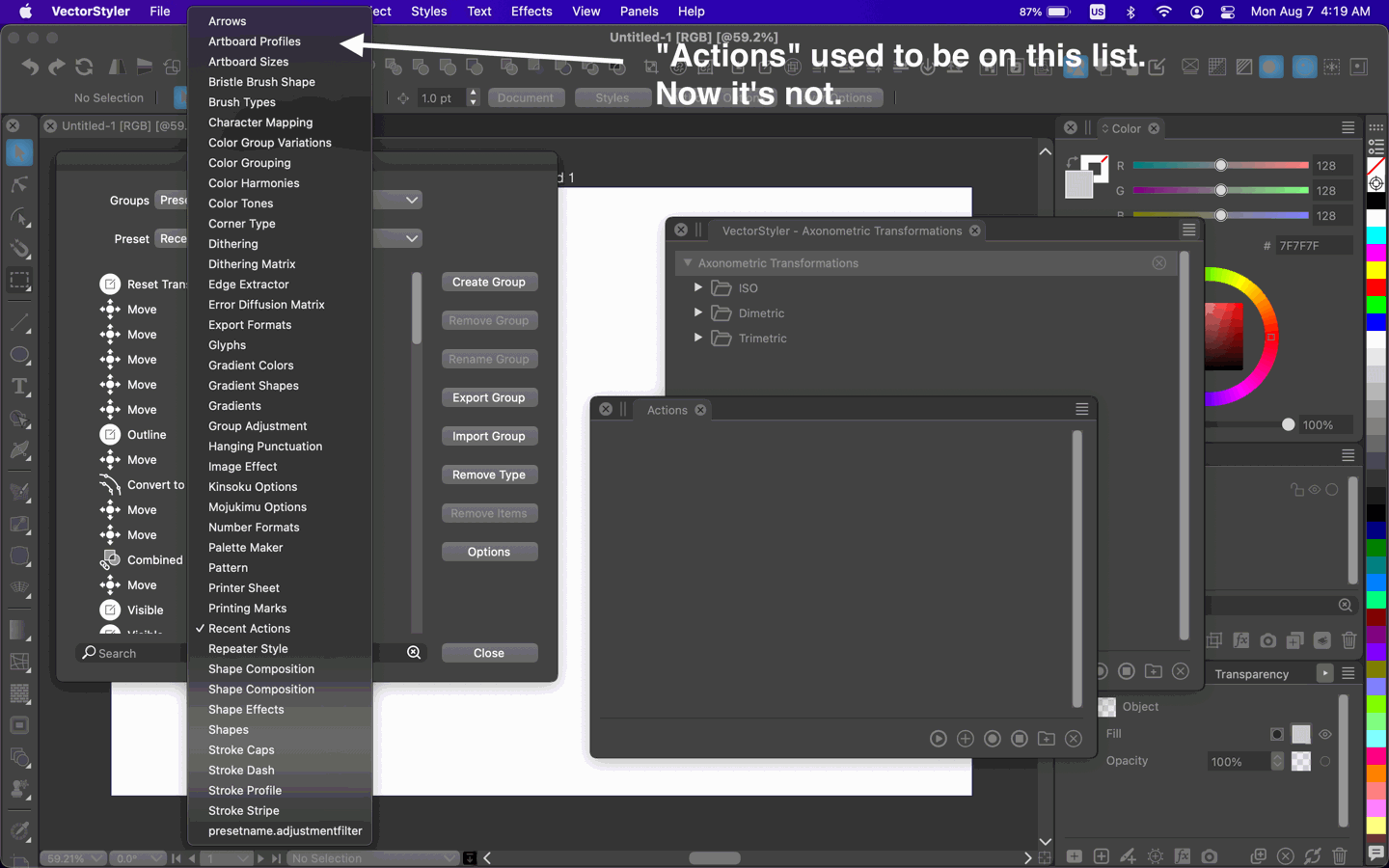
Why did "Actions" disappear from the Preset Manager's Preset list?
-
I have to admit every single day I grow more and frustrated with VS. There are so many glitches and bugs under the hood that I considered letting it go and just give up.
I created a couple of actions and saved them as a file on my drive. Up to this point my problem was that every single time I opened the app the actions disappeared from the actions panel and I had to load them from the file over and over again. So when I went to Panels > Presets > Actions, the panel titled "Actions" appeared but it was empty.
Furthermore, in the Preset Manager (Styles > Preset Manager) when you clicked the dropdown titled "Preset", the "Actions" was listed there.
So a few days ago, after a few frustrations, I finally figured out (by complete accident I must say) how to add my own action group under the Preset Manager's "Actions" group. (Group? I don't even know the correct terminology.) I think the way it is created is very confusing and difficult to understand - but this might be my fault due to lack of understanding of way too complex things.
So about a day or two ago I added my own actions to the "Actions" section in the Preset Manager. Fine. Great. Every time I opened the app my actions were there and didn't have to load them from the file. All this worked for like 2 days.
Today I had a few glitches happening and I got frustrated so I took the "VectorStyler1.0" folder (inside the NumericPath folder) and just deleted the whole thing knowing VS will recreate this folder when it's missing. Restarted the app.
Now, everything behaves completely the OPPOSITE way as it used to before. Now, my actions (that I saved in a file) do not get lost when I close the app. When I open the app and go to Panels > Presets >Actions, they open up in the panel (so I don't have to keep loading them back in from the file).
But now, when I go to Styles > Preset Manager and open the "Preset" dropdown, the "Actions" entry is not even listed there any more.
MacBook Pro 13" early 2015 8G | Intel Iris Graphics 6100 1536 MB | macOS Monterey 12.7.6
-
I just completely removed VS. Caches, logs, HTTPStorages, PLists, Saved Applications States, etc and downloaded and reinstalled it. Noticed it's already 1.1.098 (so apparently something got updated over the weekend).
Hoping to test the things that got fixed...
-
@pentool If the preset type is empty then it will not show in the list.
-
In that case I don't understand what I am doing wrong.
- Panels > Presets > Actions (to bring up my actions)
- Actions Panel side menu > Export To Group
- Select the "Presets" group. Click OK.
- Open Styles > Preset Manager. Where is the actions I just exported to the Preset group? I don't see it.
Video
https://www.youtube.com/watch?v=L-Ofc9QRLQQVS 1.1.098
MacBook Pro 13" early 2015 8G | Intel Iris Graphics 6100 1536 MB | macOS Monterey 12.7.6
-
@pentool I will try to replicate this ASAP.
-
You can download a couple of actions I uploaded here, just in case (but I'm sure you prolly have a few handy).
https://www.dropbox.com/scl/fi/pwuzy8xyzq6p29rinkof6/VectorStyler-Axonometric-Transformations.preset?rlkey=mcq2gvrcwncpvpvkmjs5qdb83&dl=0I saved these as JSON cuz I wanted to look at them. Not sure if the format has to do with their behavior (eg disappearing from the Actions panel after app restart, etc).
-
@pentool Some action or folder must be selected to have Export to Group.
I will have this grayed out if nothing is selected.After repeating these steps, I get "Axonometric Transformations" in the preset list.
-
@VectorStyler Ah, that's right! That's what it was! I knew I added the actions to the Preset Mgr somehow but I forgot how I did it. SELECTION! You have to select the group! Yes, that's what it was.
It's not as obvious because the only indication that the group in the Action panel is selected is that more icons get enabled at the bottom of the panel. And it's easy to overlook. Maybe because I'm using a dark theme...? Will have to see how the light one looks.
