VectorStyler
    • Categories
    • Unread
    • Recent
    • Tags
    • Popular
    • Register
    • Login

    Layers panel scrolls too fast when dragging an item

    Scheduled Pinned Locked Moved General Discussion
    8 Posts 5 Posters 9.8k Views 4 Watching
    Loading More Posts
    • Oldest to Newest
    • Newest to Oldest
    • Most Votes
    Reply
    • Reply as topic
    Log in to reply
    This topic has been deleted. Only users with topic management privileges can see it.
    • P Offline
      pentool
      last edited by

      When you have a few items in the Layers panel and you'd like to drag an item to above or below its current positions, I think the panel scrolls really fast. It's very difficult to reposition the dragged item because of this.

      Anyone noticed this? Could this be slowed down a little?

      This is noticeable when the Layers panel has a small height and you have lots of items.

      It would also be nice to be able to scroll the Layers panel content once you grabbed an item to move. Eg,

      1. You select an item in the Layers panel to move (but you don't actually drag it). Instead...
      2. ...while you are holding the item, you scroll the mouse wheel, which in effect scrolls the contents of the panel.
      3. When the panel scrolled to the correct position, you release the item where you want to drop it.

      Does all this make sense or should I create a video? Thanks.

      MacBook Pro 13" early 2015 8G | Intel Iris Graphics 6100 1536 MB | macOS Monterey 12.7.6

      BoldlineB VectorStylerV 2 Replies Last reply Reply Quote 1
      • BoldlineB Offline
        Boldline @pentool
        last edited by

        @pentool Yes I agree it speeds up too quickly

        🍎 macOS Tahoe 26.2, Mac mini (M1, 2020), Chip Apple M1, Memory 16 GB
        Cintiq 27QHD Display and LG Ultra HD Display

        1 Reply Last reply Reply Quote 0
        • VectorStylerV Offline
          VectorStyler @pentool
          last edited by

          @pentool I will change the drag&drop scrolling speed.

          _ 1 Reply Last reply Reply Quote 2
          • _ Offline
            _NM_ @VectorStyler
            last edited by

            @VectorStyler In my case, when I add objects, the Layers structure is altered and no longer reflects the actual objects. I constantly have to collapse and expand the layers to refresh and restore the correct layers structure.

            macOS Sonoma 14.5 - MacBook Pro 16" - Apple Silicon M2 Max

            b77B VectorStylerV 2 Replies Last reply Reply Quote 0
            • b77B Offline
              b77 @_NM_
              last edited by

              @_NM_ Here it's working fine.

              The Layers panel has a menu in the upper right corner, and the last item is 'Panel Options'.

              What are the settings here in Panel Options?
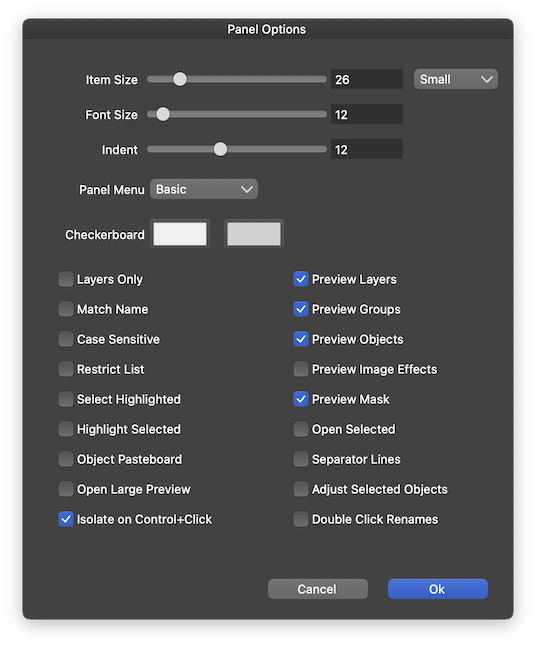
              0_1693190536943_Screenshot 2023-08-28 at 05.41.02.png

              MacBook Pro (Intel) running Monterey 12.6.4

              1 Reply Last reply Reply Quote 1
              • VectorStylerV Offline
                VectorStyler @_NM_
                last edited by

                @_NM_ Send me the layers panel option screen shot. I will open a bug on this one, but I need some info on how to replicate it.

                1 Reply Last reply Reply Quote 0
                • _ Offline
                  _NM_
                  last edited by

                  They are exactly as in the image above, which, I assume, is the default setting for the program.

                  macOS Sonoma 14.5 - MacBook Pro 16" - Apple Silicon M2 Max

                  1 Reply Last reply Reply Quote 0
                  • _ Offline
                    _NM_
                    last edited by _NM_

                    It appears that alone having opened the settings panel and clicked OK without changing any settings fixed the layer synchronization problem. Thanks again.


                    macOS Sonoma 14.5 - MacBook Pro 16" - Apple Silicon M2 Max

                    1 Reply Last reply Reply Quote 1
                    • First post
                      Last post