VectorStyler
    • Categories
    • Unread
    • Recent
    • Tags
    • Popular
    • Register
    • Login

    South Asian languages support

    Scheduled Pinned Locked Moved Questions and Support
    10 Posts 2 Posters 8.6k Views 2 Watching
    Loading More Posts
    • Oldest to Newest
    • Newest to Oldest
    • Most Votes
    Reply
    • Reply as topic
    Log in to reply
    This topic has been deleted. Only users with topic management privileges can see it.
    • K Offline
      Kumr
      last edited by

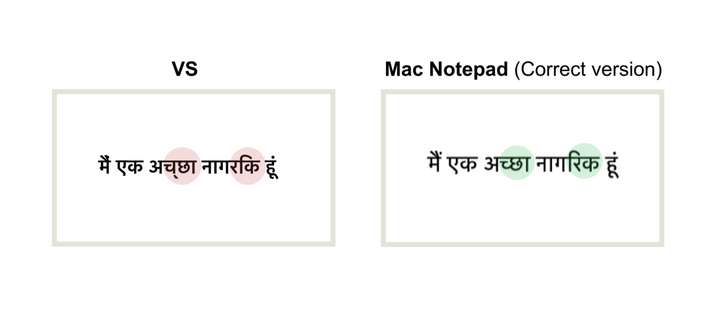
      Does VS support South Asian languages? Text is not displaying properly using devanagari fonts. Is there any setting in the preferences I have to enable? Thanks

      M1 MacBook Air, 16GB, macOS Sonoma 14.4.1

      VectorStylerV 1 Reply Last reply Reply Quote 0
      • VectorStylerV Offline
        VectorStyler @Kumr
        last edited by

        @Kumr No special support for South Asian languages yet. What are the text display issues?

        1 Reply Last reply Reply Quote 0
        • K Offline
          Kumr
          last edited by

          Attaching a screenshot. Same text I copied from Mac Notepad to VS.
          0_1696299833594_Screenshot 2023-10-03 at 7.36.47 AM.png
          Font in VS: Kohinoor Devanagari Font

          M1 MacBook Air, 16GB, macOS Sonoma 14.4.1

          VectorStylerV 2 Replies Last reply Reply Quote 0
          • VectorStylerV Offline
            VectorStyler @Kumr
            last edited by

            @Kumr This might be an OpenType font feature issue, something to be selected in the Typography panel.
            I will try to find out if this is possible and get back to you soon.

            K 1 Reply Last reply Reply Quote 0
            • K Offline
              Kumr @VectorStyler
              last edited by

              @VectorStyler Thanks

              M1 MacBook Air, 16GB, macOS Sonoma 14.4.1

              1 Reply Last reply Reply Quote 0
              • VectorStylerV Offline
                VectorStyler @Kumr
                last edited by

                @Kumr The first highlighted issue can be fixed by enabling "Half Forms" in the Typography panel "Script Forms" group.

                Not sure what is going on in the second highlight, as all I get is that two glyphs are in different order.

                K 1 Reply Last reply Reply Quote 0
                • K Offline
                  Kumr @VectorStyler
                  last edited by

                  @VectorStyler Enabling half forms did fix some text, remaining text still the same. Thanks for the support.

                  Hope this will be resolved in future versions.

                  M1 MacBook Air, 16GB, macOS Sonoma 14.4.1

                  VectorStylerV 1 Reply Last reply Reply Quote 0
                  • VectorStylerV Offline
                    VectorStyler @Kumr
                    last edited by

                    @Kumr said in South Asian languages support:

                    Hope this will be resolved in future versions.

                    I will loo into this, send me more examples of issues.

                    1 Reply Last reply Reply Quote 0
                    • K Offline
                      Kumr
                      last edited by

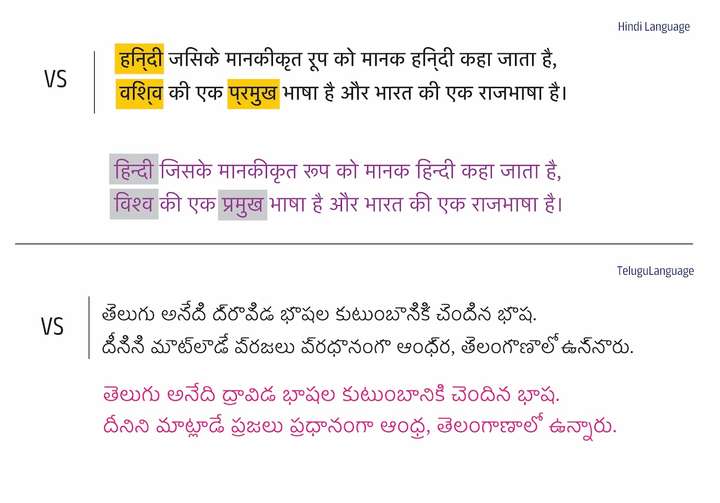
                      Two different Indian Languages. Top one Indo-European language and bottom one is dravidian language system.
                      0_1697107748774_Hindi-Language.jpg

                      Thanks

                      M1 MacBook Air, 16GB, macOS Sonoma 14.4.1

                      VectorStylerV 1 Reply Last reply Reply Quote 1
                      • VectorStylerV Offline
                        VectorStyler @Kumr
                        last edited by

                        @Kumr Thanks for the update. After 1.2 beta is complete this will be one of the things to improve.

                        1 Reply Last reply Reply Quote 0
                        • First post
                          Last post