VectorStyler
    • Categories
    • Unread
    • Recent
    • Tags
    • Popular
    • Register
    • Login

    Settings: retain certain values
    Scheduled Pinned Locked Moved VectorStyler 1.2 beta
    31 Posts 3 Posters 46.2k Views 3 Watching
    Loading More Posts
    • Oldest to Newest
    • Newest to Oldest
    • Most Votes
    Reply
    • Reply as topic
    Log in to reply
    This topic has been deleted. Only users with topic management privileges can see it.
    • B Offline
      B-Vs-V @VectorStyler
      last edited by

      @VectorStyler I wrote too fast... as long as the panels weren't reduced, there were no issues with the UI. After reducing them, stopping VS and reopening it, the toolbox and the whole second column of (reduced) docked panels attached to the first (far right) disappeared.

      W11 Pro 25H2 - 12th Gen Intel(R) i7-12700K 3.61 GHz - RAM 64 Go - NVIDIA GF GTX 4070 Ti - Intuos - Dell UP3216Q / Eizo ColorEdge
      W11 Pro 25H2 - 12th Gen Intel(R) i7-12700KF 3.60 GHz -RAM 64 Go - NVIDIA GF GTX 3080 - IntuosPro- ProArt PA329C

      VectorStylerV 1 Reply Last reply Reply Quote 1
      • VectorStylerV Offline
        VectorStyler @B-Vs-V
        last edited by

        @Pat I will try to replicate this.

        B 1 Reply Last reply Reply Quote 0
        • B Offline
          B-Vs-V @VectorStyler
          last edited by

          @VectorStyler Again I have this same issue. VS opens without toolbox and many docked panels although it indicates that the right workspace is in use:
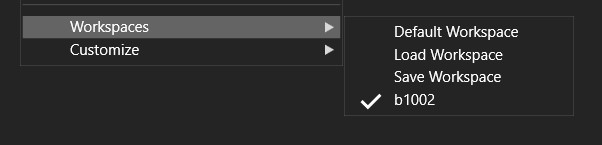
          0_1697007944963_workspace.jpg

          W11 Pro 25H2 - 12th Gen Intel(R) i7-12700K 3.61 GHz - RAM 64 Go - NVIDIA GF GTX 4070 Ti - Intuos - Dell UP3216Q / Eizo ColorEdge
          W11 Pro 25H2 - 12th Gen Intel(R) i7-12700KF 3.60 GHz -RAM 64 Go - NVIDIA GF GTX 3080 - IntuosPro- ProArt PA329C

          VectorStylerV B 2 Replies Last reply Reply Quote 1
          • VectorStylerV Offline
            VectorStyler @B-Vs-V
            last edited by

            @Pat said in Settings: retain certain values:

            Again I have this same issue. VS opens without toolbox and many docked panels although it indicates that the right workspace is in use:

            I opened a new bug on this one.

            B 1 Reply Last reply Reply Quote 0
            • B Offline
              B-Vs-V @VectorStyler
              last edited by B-Vs-V

              @VectorStyler I hope you could fix this bug. Always reloading the workspace each time you open the software is not very time-consuming but a bit annoying. I'm looking forward to installing the next update ☺

              W11 Pro 25H2 - 12th Gen Intel(R) i7-12700K 3.61 GHz - RAM 64 Go - NVIDIA GF GTX 4070 Ti - Intuos - Dell UP3216Q / Eizo ColorEdge
              W11 Pro 25H2 - 12th Gen Intel(R) i7-12700KF 3.60 GHz -RAM 64 Go - NVIDIA GF GTX 3080 - IntuosPro- ProArt PA329C

              VectorStylerV 2 Replies Last reply Reply Quote 0
              • VectorStylerV Offline
                VectorStyler @B-Vs-V
                last edited by

                @Pat said in Settings: retain certain values:

                I hope you could fix this bug.

                It is still in the list of bugs, I will try to have it for the next build.

                1 Reply Last reply Reply Quote 1
                • encartE Offline
                  encart
                  last edited by

                  I'm not sure if this will help, but I think it might have something to do with this bug. A few days ago I hooked up a second monitor as a desktop extension. I dragged some panels there. After unplugging the second monitor VS still remembered the coordinates of the panels' positions. I tried selecting and deselecting them in the menu, but they did not appear. Only when I reloaded the .workspace file did it return to normal. Maybe in this case, too, the panels appear somewhere off-screen?

                  MacBook Air M4 24Gb, Tahoe 26.2

                  VectorStylerV 1 Reply Last reply Reply Quote 2
                  • VectorStylerV Offline
                    VectorStyler @encart
                    last edited by

                    @encart said in Settings: retain certain values:

                    After unplugging the second monitor VS still remembered the coordinates of the panels' positions.

                    Could be a separate bug, but it is a bug nevertheless. I will try to replicate and fix this also.

                    1 Reply Last reply Reply Quote 1
                    • VectorStylerV Offline
                      VectorStyler @B-Vs-V
                      last edited by

                      @Pat said in Settings: retain certain values:

                      Always reloading the workspace each time you open the software is not very time-consuming but a bit annoying.

                      In beta 1.2 the workspace is kept after the restart (at least here). I also tested with the workspace you sent me (regarding the Pen tool bug, which BTW was replicated).

                      B 1 Reply Last reply Reply Quote 1
                      • B Offline
                        B-Vs-V @VectorStyler
                        last edited by

                        @VectorStyler said in Settings: retain certain values:

                        @Pat said in Settings: retain certain values:

                        Always reloading the workspace each time you open the software is not very time-consuming but a bit annoying.

                        In beta 1.2 the workspace is kept after the restart (at least here). I also tested with the workspace you sent me (regarding the Pen tool bug, which BTW was replicated).

                        I've restored defaults WKS, reposition some panels without reducing those & so far so good. The Tool box and the panels are always there when I open VS beta.
                        Great you could reproduce the issue ☺

                        W11 Pro 25H2 - 12th Gen Intel(R) i7-12700K 3.61 GHz - RAM 64 Go - NVIDIA GF GTX 4070 Ti - Intuos - Dell UP3216Q / Eizo ColorEdge
                        W11 Pro 25H2 - 12th Gen Intel(R) i7-12700KF 3.60 GHz -RAM 64 Go - NVIDIA GF GTX 3080 - IntuosPro- ProArt PA329C

                        1 Reply Last reply Reply Quote 1
                        • B Offline
                          B-Vs-V @B-Vs-V
                          last edited by

                          @Pat said in Settings: retain certain values:

                          @VectorStyler Again I have this same issue. VS opens without toolbox and many docked panels although it indicates that the right workspace is in use:

                          0_1697007944963_workspace.jpg

                          @VectorStyler Still there when I reduce some panels. It is fine with "normal" non-reduced panels even after resetting VS.

                          W11 Pro 25H2 - 12th Gen Intel(R) i7-12700K 3.61 GHz - RAM 64 Go - NVIDIA GF GTX 4070 Ti - Intuos - Dell UP3216Q / Eizo ColorEdge
                          W11 Pro 25H2 - 12th Gen Intel(R) i7-12700KF 3.60 GHz -RAM 64 Go - NVIDIA GF GTX 3080 - IntuosPro- ProArt PA329C

                          VectorStylerV 1 Reply Last reply Reply Quote 1
                          • VectorStylerV Offline
                            VectorStyler @B-Vs-V
                            last edited by

                            @Pat said in Settings: retain certain values:

                            Still there when I reduce some panels.

                            I could not replicate this yet. Send me the workspace and settings files from the /resources/ folder

                            1 Reply Last reply Reply Quote 0
                            • First post
                              Last post