VectorStyler
    • Categories
    • Unread
    • Recent
    • Tags
    • Popular
    • Register
    • Login

    Show center point of object
    Scheduled Pinned Locked Moved VectorStyler 1.2 beta
    3 Posts 2 Posters 3.7k Views 2 Watching
    Loading More Posts
    • Oldest to Newest
    • Newest to Oldest
    • Most Votes
    Reply
    • Reply as topic
    Log in to reply
    This topic has been deleted. Only users with topic management privileges can see it.
    • 861475_VctSt8 Offline
      861475_VctSt
      last edited by

      When an object is selected, the center point cannot be displayed.
      Also, the center point cannot be displayed even if the object is not selected.
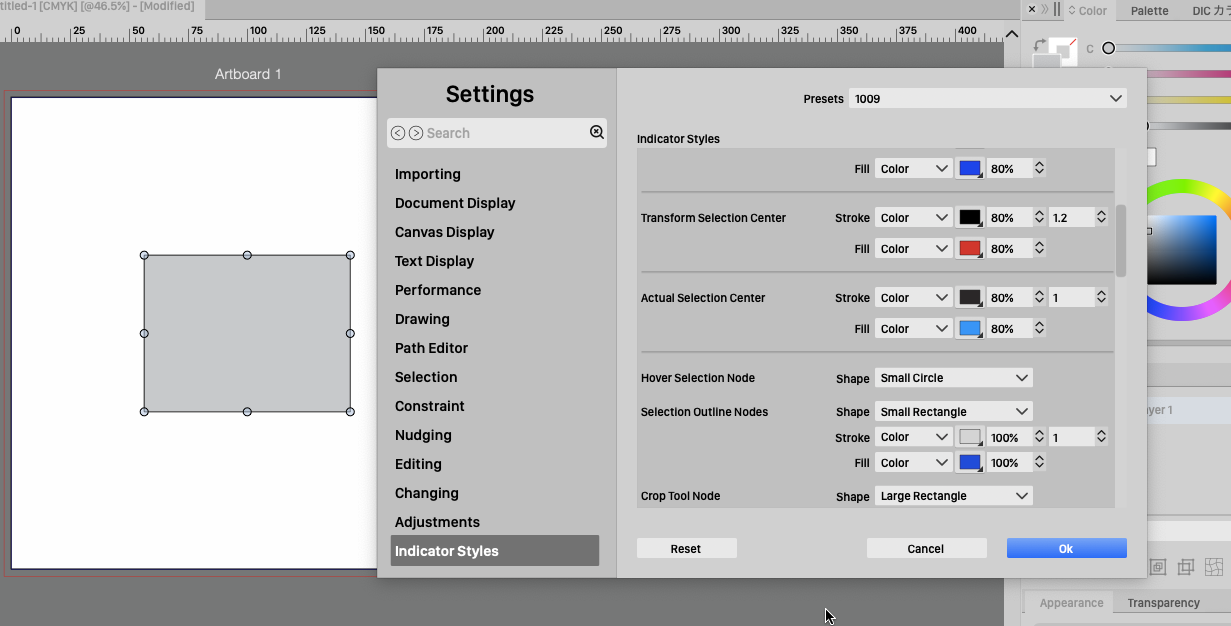
      You can set it here.
      Settings > Indicator Styles > Object Shape Center, Actual Selection Center
      0_1696829636202_10-09 13.08.28.png

      Please let me know if I am, wrong.

      LIc. 0 OS10.15.8
      MacBook Air (13-inch, Mid 2012) / Intel Core i5, 8GB / Intel HD Graphics 4000
      LIc. 1 OS15.7.4
      MacBook Pro (14-inch, 2023) / Apple M2 Pro, 16GB / Apple GPU

      VectorStylerV 1 Reply Last reply Reply Quote 0
      • VectorStylerV Offline
        VectorStyler @861475_VctSt
        last edited by

        @861475_VctSt 1.2 has these options in the context panel when the transform tool is active:

        0_1696834321794_Screenshot 2023-10-09 at 9.51.35.png

        The second one is to show/hide the center knob.

        861475_VctSt8 1 Reply Last reply Reply Quote 0
        • 861475_VctSt8 Offline
          861475_VctSt @VectorStyler
          last edited by

          @VectorStyler

          Thanks

          You made it easy.
          😃

          LIc. 0 OS10.15.8
          MacBook Air (13-inch, Mid 2012) / Intel Core i5, 8GB / Intel HD Graphics 4000
          LIc. 1 OS15.7.4
          MacBook Pro (14-inch, 2023) / Apple M2 Pro, 16GB / Apple GPU

          1 Reply Last reply Reply Quote 1
          • First post
            Last post
