Is there a way to flatten blend groups and similar controlled constructions?
-
@Arde Use 'Expand Blend' from the Effects menu > Blend.
-
Great, thanks!
-
@Arde Btw, if you want to modulate the spacing between the interpolated objects, you can do it from the Blend settings > Transfer: https://recordit.co/l2O7MVL0Cx
-
@b77 Wow thanks. This app is so full of features that I was pretty sure that this was implemented somewhere, too, but had not noticed these controls yet.
Update: Checked it now but I could not find a way to adjust distance between the objects using a curve -- I mean "acceleration" or "deceleration" so that if you have different size of intermediary shapes, you can use a curve to get the distance look right (e.g. even, or packed in either end). It seems the curves only adjust size and coloring of the shapes.
-
@Arde In the Transfer field (of the Transfer tab) you can select to control the what shapes are adjusted (separately from the styles).
Could this do the trick? -
@vectoradmin said in Is there a way to flatten blend groups and similar controlled constructions?:
In the Transfer field (of the Transfer tab) you can select to control the what shapes are adjusted (separately from the styles).
Could this do the trick?I just probably fail to see the feature but to me it seems that I can only choose Style (coloring) or Shape (size), or both, from the Transfer drop-down list. Or can I also control the distance (acceleration/deceleration) of the objects, similarly as e.g. in CorelDRAW (where "Object" refers to distance rather than the size of the objects, see below):
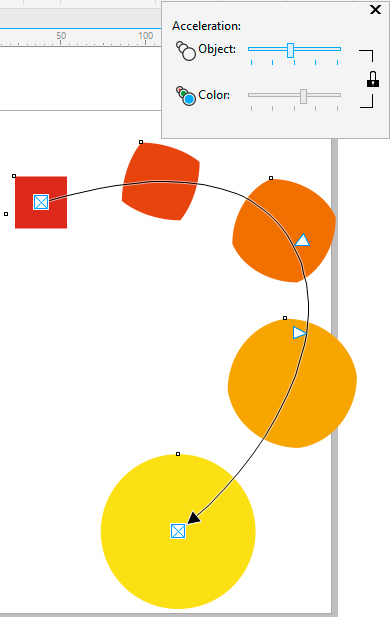
-
@Arde Shape controls both the distance and the size. I will open an issue to have a distance control also (will have to look into how that works).
-
@vectoradmin said in Is there a way to flatten blend groups and similar controlled constructions?:
Shape controls both the distance and the size. I will open an issue to have a distance control also (will have to look into how that works).
Ok, thanks. It may be that I just could not use it but I failed to adjust the spacing of that simple graphic above similarly as it is done in CorelDRAW. It is great if distance can be an additional curve. I think that size cannot be adjusted in CorelDRAW (at least in v.2017 which I used above) so that the size is there determined only by the start and end objects and intrapolated from them. If size can be determined by a curve, it is likely that there is also need for a separate distance control.
-
-
@vectoradmin said in Is there a way to flatten blend groups and similar controlled constructions?:
The new build adds a separate "Position" function to the blend object transfer curve options. This will control the position of the inner objects.
Brilliant! It is very rewarding to give feedback when suggestions and reported bugs are clearly noted and reach immediately developers!

