VectorStyler
    • Categories
    • Unread
    • Recent
    • Tags
    • Popular
    • Register
    • Login

    Icon symbol in blend panel does not look correct and does not allow me to create a blend

    Scheduled Pinned Locked Moved Questions and Support
    7 Posts 3 Posters 6.2k Views 2 Watching
    Loading More Posts
    • Oldest to Newest
    • Newest to Oldest
    • Most Votes
    Reply
    • Reply as topic
    Log in to reply
    This topic has been deleted. Only users with topic management privileges can see it.
    • BoldlineB Offline
      Boldline
      last edited by

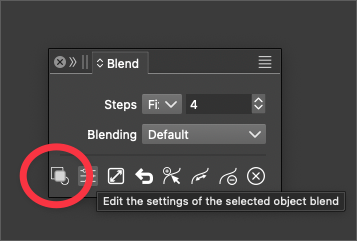
      In the blend panel, the icon used to start the blend looks different than the usual three empty shapes - the middle one is filled in. I am also unable to create a blend using that button when it is like this. I tried restarting VS and it remained. I checked the blend panel on my laptop and it looks normal (three outlined shapes)
      Is there a setting that causes this? Does it represent anything? I checked the documentation but did not see anything about it
      0_1697727092465_90726089-b21b-47ed-b340-8126a98f20ff-BLD 2023-10-19 at 10.49.24.png

      🍎 macOS Tahoe 26.2, Mac mini (M1, 2020), Chip Apple M1, Memory 16 GB
      Cintiq 27QHD Display and LG Ultra HD Display

      b77B VectorStylerV 2 Replies Last reply Reply Quote 0
      • b77B Offline
        b77 @Boldline
        last edited by b77

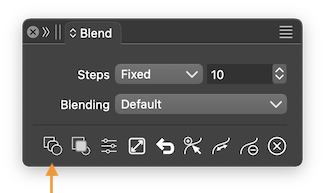
        @Boldline The button that creates a blend is not visible in
        your screenshot — make the panel wider to see it:
        0_1697727813499_cs.png

        As for that second button that doesn't work, seems to be a new
        addition, and I don't know what is supposed to do.

        MacBook Pro (Intel) running Monterey 12.6.4

        BoldlineB 1 Reply Last reply Reply Quote 1
        • BoldlineB Offline
          Boldline @b77
          last edited by

          @b77 Doh! thank you. I feel dumb. Thanks for pointing that out. Silver lining to this thread is that we can point out the second button does not seem to be working.

          🍎 macOS Tahoe 26.2, Mac mini (M1, 2020), Chip Apple M1, Memory 16 GB
          Cintiq 27QHD Display and LG Ultra HD Display

          b77B 1 Reply Last reply Reply Quote 0
          • b77B Offline
            b77 @Boldline
            last edited by b77

            @Boldline It could be that the Blend panel was docked with other narrow panels,
            and undocking it kept the same narrow width that excludes the first button.
            Something that can be improved, @VectorStyler. 🙂

            MacBook Pro (Intel) running Monterey 12.6.4

            BoldlineB 2 Replies Last reply Reply Quote 0
            • BoldlineB Offline
              Boldline @b77
              last edited by Boldline

              @b77 said in Icon symbol in blend panel does not look correct and does not allow me to create a blend:

              the Blend panel was docked with other narrow panels,
              and undocking it kept the same narrow width that excludes the first button.

              This was the case. I had the blend panel docked and at one point was icon-only and then I opened it to use it from that position and later pulled it completely free.
              I tried again but it seemed to open to the right size this time. I'll keep an eye on it

              🍎 macOS Tahoe 26.2, Mac mini (M1, 2020), Chip Apple M1, Memory 16 GB
              Cintiq 27QHD Display and LG Ultra HD Display

              1 Reply Last reply Reply Quote 0
              • BoldlineB Offline
                Boldline @b77
                last edited by

                @b77 Another silver lining: This thread did help me solve in part an issue I posted about earlier today with the main workspace hiding completely when clicking on another program. Testing the blend panel in the docking bar on the right side helped me find the culprit

                🍎 macOS Tahoe 26.2, Mac mini (M1, 2020), Chip Apple M1, Memory 16 GB
                Cintiq 27QHD Display and LG Ultra HD Display

                1 Reply Last reply Reply Quote 2
                • VectorStylerV Offline
                  VectorStyler @Boldline
                  last edited by

                  @Boldline Yes, that icon creates a single (new) object that is a blend of two objects. This is a 1.2 feature.

                  1 Reply Last reply Reply Quote 0
                  • First post
                    Last post
