VectorStyler
    • Categories
    • Unread
    • Recent
    • Tags
    • Popular
    • Register
    • Login

    Canvas Color setting

    Scheduled Pinned Locked Moved VectorStyler 1.2 beta
    3 Posts 3 Posters 3.6k Views 3 Watching
    Loading More Posts
    • Oldest to Newest
    • Newest to Oldest
    • Most Votes
    Reply
    • Reply as topic
    Log in to reply
    This topic has been deleted. Only users with topic management privileges can see it.
    • AyoA Offline
      Ayo
      last edited by

      I like to work with the background (canvas) white.
      I can change this:
      File > Document Setup > Guides > Canvas Color

      By the way, this is a strange place to look for the canvas color under 'Guides'.
      But... question:
      Can this also be set/saved as a default setting so that my new document has a white background?

      VectorStylerV b77B 2 Replies Last reply Reply Quote 0
      • VectorStylerV Offline
        VectorStyler @Ayo
        last edited by

        @Ayo Use the New Document Setup to create a new document. Here, scroll to the end of the right side, and press More Options. The document options set in this view will be kept as defaults for subsequent new documents.

        1 Reply Last reply Reply Quote 1
        • b77B Offline
          b77 @Ayo
          last edited by b77

          @Ayo After changing the canvas color in Document Setup > Guides you can
          save the document as a preset:
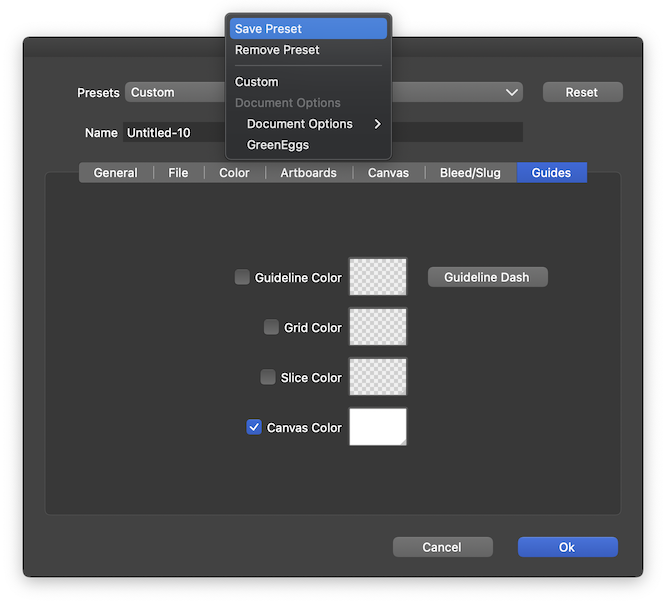
          0_1698056166216_gsef.png

          Any new document will have this setting by default until you change it or add a
          different preset.

          (The preset will be available in File > New Document Setup > Document Presets).

          MacBook Pro (Intel) running Monterey 12.6.4

          1 Reply Last reply Reply Quote 2
          • First post
            Last post
