VectorStyler
    • Categories
    • Unread
    • Recent
    • Tags
    • Popular
    • Register
    • Login

    "Cut Path at intersections"... what did I do ?

    Scheduled Pinned Locked Moved Questions and Support
    3 Posts 2 Posters 3.8k Views 2 Watching
    Loading More Posts
    • Oldest to Newest
    • Newest to Oldest
    • Most Votes
    Reply
    • Reply as topic
    Log in to reply
    This topic has been deleted. Only users with topic management privileges can see it.
    • B Offline
      B-Vs-V
      last edited by B-Vs-V

      I had simply built a blended form that appears normal when the file is opened.
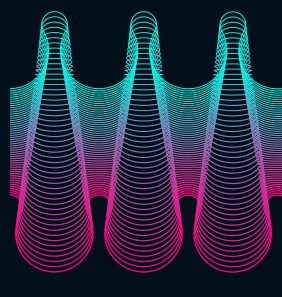
      0_1698304214211_b1.jpg

      When I want to transform it, however, I get this as if the shape were inverted.
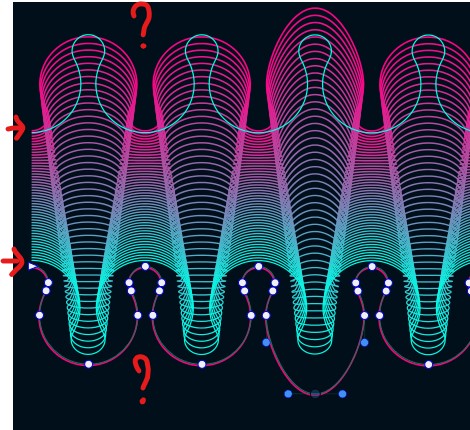
      0_1698304224202_b2.jpg

      Ctrl+R returns to the original shape.
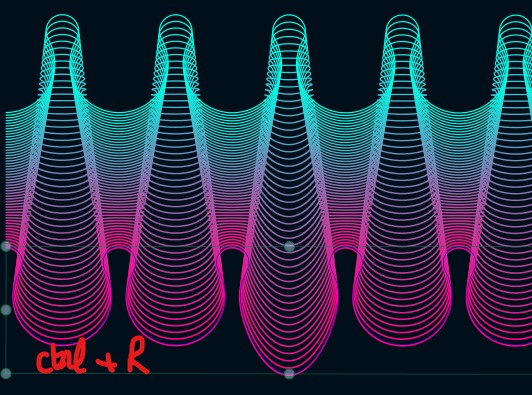
      0_1698304239875_b3.jpg

      I managed - by chance - to make the shape stable using the "Cut Path at intersections" function. I'm trying to figure out what I did wrong to get this "inverted" shape, but I don't quite understand what this "Cut Path..." function does in this specific situation.
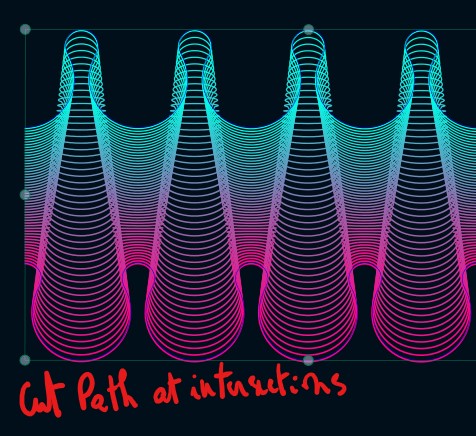
      0_1698304251087_b4.jpg

      W11 Pro 25H2 - 12th Gen Intel(R) i7-12700K 3.61 GHz - RAM 64 Go - NVIDIA GF GTX 4070 Ti - Intuos - Dell UP3216Q / Eizo ColorEdge
      W11 Pro 25H2 - 12th Gen Intel(R) i7-12700KF 3.60 GHz -RAM 64 Go - NVIDIA GF GTX 3080 - IntuosPro- ProArt PA329C

      VectorStylerV 1 Reply Last reply Reply Quote 0
      • VectorStylerV Offline
        VectorStyler @B-Vs-V
        last edited by

        @Pat Hard to tell what could cause this. One possible thing is Convert to Curves (which is done on pat cutting).
        Try Convert to Curvers on the shapes.

        B 1 Reply Last reply Reply Quote 1
        • B Offline
          B-Vs-V @VectorStyler
          last edited by

          @VectorStyler I'm sure it's not easy to determine the cause of the problem after the fact. I've been dragging this thing around for weeks/months and I still wonder why the "Cut Path at..." feature solved the problem... well, let's move on ☺

          W11 Pro 25H2 - 12th Gen Intel(R) i7-12700K 3.61 GHz - RAM 64 Go - NVIDIA GF GTX 4070 Ti - Intuos - Dell UP3216Q / Eizo ColorEdge
          W11 Pro 25H2 - 12th Gen Intel(R) i7-12700KF 3.60 GHz -RAM 64 Go - NVIDIA GF GTX 3080 - IntuosPro- ProArt PA329C

          1 Reply Last reply Reply Quote 1
          • First post
            Last post
