VectorStyler
    • Categories
    • Unread
    • Recent
    • Tags
    • Popular
    • Register
    • Login

    Offsetpath tool - corners
    Scheduled Pinned Locked Moved Questions and Support
    3 Posts 2 Posters 3.4k Views 2 Watching
    Loading More Posts
    • Oldest to Newest
    • Newest to Oldest
    • Most Votes
    Reply
    • Reply as topic
    Log in to reply
    This topic has been deleted. Only users with topic management privileges can see it.
    • K Offline
      Kumr
      last edited by

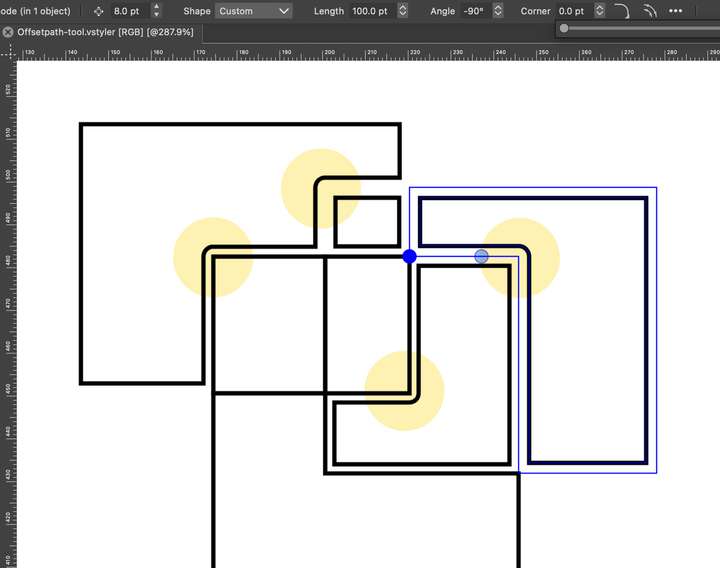
      As shown in the screenshot, at some corners, a round shape is generated (highlighted in yellow). Is there some option that I am missing here?
      0_1698831304604_Screenshot 2023-11-01 at 3.01.45 PM.png

      Request: Currently, the tool works on one selected object at a time. Is it possible to extend the function to multiple selected objects?

      Thanks

      M1 MacBook Air, 16GB, macOS Sonoma 14.4.1

      VectorStylerV 1 Reply Last reply Reply Quote 0
      • VectorStylerV Offline
        VectorStyler @Kumr
        last edited by

        @Kumr said in Offsetpath tool - corners:

        Is there some option that I am missing here?

        Yes. Expand the Offset Path shape effect options (upper right corner button) and set the Join mode to Miter.

        Currently, the tool works on one selected object at a time.

        Grouping (a single effect on the group), but it still be individual offsets.
        Or some form of Combine Shape first.

        K 1 Reply Last reply Reply Quote 0
        • K Offline
          Kumr @VectorStyler
          last edited by

          @VectorStyler Thanks for the quick reply and help.

          M1 MacBook Air, 16GB, macOS Sonoma 14.4.1

          1 Reply Last reply Reply Quote 0
          • First post
            Last post