VectorStyler
    • Categories
    • Unread
    • Recent
    • Tags
    • Popular
    • Register
    • Login

    Did the brush width indicator change? I don't see a difference

    Scheduled Pinned Locked Moved VectorStyler 1.2 beta
    13 Posts 3 Posters 11.9k Views 2 Watching
    Loading More Posts
    • Oldest to Newest
    • Newest to Oldest
    • Most Votes
    Reply
    • Reply as topic
    Log in to reply
    This topic has been deleted. Only users with topic management privileges can see it.
    • BoldlineB Online
      Boldline
      last edited by Boldline

      In the new 1.2.003 Beta, you listed, "Better brush width indicator for eraser and path brush tools."

      It looks the same to me and has the long crosshairs like before. Was there something else about it that changed?

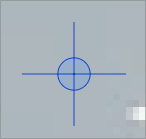
      UPDATE: On my desktop computer I am getting the eraser and brush icons with the oversized crosshairs as the screenshots below show. But on my macbook pro, also running the new beta build, it's showing the new icon of a circle with the paintbrush inside it. The behavior of the eraser/brush on my laptop is different than the desktop. The desktop eraser/brush fixes the brush or eraser stroke after completion and the macbook version is an immediate result. I'm trying to figure out where and how this gets switched.
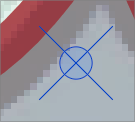
      0_1699151574943_d7a7c98f-55a4-4583-a568-c6184758563e-BLD 2023-11-04 at 22.32.45.png
      0_1699151609287_19f5138d-32a4-4ec6-8729-426cab0f2f70-BLD 2023-11-04 at 22.30.04.png

      🍎 macOS Tahoe 26.2, Mac mini (M1, 2020), Chip Apple M1, Memory 16 GB
      Cintiq 27QHD Display and LG Ultra HD Display

      BoldlineB 1 Reply Last reply Reply Quote 0
      • BoldlineB Online
        Boldline @Boldline
        last edited by

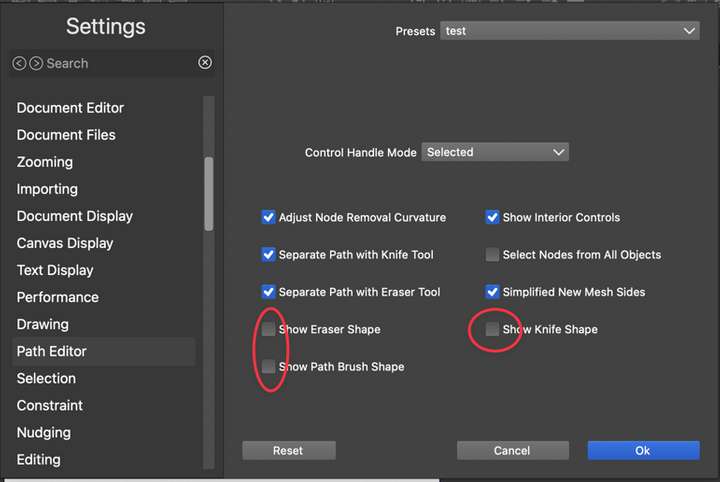
        @VectorStyler Is this where I switch back and forth between the different eraser/path brush functionality? Between VS letting it go where it may or auto-correcting the beginning of the action based on the end? Because I have these off on both computers but still get different cursor icons and functionality
        0_1699210628565_221cb14c-08c5-45b1-8404-2ac7e8d42e37-CleanShot 2023-11-05 at 13.55.54.png

        🍎 macOS Tahoe 26.2, Mac mini (M1, 2020), Chip Apple M1, Memory 16 GB
        Cintiq 27QHD Display and LG Ultra HD Display

        VectorStylerV AyoA 2 Replies Last reply Reply Quote 0
        • VectorStylerV Offline
          VectorStyler @Boldline
          last edited by

          @Boldline Those options are for previewing the smoothed brush shape.

          BoldlineB 1 Reply Last reply Reply Quote 1
          • AyoA Offline
            Ayo @Boldline
            last edited by

            @Boldline see also post:
            https://www.vectorstyler.com/forum/topic/3707/what-does-show-eraser-knife-brush-shape-setting-do

            1 Reply Last reply Reply Quote 2
            • BoldlineB Online
              Boldline @VectorStyler
              last edited by

              @Ayo Thanks, that makes more sense now. I agree a little more info would help explain those settings better

              @VectorStyler Where do we switch between the two different modes for the eraser/path brush tool? I'm not seeing the option in the context bar or in the path brush and eraser panels. Thanks

              🍎 macOS Tahoe 26.2, Mac mini (M1, 2020), Chip Apple M1, Memory 16 GB
              Cintiq 27QHD Display and LG Ultra HD Display

              AyoA BoldlineB 2 Replies Last reply Reply Quote 0
              • AyoA Offline
                Ayo @Boldline
                last edited by

                @Boldline said in Did the brush width indicator change? I don't see a difference:

                I agree a little more

                More meaningful fewer words

                VectorStylerV 1 Reply Last reply Reply Quote 1
                • VectorStylerV Offline
                  VectorStyler @Ayo
                  last edited by

                  @Ayo said in Did the brush width indicator change? I don't see a difference:

                  More meaningful fewer words

                  How about "Preview Erased Area" or "Preview Erased Shape" ?

                  AyoA 1 Reply Last reply Reply Quote 0
                  • AyoA Offline
                    Ayo @VectorStyler
                    last edited by

                    @VectorStyler said in Did the brush width indicator change? I don't see a difference:

                    Preview Erased Area" or "Preview Erased Shape

                    That does not point the user to the 'smoothing' property, that's the core I think. 'Shape' is in VS a too commonly used word in my opinion with many applications/meanings.
                    How about "Preview Erased Smoothing" or "Preview Eraser Smoothing"

                    1. Show Eraser Shape
                    2. Preview Eraser Shape Smoothing
                    3. Preview Erased Area
                    4. Preview Erased Shape
                    5. Preview Erased Smoothing
                    6. Preview Eraser Smoothing
                    VectorStylerV 1 Reply Last reply Reply Quote 0
                    • VectorStylerV Offline
                      VectorStyler @Ayo
                      last edited by

                      @Ayo said in Did the brush width indicator change? I don't see a difference:

                      That does not point the user to the 'smoothing' property, that's the core I think. '

                      It is not just the smoothing that is previewed, but also the variable with profile (if exists) or pressure.

                      AyoA 1 Reply Last reply Reply Quote 0
                      • AyoA Offline
                        Ayo @VectorStyler
                        last edited by

                        @VectorStyler Ok.
                        Then "Preview Erased Shape" is now my favourite.
                        Or ...
                        "Preview Erased Shape Properties", but that's again too long and complicated. Then "Preview Erase Properties"?

                        Show Eraser Shape
                        Preview Eraser Shape Smoothing
                        Preview Erased Area
                        Preview Erased Shape
                        Preview Erased Smoothing
                        Preview Eraser Smoothing
                        Preview Erased Shape Properties
                        Preview Erase Properties

                        1 Reply Last reply Reply Quote 1
                        • BoldlineB Online
                          Boldline @Boldline
                          last edited by

                          @Boldline said in Did the brush width indicator change? I don't see a difference:

                          @VectorStyler Where do we switch between the two different modes for the eraser/path brush tool? I'm not seeing the option in the context bar or in the path brush and eraser panels. Thanks

                          Hey @VectorStyler I didn't want this question to get lost in the mix. Where do I go to swap between the two methods of using the path brush and eraser tools? thanks!

                          🍎 macOS Tahoe 26.2, Mac mini (M1, 2020), Chip Apple M1, Memory 16 GB
                          Cintiq 27QHD Display and LG Ultra HD Display

                          VectorStylerV 1 Reply Last reply Reply Quote 0
                          • VectorStylerV Offline
                            VectorStyler @Boldline
                            last edited by

                            @Boldline said in Did the brush width indicator change? I don't see a difference:

                            I didn't want this question to get lost in the mix. Where do I go to swap between the two methods of using the path brush and eraser tools? thanks!

                            I understood that this question is about those check boxes. Is it about something else?

                            1 Reply Last reply Reply Quote 0
                            • BoldlineB Online
                              Boldline
                              last edited by

                              ok maybe I'm all set - I've updated the build since then and the icon for the path brush and eraser are both the current circle with brush inside and no longer the elongated cross hairs. Maybe I need to play around with it more but the two settings do not seem as different anymore from one another. I will test it more and get back to you


                              🍎 macOS Tahoe 26.2, Mac mini (M1, 2020), Chip Apple M1, Memory 16 GB
                              Cintiq 27QHD Display and LG Ultra HD Display

                              1 Reply Last reply Reply Quote 1
                              • First post
                                Last post