VectorStyler
    • Categories
    • Unread
    • Recent
    • Tags
    • Popular
    • Register
    • Login

    Artboard Label Settings

    Scheduled Pinned Locked Moved VectorStyler 1.2 beta
    6 Posts 4 Posters 6.1k Views 3 Watching
    Loading More Posts
    • Oldest to Newest
    • Newest to Oldest
    • Most Votes
    Reply
    • Reply as topic
    Log in to reply
    This topic has been deleted. Only users with topic management privileges can see it.
    • AyoA Offline
      Ayo
      last edited by

      While checking out the 004 beta Artboard alignment bug fix
      I stumbled across the following issue.
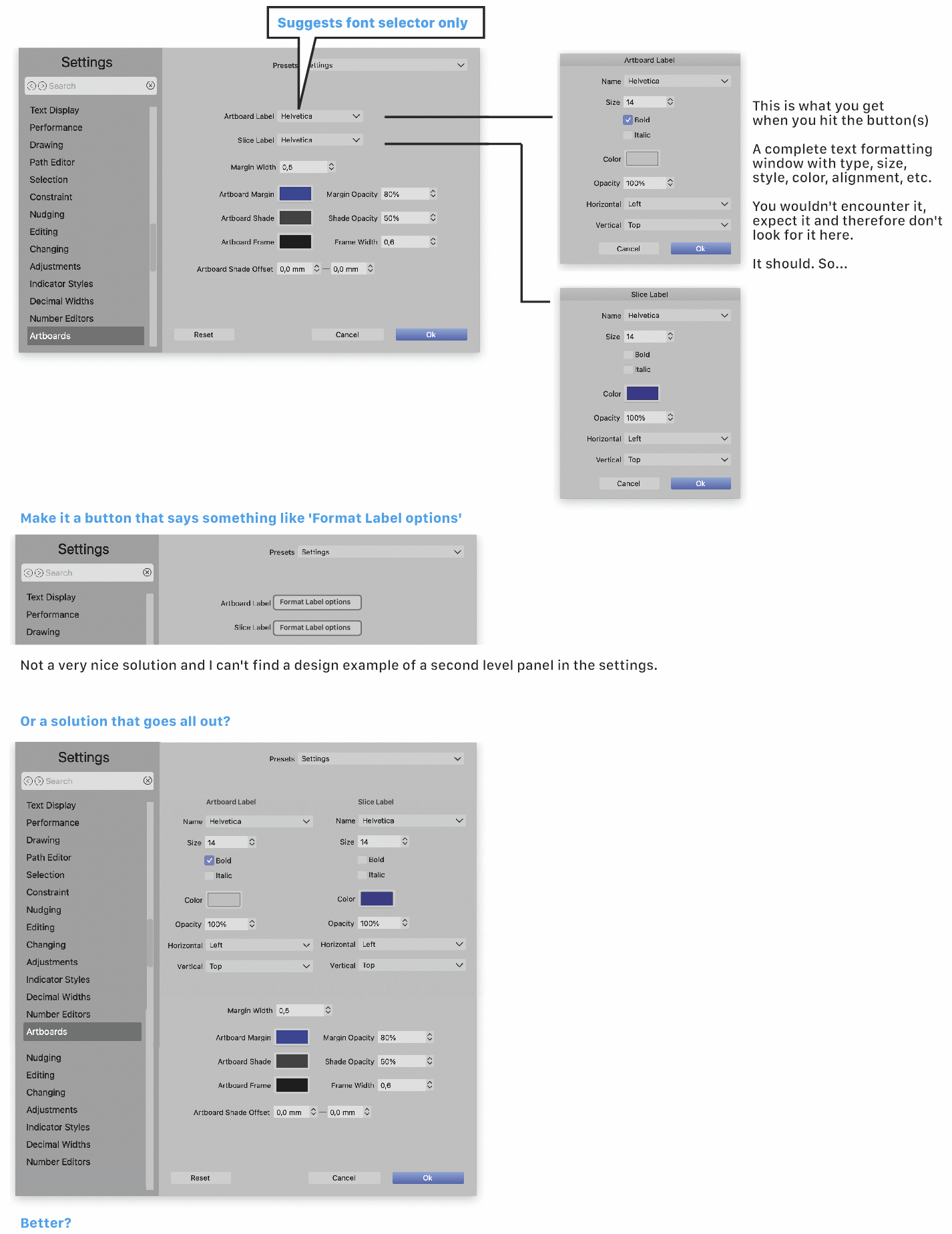
      0_1699225677519_9920d223-8b44-4162-bf70-79e3c602873f-image.png

      b77B VectorStylerV 2 Replies Last reply Reply Quote 1
      • b77B Offline
        b77 @Ayo
        last edited by b77

        @Ayo Displaying some of the settings directly and using a 'More…' button for the rest
        would not mess with the height of the Settings window or need scrolling bars:
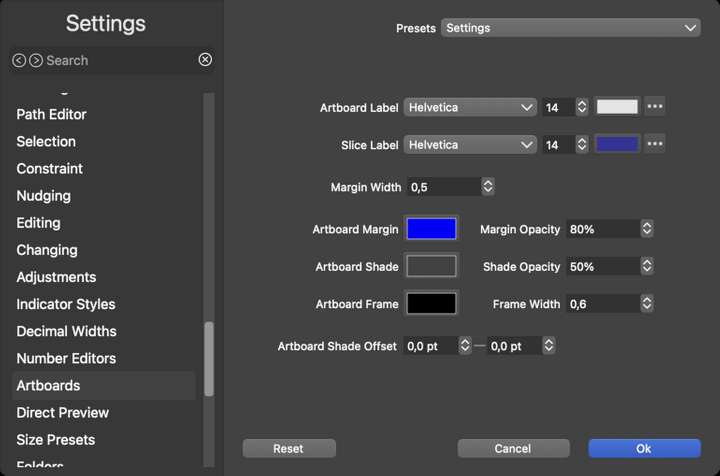
        0_1699266794356_fgh.png

        MacBook Pro (Intel) running Monterey 12.6.4

        1 Reply Last reply Reply Quote 1
        • VectorStylerV Offline
          VectorStyler @Ayo
          last edited by

          @Ayo I added this to the backlog. I think it would be better to not use more than one line for this. The size of the settings view should be kept under control.

          AyoA 1 Reply Last reply Reply Quote 0
          • AyoA Offline
            Ayo @VectorStyler
            last edited by

            @VectorStyler
            That's also good, but something is not right/needs to be done. In that case, a solution like b77 suggests is also an excellent solution.
            NB
            Size of the settings view is sometimes a bit tight for the extensive settings that VS offers.

            VectorStylerV 1 Reply Last reply Reply Quote 1
            • VectorStylerV Offline
              VectorStyler @Ayo
              last edited by

              @Ayo said in Artboard Label Settings:

              Size of the settings view is sometimes a bit tight for the extensive settings that VS offers.

              yes, this view was much larger in 1.1 (and it had the tendency of growing as things were added).
              But then some users could not use that on their laptop screen 😞
              So I instead created more sections, which can be added in the future also if needed.

              1 Reply Last reply Reply Quote 1
              • F Offline
                fde101 Global Moderator
                last edited by

                Suggest putting the options in tabs on the right side - "Sizing", "Appearance", "Artboard Label", "Slice Label" perhaps?

                As long as there are only a few, logically organized tabs in a section that is still a logical and accessible way to organize these.

                Just need to be careful that it doesn't get out of control and lead to one of the three cardinal sins of tabbing: scrolling tabs, multiple rows of tabs or tabs within tabs.

                1 Reply Last reply Reply Quote 1
                • First post
                  Last post
