VectorStyler
    • Categories
    • Unread
    • Recent
    • Tags
    • Popular
    • Register
    • Login

    two Buttons in layer panel are too similar

    Scheduled Pinned Locked Moved VectorStyler 1.2 beta
    2 Posts 2 Posters 2.7k Views 1 Watching
    Loading More Posts
    • Oldest to Newest
    • Newest to Oldest
    • Most Votes
    Reply
    • Reply as topic
    Log in to reply
    This topic has been deleted. Only users with topic management privileges can see it.
    • BoldlineB Offline
      Boldline
      last edited by

      I noticed these two buttons in the layers panel sitting right next to one another and although I know they serve different purposes, the fact that they are so similar in appearance and right next to one another is going to cause a lot of confusion
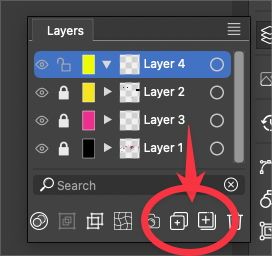
      0_1699564247987_01ff06f4-9fde-490c-913f-547a6ebadb28-BLD 2023-11-09 at 15.47.06.png

      i was playing around with a way to show the submenu addition, but its still similar.... maybe it needs to be moved somewhere else in the order of buttons?

      0_1699564467715_8680a20b-4232-4ddb-9288-9b5c2c0a8b81-BLD 2023-11-09 at 16.13.20.png

      🍎 macOS Tahoe 26.2, Mac mini (M1, 2020), Chip Apple M1, Memory 16 GB
      Cintiq 27QHD Display and LG Ultra HD Display

      VectorStylerV 1 Reply Last reply Reply Quote 1
      • VectorStylerV Offline
        VectorStyler @Boldline
        last edited by

        @Boldline I added this to the backlog.

        1 Reply Last reply Reply Quote 0
        • First post
          Last post
