VectorStyler
    • Categories
    • Unread
    • Recent
    • Tags
    • Popular
    • Register
    • Login

    Text on path

    Scheduled Pinned Locked Moved Questions and Support
    14 Posts 5 Posters 11.5k Views 5 Watching
    Loading More Posts
    • Oldest to Newest
    • Newest to Oldest
    • Most Votes
    Reply
    • Reply as topic
    Log in to reply
    This topic has been deleted. Only users with topic management privileges can see it.
    • Devil DinosaurD Offline
      Devil Dinosaur @Kumr
      last edited by

      @Kumr
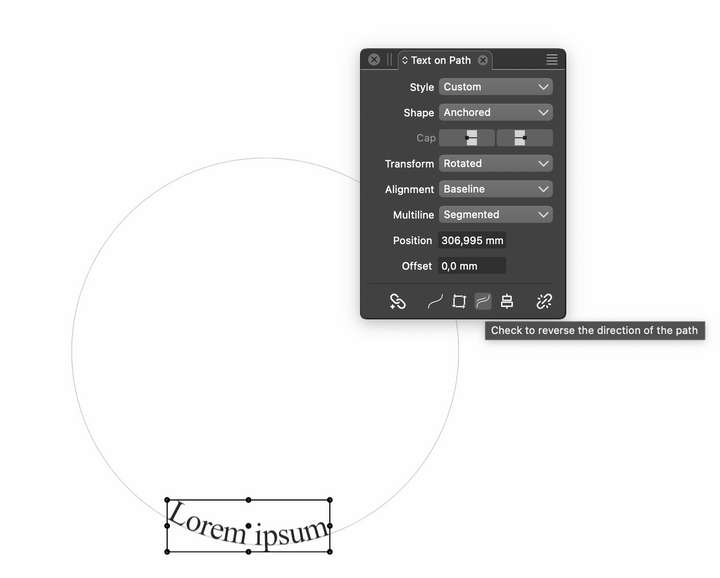
      Open the "Text on Path" Panel, it's on the bottom.
      0_1700029365495_text_path.png

      Fred.
      MacBook Pro (M1) - MacOs Sonoma 14

      K 1 Reply Last reply Reply Quote 1
      • K Offline
        Kumr @Devil Dinosaur
        last edited by

        @Devil-Dinosaur Thanks for the help. I was looking for that option.

        M1 MacBook Air, 16GB, macOS Sonoma 14.4.1

        1 Reply Last reply Reply Quote 1
        • encartE Offline
          encart
          last edited by

          I have also had trouble finding it myself on several occasions. I used it infrequently and had to look for answer on the forum. Perhaps it would be worth putting such basic functionality on the Context bar when 'Text on Path" tool is active?

          Windows 11 Home 10.0.22621

          K VectorStylerV 2 Replies Last reply Reply Quote 2
          • K Offline
            Kumr @encart
            last edited by

            @encart I agree.

            M1 MacBook Air, 16GB, macOS Sonoma 14.4.1

            1 Reply Last reply Reply Quote 0
            • VectorStylerV Offline
              VectorStyler @encart
              last edited by

              @encart said in Text on path:

              I have also had trouble finding it myself on several occasions. I used it infrequently and had to look for answer on the forum. Perhaps it would be worth putting such basic functionality on the Context bar when 'Text on Path" tool is active?

              i will try to add this.

              S 1 Reply Last reply Reply Quote 0
              • S Offline
                Subpath @VectorStyler
                last edited by

                @VectorStyler

                just for inspiration, here the CorelDraw
                way of doing this

                Here the Video

                Win 11
                CPU: AMD Ryzen 5 9600X, 6-core.
                GPU: Nvidia Geforce RTX 5070.

                1 Reply Last reply Reply Quote 1
                • K Offline
                  Kumr @Kumr
                  last edited by

                  @VectorStyler Looking for a solution for these two things.

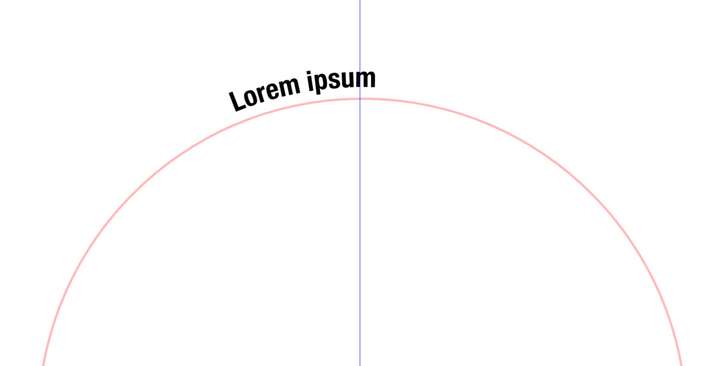
                  Text on the path drifting towards the left when setting an offset value. 0_1700021095346_Screenshot 2023-11-15 at 9.29.41 AM.png
                  https://recordit.co/fFs9DQ6tG6

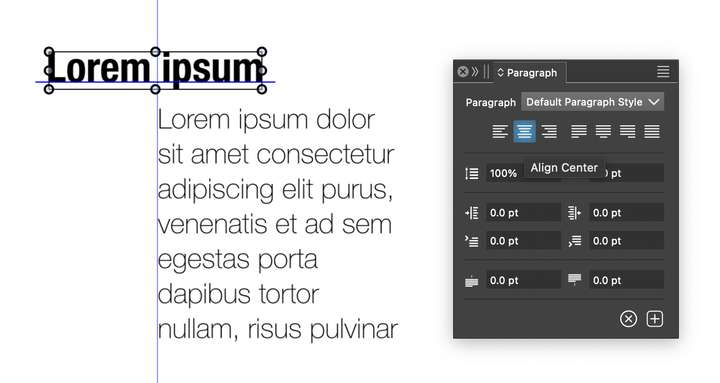
                  The artistic text frame is shifting when I change paragraph alignment. Is there a setting where I can restrict the movement of the artistic text frame?
                  0_1700023103598_Screenshot 2023-11-15 at 10.08.12 AM.png

                  https://recordit.co/vKew5BouUr

                  M1 MacBook Air, 16GB, macOS Sonoma 14.4.1

                  VectorStylerV 1 Reply Last reply Reply Quote 0
                  • VectorStylerV Offline
                    VectorStyler @Kumr
                    last edited by

                    @Kumr

                    Text on the path drifting towards the left when setting an offset value

                    In the "Text on Path" option, Radial Position should enabled and position set to 90 degree.
                    When the Radial Position is disabled, the position is given in length along the curve which is different after the curve was offset.

                    The artistic text frame is shifting when I change paragraph alignment. Is there a setting where I can restrict the movement of the artistic text frame?

                    This is by design. The text alignment is relative to the text position (point text). The same happens in Illustrator.

                    K 1 Reply Last reply Reply Quote 0
                    • K Offline
                      Kumr @VectorStyler
                      last edited by

                      @VectorStyler Thanks for the help. That radial position option helped. I have to spend more time on VS manual.

                      On the text frame drifting, I haven't checked how AI approaches this part, but like what AD does, keeping the frame in place. It will be difficult if the frame shifts the position every time alignment changes, particularly on circle designs with multiple text elements. I struggled with a circular infographic creative.

                      An option to keep the frame in place will be helpful at least in text on path tool.

                      M1 MacBook Air, 16GB, macOS Sonoma 14.4.1

                      VectorStylerV 1 Reply Last reply Reply Quote 2
                      • VectorStylerV Offline
                        VectorStyler @Kumr
                        last edited by

                        @Kumr said in Text on path:

                        An option to keep the frame in place will be helpful at least in text on path tool.

                        This is harder part. The text could be moved automatically, when not on the path, to accommodate the new alignment.
                        But when on the path, the position along the path must be according to the text alignment.

                        One thing I can try to do is to keep the non-radial position the same for changing offsets.

                        K 1 Reply Last reply Reply Quote 0
                        • K Offline
                          Kumr @VectorStyler
                          last edited by

                          @VectorStyler Thanks.

                          M1 MacBook Air, 16GB, macOS Sonoma 14.4.1

                          1 Reply Last reply Reply Quote 1
                          • First post
                            Last post
