VectorStyler
    • Categories
    • Unread
    • Recent
    • Tags
    • Popular
    • Register
    • Login

    Drawing Place Icons

    Scheduled Pinned Locked Moved VectorStyler 1.2 beta
    5 Posts 2 Posters 5.1k Views 2 Watching
    Loading More Posts
    • Oldest to Newest
    • Newest to Oldest
    • Most Votes
    Reply
    • Reply as topic
    Log in to reply
    This topic has been deleted. Only users with topic management privileges can see it.
    • AyoA Offline
      Ayo
      last edited by

      I think the Drawing Place Icons need optimization, still too fuzzy.
      I'd like to take a look at that if that's okay with you. Are there any special preconditions in that case?

      VectorStylerV 1 Reply Last reply Reply Quote 0
      • VectorStylerV Offline
        VectorStyler @Ayo
        last edited by

        @Ayo said in Drawing Place Icons:

        I'd like to take a look at that if that's okay with you. Are there any special preconditions in that case?

        Thanks a lot for the feedback, yes this helps. I sent an email with these icons as they are currently.

        There are not special requirements, other than:

        • they must be vectors, all VS icons are vectors, cannot include images into these icons.
        • typically drawn on a 100x100pt artboard (but can be scaled, as they are vectors).
        • must use gray tones, will be mapped by the current theme.
        • should not be too complicated, the icons are always drawn as vectors in the UI.

        BTW: in 1.2 beta it is possible to customize any icon of the UI.

        AyoA 1 Reply Last reply Reply Quote 1
        • AyoA Offline
          Ayo @VectorStyler
          last edited by

          @VectorStyler

          Thank you.
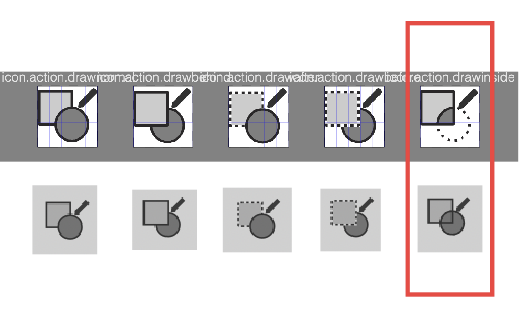
          Are the icons you sent me the same as used in 1.2.005? Draw Inside is not matching.
          0_1700737518567_804f6645-9056-4766-91b0-92b1065c206e-image.png

          must use gray tones, will be mapped by the current theme.

          Why? Icons like these are also pure black and white/none (apart from antialiasing)?

          0_1700737965459_8c6f0e1f-a665-44e1-adce-8cc868bffdac-image.png

          VectorStylerV 2 Replies Last reply Reply Quote 0
          • VectorStylerV Offline
            VectorStyler @Ayo
            last edited by

            @Ayo said in Drawing Place Icons:

            Why? Icons like these are also pure black and white/none (apart from antialiasing)?

            My mistake: no other colors than levels of gray for now (so black and white are ok).

            1 Reply Last reply Reply Quote 1
            • VectorStylerV Offline
              VectorStyler @Ayo
              last edited by

              @Ayo it might be that the draw inside icon was not exported correctly.
              I will check this later.

              1 Reply Last reply Reply Quote 1
              • First post
                Last post
