VectorStyler
    • Categories
    • Unread
    • Recent
    • Tags
    • Popular
    • Register
    • Login

    toolbox settings and locks for panels do not seem to be working

    Scheduled Pinned Locked Moved VectorStyler 1.2 beta
    4 Posts 3 Posters 5.9k Views 2 Watching
    Loading More Posts
    • Oldest to Newest
    • Newest to Oldest
    • Most Votes
    Reply
    • Reply as topic
    Log in to reply
    This topic has been deleted. Only users with topic management privileges can see it.
    • BoldlineB Offline
      Boldline
      last edited by

      The toolbox styles do not seem to be working in the beta (I do not know if it works in the 1.1 version). trying to change the toolbox to be two columns, set it to horizontal/vertical, etc... none of them seem to have any affect.
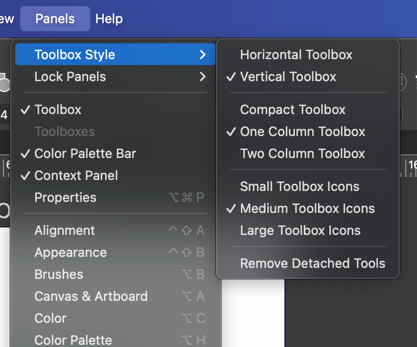
      0_1700961857547_c0c20eae-836a-4658-b495-9640aae4917d-CleanShot 2023-11-25 at 20.23.16.png

      in a simialr way, the lock panels does not seem to be working either. There's also no way to know if the panels are already locked in the "panels" dropdown panel. Maybe it should offer to "unlock" if the toolbox or context menu bar, etc are set to "lock"?

      🍎 macOS Tahoe 26.2, Mac mini (M1, 2020), Chip Apple M1, Memory 16 GB
      Cintiq 27QHD Display and LG Ultra HD Display

      b77B VectorStylerV 2 Replies Last reply Reply Quote 0
      • b77B Offline
        b77 @Boldline
        last edited by b77

        @Boldline All toolbox styles work here.
        Panel locking works as well for docked panels — I can't undock them.
        Floating panels can still be moved, which I think it's how is supposed to be.

        MacBook Pro (Intel) running Monterey 12.6.4

        BoldlineB 1 Reply Last reply Reply Quote 0
        • BoldlineB Offline
          Boldline @b77
          last edited by

          @b77 hmmm ok. Yeah just tried again after restarting VS and still nothing works for me.

          🍎 macOS Tahoe 26.2, Mac mini (M1, 2020), Chip Apple M1, Memory 16 GB
          Cintiq 27QHD Display and LG Ultra HD Display

          1 Reply Last reply Reply Quote 0
          • VectorStylerV Offline
            VectorStyler @Boldline
            last edited by

            @Boldline Tested, and works here also.
            Look into the user settings folder (Help -> Reveal Workspace Folder), if any of the files change after setting a new toolbox and exiting.

            Could be some other customization or workspace issue.

            1 Reply Last reply Reply Quote 0
            • First post
              Last post
