VectorStyler
    • Categories
    • Unread
    • Recent
    • Tags
    • Popular
    • Register
    • Login

    unable to get the kind of precision I need with the slide feature in offset path

    Scheduled Pinned Locked Moved VectorStyler 1.2 beta
    3 Posts 3 Posters 4.5k Views 2 Watching
    Loading More Posts
    • Oldest to Newest
    • Newest to Oldest
    • Most Votes
    Reply
    • Reply as topic
    Log in to reply
    This topic has been deleted. Only users with topic management privileges can see it.
    • BoldlineB Offline
      Boldline
      last edited by

      When I am creating an offset path, I am unable to get the kind of precision I need with the slide feature. I'm using inches as my measurement type. There's no easy way to get it to slide in smaller increments and I have to manually edit the number. Is there a way to make this more sensitive, especially with lower numbers?
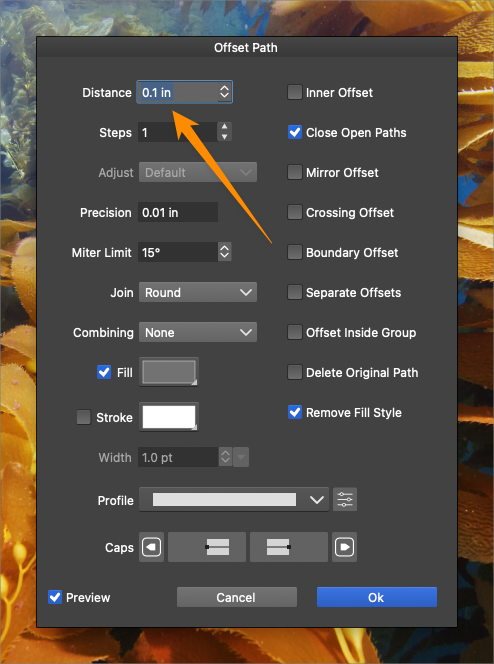
      Here is a video of the issue

      0_1702607711423_f71da083-c325-4518-b43e-cf70b457e7fe-BLD 2023-12-14 at 21.34.04.png

      🍎 macOS Tahoe 26.2, Mac mini (M1, 2020), Chip Apple M1, Memory 16 GB
      Cintiq 27QHD Display and LG Ultra HD Display

      L VectorStylerV 2 Replies Last reply Reply Quote 0
      • L Offline
        Li Xiao @Boldline
        last edited by

        @Boldline I tried moving the slider, and it was 0.01in.

        1 Reply Last reply Reply Quote 1
        • VectorStylerV Offline
          VectorStyler @Boldline
          last edited by

          @Boldline In Settings -> Decimal Widths what is the value at "Inch Decimals"? Try increasing it (set to 3).


          1 Reply Last reply Reply Quote 1
          • First post
            Last post