Couple of Palette Questions
-
Hello!
Firstly, is there supposed to be a group icon in the left light blue swatch next to a group row? All I see is the light blue square that looks like another swatch...
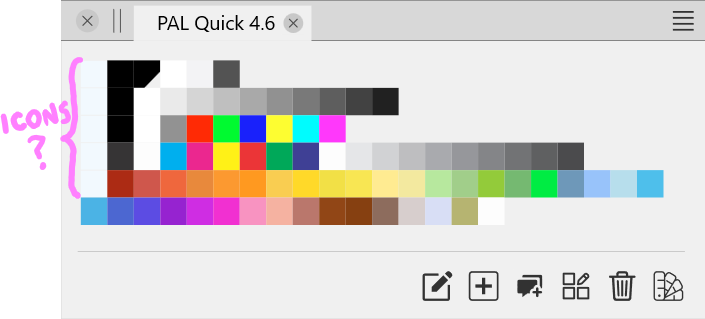
Secondly, is it possible to change the arrangement of the swatches within a group? Note, I am not referring to "sorting" the palette by name, hue, etc., I mean changing the position of a swatch when "no sorting" is the chosen option.
I thought this was possible, but I may be confusing this function with one in another app.
If anyone is able to do this, please let me know so I can figure out if I have something configured incorrectly; thanks!

-
@Victor-Vector yes, there is an icon there. Looks like the light UI theme has some colors wrong.
To change the color order manually, drag and drop a color to a new position.
-
@VectorStyler
Oh, haha. I figured out why I could not drag and drop the colors to move them around:
The palettes are not editable unless there is a document open in the interface. I was attempting to adjust the color palettes with no open document. It never occurred to me that this would not work.Thank you for your help, and I hope you can fix the light UI issue obfuscating the Palette Group icon.
-
@Victor-Vector said in Couple of Palette Questions:
I was attempting to adjust the color palettes with no open document. It never occurred to me that this would not work.
I think this might be a bug, for palettes that are not in a document.
-
Okay, thank you for clarifying that @VectorStyler.
Another question:
I Tried using the "Save Palettes to Preset" in the Palette Panel hamburger menu.
After naming it, I can now see the new entry in the Palette Panel hamburger menu under "Preset Palette"; excellent.However, I do not know how to edit this Preset Palette item.
If I go to the Presets Panel and look for an entry for the Palette Preset there is none to be found, even with the Panel Option to show "Empty Groups" checked.
If I look in the "c:\Users\Victor\AppData\Local\NumericPath\VectorStyler1.0\vector\data\presets" folder, there is a new file called "colorset.preset", and when I update the Preset Panel list by adding another one, using "Save Palettes to Preset", the size and date changes on "colorset.preset", indicating that it is where the data is stored.Is there another place where I can edit the Preset Palette (colorset.preset)? Or is this not functioning as it should?
-
@Victor-Vector said in Couple of Palette Questions:
However, I do not know how to edit this Preset Palette item
You can edit a palette preset if you open it into a panel and edit it there.
Otherwise, it can be removed in the Styles -> Preset Manager.
-
@VectorStyler said in Couple of Palette Questions:
Otherwise, it can be removed in the Styles -> Preset Manager.
Ahh! that's where that is!
Thank you, sir.

