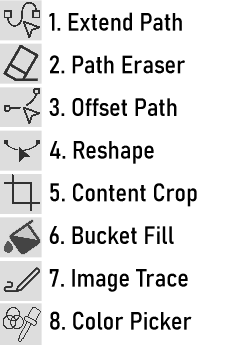
The 8 Exciting New Tools
-
@VectorStyler When using the Reshape tool, there is an issue where selecting the second point and consecutively selecting the subsequent points results in the inability to move the points or lines. However, when adding the starting point again, there are no issues. Is this by design or a bug?
-
@Li-Xiao said in The 8 Exciting New Tools:
However, when adding the starting point again, there are no issues. Is this by design or a bug?
There seems to be a bug here.
-
@VectorStyler It seems like there is an issue with the Offset Path Tool. It works correctly on one side but not on the other side.
-
When using the crop tool for a vector object the only thing it is doing is to scale the vector. So it doesn't seem to work like cropping the vector...
Windows 10 | 1920x1080 | 125%
-
@VectorStyler Can the Extend Path feature be improved to support moving across points and removing nodes? It would be very useful for manipulating nodes in the Blend tool. You can take inspiration from other software that offers similar functionality.
-
@FastVector said in The 8 Exciting New Tools:
So it doesn't seem to work like cropping the vector...
The crop tool is to crop images and "linked" content (pdf, etc).
-
@Li-Xiao said in The 8 Exciting New Tools:
You can take inspiration from other software that offers similar functionality.
Which app is that?
-
@VectorStyler It's a specialized custom software for my laser device
-
@Victor-Vector said in The 8 Exciting New Tools:
@VectorStyler said in The 8 Exciting New Tools:
4. ReshapeSelect two or more nodes with the Shift+ key. Then drag the segments between the selected nodes.
I tried this, but when I shift + click-select one or more nodes, then try and drag the segment, it deselects the two or more selected nodes, or if i try and drag from the node, it deselects the other nodes and allows me to only drag the one node.
@VectorStyler
So I was inspired by @Li-Xiao's attempt regarding the Reshape Tool, and I have some additional troubleshooting data. I created a wavy stroke, using a similar sine wave pattern, with eight nodes at the top and bottom extrema, start point at the left, end point at the right, like so:.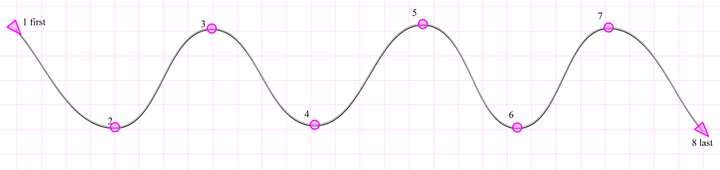
Findings:-
For me, in Windows 11, the Shift-select method to grab points does not work. I need to have the Reshape Tool selected, and then click-drag around the points I wish to influence.
-
If I select left to right, the first #1 node, and up to 4 more nodes (5 nodes total), the tool works. I can move and stretch the stroke back on forth.
-
Selecting more than 5 nodes from the start #1 node (1-6+) I cannot move and stretch the stroke.
-
If I select right to left, the last #8 node, and up to 4 more nodes (5 nodes total), the tool works. I can move and stretch the stroke back on forth.
-
Selecting more than 5 nodes from the from the last #8 node (8-3+) I cannot move and stretch the stroke.
-
Selecting only the one inner node (2,3,4,5,6,7) will move/stretch the stroke.
-
Selecting any sequential combination of 2-8 or 7-1 will NOT move the stroke.
So hopefully that is clear. I am sure there are combinations of selection that work and don't work, that I have not figured out, but I hope this helps you further troubleshoot the issue.
-
-
@Victor-Vector I did manage to replicate some of the issues in the original post.
I will test this new steps also. -
@Victor-Vector said in The 8 Exciting New Tools:
Content Crop - "Adjust the frame of a content object (image, or vector) to crop the content".
A long awaited tool for me, allowing the easy cropping of placed (imported) images. Thank you for adding this one as it will save a great deal of time.This is a terrific tool! I noticed that if you use the option/alt key as a modifier while creating the crop, it will create a second clipped image from the original that can be independently adjusted as a new clipped image
The only thing I would think to improve the content clip would be a modifier key option to allow for a clip to be made without any ratio restrictions - so it could be function as a free-form selection if the user wanted
-
@Boldline Oh, I did not know that about the Option/Alt to make a copy. Thanks for discovering that; I was using it today!
-
@VectorStyler The Reshape tool and the Offset Path Tool have been fixed. thanks


